CE 312 Lecture 37: Matrix Structural Analysis I, Review of Matrix Algebra (2026.11.13)
Overview
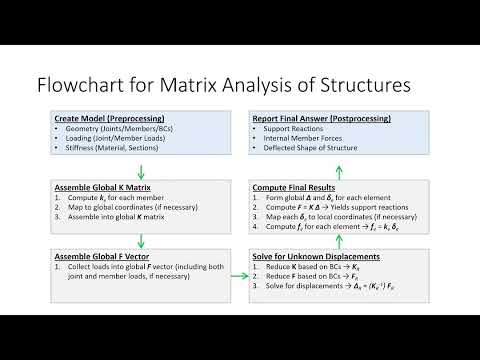
Gregory Michaelson reviews matrix algebra as preparation for matrix structural analysis, showing how structural software assembles a global stiffness matrix and force vector, solves for displacements, and recovers reactions and member forces. He covers matrix dimensions, addition, multiplication, inverses, and transposes, then demonstrates Excel functions including TRANSPOSE, MMULT, and MINVERSE before assigning a spreadsheet exercise.
Key takeaways
- Structural analysis software assembles member stiffness matrices into a global stiffness matrix, combines applied loads into a force vector, solves for displacements after applying boundary conditions, and then recovers reactions and member forces.
- For matrix multiplication, the number of columns in the left matrix must equal the number of rows in the right matrix; an m-by-n times n-by-p product has dimensions m-by-p.
- Matrix multiplication is generally order-dependent, so AB and BA are not interchangeable even when both products are dimensionally valid.
- A structural stiffness matrix should be symmetric, meaning it equals its transpose; checking this property can help catch assembly or calculation errors.
- In Excel, use MMULT for row-column matrix multiplication, MINVERSE for inversion, and TRANSPOSE for swapping rows and columns; the asterisk performs only elementwise multiplication.
- Multiplying a matrix by its computed inverse with MMULT should produce an identity matrix, providing a direct check of the inverse calculation.
Chapters
- Homework 8.3 and 8.4 solutions are available while grading continues; Homework 8.5 was due on lecture day and Homework 9.1 is due Monday.
- The project is due Friday at 5:00 p.m.; students should complete at least three Mastan analyses, including real-load and virtual-load runs.
- The final Mastan analysis should use real loads and match the final member selections and Excel calculations for deflection and mass.
- Submit the final Mastan file, stress and deflection checks, cost calculation, complete CAD drawing, and a reflection statement.
- Pre-processing defines model geometry, joints, members, boundary conditions, loads, material properties, and section properties.
- Structural software assembles each member stiffness matrix into a global stiffness matrix, mapping member quantities into global coordinates when needed.
- The solver assembles a global force vector, applies boundary conditions, and solves the linear system for displacements.
- Displacements are used to recover support reactions and individual member forces; the software can then display the deformed shape.
- A matrix is a rectangular array with m rows and n columns; an entry aᵢⱼ lies in row i and column j.
- The example matrix C has 3 rows and 5 columns, and its entry C₂₄ equals 7.
- Structural analysis primarily uses square matrices and column vectors, which may contain dozens or hundreds of entries.
- A two-equation, two-unknown system can be written as a coefficient matrix multiplied by an unknown vector, equal to a right-hand-side vector.
- Matrix addition requires matching dimensions and adds corresponding entries, such as Aᵢⱼ + Bᵢⱼ.
- A matrix and a vector cannot be added when their dimensions differ, although matrix-vector multiplication may be valid.
- Scalar multiplication also operates entry by entry: multiplying matrix A by 3 multiplies every entry by 3.
- An m-by-n matrix can multiply an n-by-p matrix, producing an m-by-p result; the inner dimensions must match.
- Each output entry is a dot product between one row of the left matrix and one column of the right matrix.
- The left-and-top layout provides a visual way to track output dimensions and calculate each dot product; the worked example produces entries 11 and 38.
- Matrix multiplication is generally not commutative: AB may differ from BA, or one order may not be dimensionally valid.
- For an invertible square matrix A, its inverse satisfies A⁻¹A = AA⁻¹ = I.
- The identity matrix has ones on its main diagonal and zeros elsewhere, and multiplying by it leaves a compatible matrix unchanged.
- Transposing swaps rows and columns, so entry aᵢⱼ becomes aⱼᵢ; transposing twice returns the original matrix.
- A symmetric matrix equals its transpose, and structural stiffness matrices should be symmetric, providing a useful check on calculations.
- Excel's TRANSPOSE function returns a matrix with rows and columns exchanged; dynamic-array results spill into adjacent cells.
- MMULT performs true matrix multiplication, while MINVERSE computes a matrix inverse.
- MUNIT can generate an identity matrix and MDETERM can calculate a determinant, though determinants are not needed for this course's main analysis.
- A spill error occurs if existing cell contents block Excel from filling the full result array.
- The spreadsheet demonstration covers elementwise addition and scalar multiplication, as well as transposing and inverting matrices.
- Use MMULT rather than the asterisk for matrix multiplication: the asterisk multiplies corresponding entries instead of calculating row-column dot products.
- Verify MINVERSE by multiplying the inverse by the original matrix with MMULT; the result should be an identity matrix.
- Nested MMULT calculations handle expressions such as A⁻¹B and AᵀBA because Excel's MMULT operation accepts two matrices at a time.
- The assigned spreadsheet exercise uses four matrices, A, B, X, and M; the next class derives 1D bar elements, followed later by 2D truss elements.
Transcript excerpt
0:01 There's like European countries there. >> Okay, everybody. Uh we are in lecture 37. Let's get started. Um just a couple of housekeeping items. So number one, uh attendance uh is up to date. Uh homeworks 8.3 and 8.4 are still being graded, but the solutions are live for those. Um homework 8.5 uh was due today. Um, and then, uh, your next, uh, homework assignment, homework 9.1, is assigned today, due Monday. Um, I told you all I was going to distribute the at home game via email. I think I did, uh, given the, uh, uh, Microsoft apocalypse of 2026 that happened yesterday. Did everybody get that?
0:49 >> Okay. All right. Just wanted to make sure. Maybe a conspiracy theory. Maybe it was Microsoft and Disney collaborating for a marketing gimmick for the next Doomsday movie cuz everybody was like, "Ah, it's doom and gloom." That was a joke, not a funny one. Okay. Um, just a couple of uh reminders on the project. The project is due Friday, next Friday at 5:00 p.m. We're going to have a um on Friday sort of a troubleshooting Q&A session. Uh you don't have to come. Uh if you get your project done early, you can at least in terms of my class have turkey time a little bit early. Uh but again uh for the mast tan analyses, you should be doing at least three of them. Uh the real and the virtual loads to get your
1:35 forces. It doesn't matter what section you apply for those, but your final analysis, the one that you submit should be with the real loads on it. Uh and it should have your final member choices because your deflection and mass stand should match what you're computing in Excel. Okay. And so what you're
This is the start of the transcript. Save this video free for the whole transcript, searchable and time-coded.
In this course
Related notes
Summary, takeaways, and chapters were generated by AI from the video's transcript and may contain errors. The video belongs to its creator, Gregory Michaelson.