UUtah CS 6340 NLP | Fall 2026 | HuggingFace transformers & running GPU jobs
 Watch on YouTube →
Overview
A hands-on NLP class introduces Hugging Face Transformers for tokenization, inference, model inspection, and IMDb sentiment fine-tuning, then demonstrates how to run GPU work on the University of Utah CHPC cluster. The walkthrough covers PyTorch-compatible model loading, padding and attention masks, Trainer configuration, and a Slurm workflow that submits a Python training script from an SSH session.
Key takeaways
- AutoTokenizer and the task-specific AutoModel loaders reduce model setup to a model identifier while selecting compatible tokenizers and architectures.
- For batched text, padding creates rectangular tensors and attention-mask zeros prevent padded positions from affecting the model; truncation protects inputs from exceeding context limits.
- DistilBERT's six encoder layers and 12 attention heads produce per-head attention matrices whose dimensions scale with the token sequence length.
- Hugging Face Trainer automates much of fine-tuning, while TrainingArguments controls epochs, device batch size, learning rate, validation cadence, and checkpoint saving.
- CHPC jobs should be debugged on an interactive GPU session and submitted from the login node with sbatch; Slurm queues them until the requested resources are available.
Chapters
- The class plans two practical sessions: Hugging Face Transformers in Colab and GPU job submission to the University of Utah Center for High Performance Computing, or CHPC.
- The Transformers portion progresses from setup and the Hugging Face ecosystem to tokenizers, model inference, and IMDb fine-tuning.
- PyTorch is the primary framework used in the demonstrations; Transformers also supports TensorFlow and Flax/JAX.
- Hugging Face hosts model architectures, pretrained weights, tokenizers, configuration files, datasets, and related code.
- A common workflow is to find a model suited to a task, load its tokenizer and weights, then run inference or fine-tuning.
- The class uses a shared Google Colab notebook, with a T4 GPU available for the first hands-on exercise.
- A pretrained RoBERTa large English sentiment model is loaded with its tokenizer; downloading the weights requires about 1.35 GB.
- The tokenizer converts review text into PyTorch input IDs and an attention mask before the model returns classification logits.
- For the binary sentiment example, label index 0 means negative and index 1 means positive; argmax selects the higher logit.
- The model card and config.json define the model's label mapping, so custom label conventions must remain consistent with the pretrained model.
- A tokenizer splits raw text into recognized subword tokens, maps them to token IDs, and packages them as tensors for model input.
- Fast Hugging Face tokenizers use Rust and are described as offering roughly 10 to 25 times the performance of Python tokenizers on large datasets.
- Special tokens such as CLS and SEP mark input boundaries, while decoding token IDs can help verify how text was tokenized.
- Padding makes examples in a batch the same length, attention-mask zeros hide padding tokens, and truncation limits inputs to a model's context length.
- The notebook compares tokenizer loading methods and uses AutoTokenizer to select the tokenizer associated with a model name.
- The BERT-style example adds CLS and SEP tokens, with IDs 101 and 102, and demonstrates converting the result to PyTorch tensors with return_tensors="pt".
- Fast tokenizers can map character positions back to token positions, which supports word alignment and multilingual analysis.
- Padding two differently sized sentences produces equal-length rows; the shorter example's padding positions receive zeroes in its attention mask.
- The class distinguishes encoder-only models such as BERT and DistilBERT, decoder-only models such as GPT and Llama, and encoder-decoder models such as T5.
- Task-specific heads let a pretrained representation support tasks such as sequence classification, named entity recognition, part-of-speech tagging, or causal language modeling.
- The notebook loads DistilBERT as a base model, a sequence-classification model, and through AutoModelForSequenceClassification.
- The DistilBERT configuration describes six encoder layers with 12 attention heads per layer; a classification head maps model representations to class logits.
- Tokenized inputs can be passed to DistilBERT as separate input_ids and attention_mask arguments or unpacked from a dictionary.
- The classifier returns two logits for negative and positive sentiment; softmax converts them to class probabilities.
- The example calculates cross-entropy loss and gradients using ordinary PyTorch, showing that Transformers models remain compatible with standard torch functions.
- Passing a labels field with the model inputs lets Hugging Face calculate the training loss directly.
- Inference runs inside torch.no_grad() when gradients are unnecessary, and model outputs can expose hidden states and attention weights.
- For one nine-token input, the hidden-state tensor has shape 1 × 9 × 768: batch size, token count, and hidden dimension.
- Attention tensors reflect 12 heads across the model's six layers, with a 9 × 9 query-to-key matrix for each head.
- The notebook visualizes token-to-token attention by layer and head, illustrating how attention patterns can be examined for interpretability.
- The Hugging Face IMDb dataset contains 25,000 training reviews and 25,000 test reviews, plus an unlabeled split whose examples use label -1.
- The exercise selects a small subset of 128 training examples and 32 validation examples to keep the demonstration manageable.
- IMDb labels use 0 for negative sentiment and 1 for positive sentiment, paired with each review's text.
- The dataset map operation tokenizes reviews and can remove raw text columns once the model-ready IDs are available.
- A PyTorch DataLoader groups tokenized IMDb examples into batches that can be iterated through during training.
- A manual training loop configures an optimizer, iterates over epochs and batches, computes gradients, and performs backpropagation.
- Hugging Face Trainer and TrainingArguments provide a shorter alternative, with settings for epochs, per-device batch size, and learning rate.
- Evaluation and checkpoint strategies can run at each epoch, and compute_metrics can report accuracy; callbacks can control training behavior.
- CHPC provides University of Utah students access to shared computing resources for research and coursework.
- Notch Peak and Granite are introduced as GPU-capable clusters; each compute node has its own CPUs, memory, and GPUs.
- Slurm schedules jobs and allocates resources according to partitions, priorities, and availability.
- The recommended workflow is to debug on an interactive GPU session, then use sbatch for a longer unattended job.
- CHPC access requires an account and an SSH connection; VS Code's Remote SSH command can save a host such as Granite or Notch Peak.
- The login node provides the initial Linux terminal connection, but it is not the place to run GPU training jobs.
- CHPC login may prompt for a University of Utah account password and Duo two-factor authentication.
- The myCHPC bash command displays the partitions and GPU resources available to the user's account.
- The tutorial creates a working directory for the job files and sets up a Python virtual environment for dependencies.
- A requirements.txt file lists the packages to install; the demonstrated installation can take about 20 minutes.
- The example Python script loads a tokenizer and model, prepares a small fine-tuning dataset, configures a Trainer, and starts training.
- The training script must be submitted to a GPU compute node rather than run directly on the login node.
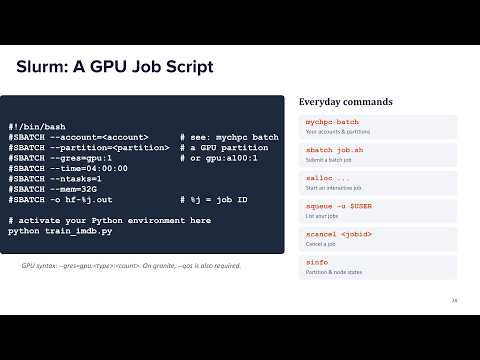
- A bash batch script specifies the account, quality of service, GPU partition, virtual environment, and Python command.
- The myCHPC batch command helps identify account-specific partitions and QOS options; preemptable GPU resources can be reclaimed for higher-priority work.
- The class example targets a Granite GPU guest partition and submits the script with sbatch followed by the script filename.
- A successful submission returns a job ID, after which Slurm can queue the job until the requested GPU resources are available.
- The squeue command with a user filter checks whether a submitted job is queued or running.
- Slurm writes standard output and error logs when the job runs; the example logs show training progress, falling loss, and text generation after training.
- The small demonstration finishes in about five seconds once scheduled, but a larger job may wait for resources.
- Interactive GPU sessions are recommended for debugging arguments, data types, and script failures before waiting in the batch queue.
Transcript excerpt
0:34 Okay. Hi everyone. So, today is your last class before the midterm breaks and I'm hoping all of you are excited about the break. So, today we are going to have a hands-on two things. First, the hugging face transformers and secondly, a bit on CHPC and at the end of the class, we would hope that you can submit a job in queue on CHPC. But before that, the hugging face transformers. So, a bit of context here is that you already have covered the basics of the transformer and how it works and everything. So, today we are going to focus on um Python library hugging face
1:22 and I'm pretty sure that many of you have already used it extensively and so is the case for CHPC. But today we for our presentation demonstration will be assuming that you don't have prior experience on it and we're going to keep everything to the basics. So, first what is this hugging face transformers? Oh, before that, I would like to also like to what the session agenda is going to be on on this library. Okay. So, first we're going to see a bit of how to set up uh set up your tools and we're are going to be doing this collaboratively on Colab. So, I'm going to share a link and you can join and run uh, sales or or the program uh, as I'm going through the steps.
2:11 Um, I'm going to introduce you a bit to what Hugging Face ecosystem is, then we are going to look into tokenizers, we are going to look into the models and how to do inference and uh, finally we are going to have a fine-tuning session on IMDB data. So, what is Hugging Face Transformers? So, this is
This is the start of the transcript. Save this video free for the whole transcript, searchable and time-coded.
In this course
Related notes
Summary, takeaways, and chapters were generated by AI from the video's transcript and may contain errors. The video belongs to its creator, UofU Data Science.