EDF9850_Homework_Demo
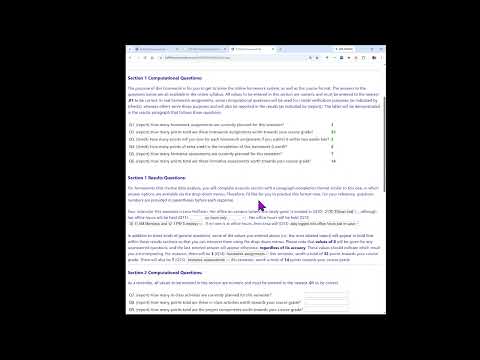
Overview
Lesa Hoffman demonstrates her custom online homework system through HW0, a syllabus-based practice assignment, explaining Clemson 8-digit ID login, automatically checked computational answers, paragraph-completion results questions, and final submission. The system saves progress, reveals correct answers after the due date, and reports points; Hoffman recommends submitting imperfect work on time rather than risking the 3-point late penalty.
Key takeaways
- The homework portal uses the intake-survey last name and Clemson 8-digit ID for login, and accepted computational answers turn green and lock automatically.
- Students can save and resume work, but results-question dropdowns do not reveal correctness until after the assignment due date.
- Final submission requires entering the same Clemson 8-digit ID used to log in; once confirmed, answers are locked and can no longer be edited.
- Incorrect answers receive individualized feedback after the deadline, with the submitted response in red italics and the correct answer in green bold.
- A late homework assignment submitted within two weeks loses 3 points, so Hoffman recommends submitting on time even if some answers are wrong or incomplete.
- Point totals may not appear immediately because Hoffman manually processes submissions; students must also upload syntax and output to Canvas for review.
Chapters
- Students log in with the last name listed on the intake survey, including spaces or hyphens, and their Clemson 8-digit ID after the C.
- The landing page lists available assignments, submitted answers, downloadable project feedback, and a running points inventory.
- HW0 offers up to 2 extra-credit points; computational answers are checked to the precision requested, usually 0.01.
- Correct computational answers turn green and lock; pressing Enter checks multiple entries, and the manual check-and-save button is an alternative.
- Results questions use paragraph-completion fields that pull in the student's entered answers, including incorrect ones; unanswered values appear as zero.
- Students can save and return later, with the last saved results choices restored; feedback on dropdown answers is withheld until after the due date.
- HW0 practices multiple-choice questions and covers course logistics, including Zoom-only office hours on Mondays from 10 to 11 and Tuesdays from 12 to 1.
- After checking and saving, students submit final answers, can reopen choices before confirmation, and enter the same Clemson 8-digit ID to lock the submission.
- After the due date, incorrect responses appear in red italics beside the correct answers in green bold, allowing students to diagnose errors.
- The course plans 3 homework assignments worth 32 points, with a 3-point penalty per assignment submitted within two weeks late; HW0 is worth up to 2 extra-credit points.
- Hoffman advises submitting on time even with a few unanswered or incorrect items rather than losing the full late penalty.
- Course point totals update through a manual data-processing step, typically at least weekly; credit also depends on uploading syntax and output to Canvas for review.
Transcript excerpt
0:01 Hello folks. Welcome back to my home office where I am here to demonstrate how to use the homework system that we will work with this semester in multi-level models and that I've used for all of my classes since boy, I'm going to go 15 years ago. Yeah, it's it's evolved since then and I hope that it makes your work a little less painful than it might otherwise be by providing you with automatic feedback. So, I have our course page in front of us. And I want to highlight the link to the homework system that I just activated. When you click the link, you will be brought to a screen that looks like this to sign in. And the information that you use is your last name as you indicated on the intake survey if it's different than the one that you typically use, but that includes any spaces or dashes if you have a hyphenated last name, as well as
0:49 your Clemson 8digit ID after the C as your login. And I'm going to use one of the many uh fake loginins that I use for testing purposes to show you what it will look like. Okay. When you arrive at this landing spot, all of the assignments that are available will be here. And if you have not submitted it yet, it will say beginner or continue. If you have, it will say view submitted answers. And also later in the semester when you have written components for your projects, I will have hyperlinks here by which you can download the document that you submitted in Canvas with my feedback. That way I don't have to email them back to each of you. And then down here is an inventory of all of the different points
This is the start of the transcript. Save this video free for the whole transcript, searchable and time-coded.
In this course
Related notes
Summary, takeaways, and chapters were generated by AI from the video's transcript and may contain errors. The video belongs to its creator, Lesa Hoffman.