CE351 lec15 Play a song, multiple ISRs
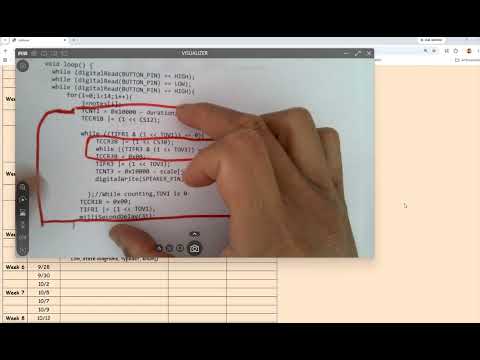 Watch on YouTube →
Overview
Yiyan Li connects CE351's earlier polling-based tone generation to interrupt-driven music playback, showing how timer overflow ISRs, flags, and TCNT register offsets control note pitch and duration. The lesson then builds a two-ISR state machine for a four-song music game, explaining volatile variables, enum states, note/rest transitions, and how to test ISR timing with an oscilloscope.
Key takeaways
- Polling-based tone generation repeatedly starts a timer, waits for its overflow flag, and stops it; an ISR replaces that busy-wait loop with timer-triggered work.
- Reliable song playback separates pitch generation from note timing: one timer toggles the speaker pin, while another schedules note lengths and rests.
- A play-note flag lets an always-enabled ISR run without producing sound, and a one-shot increment flag prevents the note index from changing on every interrupt.
- Variables shared with an ISR should be volatile because asynchronous updates can otherwise be missed when compiler optimization reuses a cached value.
- An enum-backed static state variable preserves playback progress across interrupts and supports clear transitions among idle, note, and rest states.
- A test pin pulse measured on an oscilloscope reveals ISR execution time, helping assess whether code overhead meaningfully shifts the intended audible frequency.
Chapters
- A pressed button starts a timer, and polling waits for the overflow flag before toggling the speaker pin.
- The polling pattern has three main steps: start counting, wait while the timer counts, then stop counting.
- Writing a one to the timer overflow flag clears it; resetting the counter prepares the next half-period.
- A single-note example cannot play a song because playback requires changing note indices in sequence.
- Two timers can separate responsibilities: one controls each note's oscillation, while another controls how long the note lasts.
- The earlier polling implementation also uses a microsecond delay for rests rather than adding another timer.
- The Arduino serial monitor sends keyboard characters through the USB-to-UART connection, and a switch statement maps characters to commands.
- In the interrupt example, setup enables the timer overflow interrupt and global interrupts; the ISR continues firing independently of user input.
- A play-note flag determines whether the ISR toggles the speaker, so an interrupt can run without producing sound.
- A physical test pin is set high at ISR entry and low at exit, creating a pulse that can be measured with an oscilloscope.
- ISR instructions take time and can slightly affect output frequency, but the lesson notes that the overhead is small relative to audible note periods.
- The ISR resets TCNT for the next count interval and clears the overflow flag where the code requires it.
- An increase-note flag increments the note index once, then is cleared so every later ISR does not advance to another note.
- Keeping the index stable lets repeated pin toggles produce one consistent pitch until the user requests a change.
- Flags offer a simple way to control playback states while leaving the timer interrupt enabled.
- The game has four songs: a test song, a three-note copy song, a success song, and a failure song.
- The user starts the copy challenge with R and Enter, then reproduces the three-note pattern using button presses and similar rests.
- Task 2.2 first tests automatic playback with a longer song whose note lengths vary while the rests remain uniform.
- The example uses two timer interrupts: Timer1 toggles the speaker pin to generate note oscillations, and Timer3 controls note duration and rests.
- The note-playing ISR checks a play-note flag, updates TCNT, and flips the output pin to continue producing the selected pitch.
- For the interrupt frequency, the key timer adjustment is the TCNT counter offset; the ISR approach avoids polling the overflow flag.
- Variables that an ISR can change asynchronously should be declared volatile so the compiler does not rely on stale cached values.
- The lesson presents an enum as a readable way to name states such as idle, play-note, and play-rest, comparable to assigning named numeric constants.
- A static state variable retains its value between ISR calls, allowing each timer event to continue the state machine rather than restart at idle.
- Timer ISRs remain enabled after setup; flags and the current state determine what each ISR does, rather than whether the interrupt runs.
- When the user starts the test song, the state machine transitions from idle, then a later Timer3 interrupt begins the next state.
- Changing the TCNT offset changes the interval until the next interrupt, allowing the timer event rate to match the current playback phase.
- At the end of a note, the duration ISR disables the play-note flag, sets a rest duration, and transitions to the rest state.
- During a rest the note-generation ISR may still fire, but its false play-note flag keeps the speaker quiet.
- After a rest, the note index advances: playback returns to the note state if notes remain, or returns to idle after the final note.
- The review identifies the note-playing ISR's core actions as resetting TCNT and toggling the speaker pin.
- It reiterates that volatile is needed for values an ISR can modify, while enums provide named state labels for the state machine.
- Task 2.3 is deferred to the next class; students are asked to work on Task 2.2 and submit In-Class 5 on Monday.
Transcript excerpt
0:00 I've done this so many times. If there's no press skater for timer one, how do we start a timer? Okay. Yeah. TCR1BD and um what's a what's a bit are checking CS10, right? There's no crisis. So, I'm going just show you the answer here because this is not the code we are doing working on today. This is from tutorial number two or something. Okay. So by looking at this one we will um check with our new one. Okay. See this right? Okay. Remember when we did our polling?
0:50 So this was the code and today's tutorial uh the the music box will be entire totally different but we want to go back to this one see what are the differences that's that's the purpose otherwise you couldn't compare like why we are doing this so you have to remember what we did two weeks ago okay so remember what is this code doing or what was this code doing remember was that like remember the f the very first one we did was the the push button you push it it plays the notes the note you release it it stops it okay so that's why um do I need to pull it actually for this
1:39 case you are pulling Let's see. So, if the button is low, which means it's been pressed. So, while it's being pressed, I turn it on, right? And it's pulling it's pulling the overflow flag to do what? Yeah. >> Then flip it, right? So, which means it's pulling the overflow flag in order to flip it. It's basically the timer um will be turned on. After press it,
2:30 turn on and then it keep holding it. See if it's done. That's actually just half period waiting during the half period of
This is the start of the transcript. Save this video free for the whole transcript, searchable and time-coded.
Related notes
Summary, takeaways, and chapters were generated by AI from the video's transcript and may contain errors. The video belongs to its creator, Yiyan Li.