CE351 lec2 Embedded C examples
 Watch on YouTube →
Overview
Yiyan Li reviews embedded C through practical Arduino examples, emphasizing fixed-width types, loop behavior, and how software interacts with hardware. The examples cover 8-bit unsigned overflow, polling a pull-up button, Arduino setup and loop functions, UART serial output at 9600 baud, arrays, format specifiers, and converting a digit character to its numeric value.
Key takeaways
- A uint8_t stores values from 0 to 255, and unsigned overflow wraps modulo 256, so loop conditions and final counter values must be traced with the declared width in mind.
- A pull-up button input reads high while idle and low when pressed; polling code can wait for both transitions, but mechanical bounce may still require a delay-based software debounce or hardware latch.
- Arduino setup() runs once after startup, while loop() repeats indefinitely; one-time calculations and serial initialization belong in setup().
- Serial.begin(9600) sets the UART baud rate, and the computer's serial monitor must match it to display output reliably.
- A C string needs space for its null terminator, so three words including study require a 3-by-6 character array.
- Subtracting '0' from a digit character converts its ASCII representation into the corresponding integer value, for example, '3' - '0' equals 3.
Chapters
- Embedded C uses fixed-width types such as uint8_t, where the _t suffix identifies a type.
- A loop can start at 3, continue while i is less than 105, and increment by 5 with i += 5.
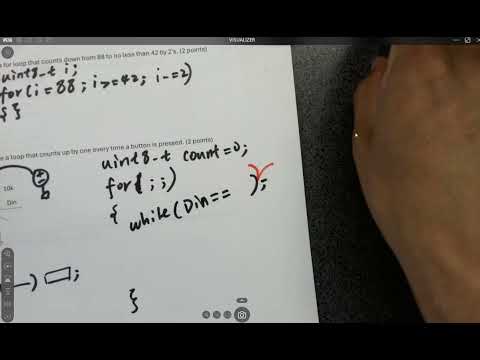
- A countdown loop can start at 88, continue while i is at least 42, and decrement by 2 with i -= 2.
- With a pull-up resistor connected to VDD, an unpressed button leaves the input at approximately 5 V.
- Pressing the button connects the input to ground, changing the signal from high to zero.
- A uint8_t counter is sufficient for counts up to 255, assuming the button will not be pressed more than 255 times.
- A for loop with omitted initialization, condition, and update expressions, written as for (;;), runs indefinitely.
- Nested while loops can wait first for the button input to go low and then for it to return high before incrementing the count.
- Mechanical switches can bounce for several milliseconds; software debouncing waits, often around 10 to 20 ms, before sampling again.
- A hardware latch is another debouncing approach, while the simple polling example is not a complete debounce solution.
- An unsigned 8-bit integer represents values from 0 through 255; adding 1 to 255 wraps the value to 0.
- The loop trace demonstrates that initialization, condition checking, the loop body, and the increment step occur in a specific order.
- The final values of both i and count depend on whether the loop condition is checked before or after the increment that causes overflow.
- An Arduino sketch uses void setup() for one-time initialization and void loop() for repeated execution.
- A function declaration includes its return type; the example function returns a uint8_t count to a value variable.
- The setup function can call the user-defined function, store its result, and print the returned value.
- Serial.begin(9600) configures the Arduino serial connection, and the serial monitor must use the same baud rate.
- Serial output travels from the microcontroller's UART through a USB conversion chip to the laptop.
- The worked loop example starts i at 200, increments it through 255 and wraps to 0, then stops at 100; the lecture calculates a final count of 156.
- Serial printing provides a practical way to inspect values because the microcontroller board has no built-in display.
- A preprocessor definition such as #define N 2 keeps the dimensions of a 2-by-2 array easy to change.
- Nested curly braces organize the array by row, with commas separating the row initializers.
- The example prints row 0, column 1 using array1[0][1] inside setup().
- Arduino sketches also need a loop() function, even when that function has an empty body.
- %d formats a signed decimal integer, %u an unsigned decimal integer, %c a character, %s a null-terminated string, and %x a hexadecimal value.
- A field width such as %5d reserves five character positions for an integer, helping align printed values.
- A precision such as %.2f displays two digits after the decimal point.
- Floating-point values typically use 32 bits and can be costly on an 8-bit microcontroller, so the lecture advises avoiding them unless needed.
- The example reserves a character buffer large enough for the formatted text and its terminating null character.
- An sprintf-style formatting call places a character or numeric value into the buffer before Serial.println() prints the string.
- Formatting a character such as 'x' with %u prints its unsigned ASCII value, 120.
- Arduino's Serial print functions do not directly handle the discussed C-style format specifiers, so the buffer provides an intermediate step.
- Commas in the initializer separate words into rows of a two-dimensional character array.
- For the three words skip, tool, and study, the array needs three rows and six columns.
- The longest word, study, has five visible characters plus one null terminator, determining the six-column width.
- Indexing a character array with a %c-style print displays one character rather than an entire word.
- A character such as '3' stores an ASCII code, not the numeric value 3.
- Subtracting the character '0' from a digit character, as in value = number - '0', converts the digit to its numeric value.
- Characters support arithmetic because their underlying values are ASCII codes; the result can be formatted as an unsigned decimal number.
- The complete Arduino example places initialization and printing in setup() and includes an otherwise empty loop().
Transcript excerpt
0:00 Very simple, right? Just try to revisit what you learned in C++. And this is uh embedded C language is really similar to C++. But I can say it's relatively easier. Um because the computer is simpler, right? It's not that complicated. Um so how could you get started in the first one? We have to define the type first. The data type. Okay? So in embedded systems, we we do it this way. For example, unsigned integer and _t. So t is type, okay? And then we put I here, for example,
0:48 right? Then it's just a very simple for loop. We could do for I starts with three. So it counts up by five. Um so it's not really counting to five. So whenever it's I know it just counts up by five, which is increment by five, right? But uh before reaching 105, it should be less than 105. So when I less I is less than 105, we'll stop. And then we increment I by five each time. You could also do I equals or I plus five. Right? You assign I plus five to I, but
1:39 usually we just do I plus equals five. It's the same thing in C, similar in C++. Do you need the semicolon here? For loop? No, right? Just follow with the curly bracket. This is the same as uh whatever you learned in C++ And it's you need in there inside the loop. No, it didn't didn't tell you to do anything, right? So, that's it for the first one. It's really simple. I'm just revisit the for loop. The second one It's a for loop that counts down from um 88. So, Oh, sorry. I I missed the one. the
2:26 months of the of the data over here. So,
This is the start of the transcript. Save this video free for the whole transcript, searchable and time-coded.
Related notes
Summary, takeaways, and chapters were generated by AI from the video's transcript and may contain errors. The video belongs to its creator, Yiyan Li.