CE351 lec3 Embedded C programming
 Watch on YouTube →
Overview
Yiyan Li uses Arduino IDE exercises to teach complete embedded C programs, from converting uppercase characters and printing through the serial monitor to variable scope, array parameters, and 2D-array summation. The lesson emphasizes quiz preparation, integer division, array-dimension syntax, and choosing data types large enough for computed sums.
Key takeaways
- For uppercase ASCII letters, preserve the letter's position in the alphabet with lowercase = uppercase - 'A' + 'a', rather than hard-coding individual conversions.
- Arduino sketches can perform a one-time calculation in setup(), initialize serial output with Serial.begin(9600), and leave loop() empty when no repeated work is needed.
- C integer division discards fractional results, so 28 / 8 evaluates to 3, not 3.5, when both operands are integers.
- When passing a multidimensional array to a C function, the first dimension may be omitted in the parameter declaration, but subsequent dimensions must be specified.
- An 8-bit accumulator cannot safely hold the sum of many 8-bit array elements; select the accumulator and function return type based on the maximum possible total.
Chapters
- Students are expected to write complete programs, not only the main logic, whether working on paper or in an IDE.
- The next week is reserved for assembling and testing the Skyboard; tutorials using the board begin in week three.
- A C programming quiz is planned for week three, and homework two is board assembly and testing using the Canvas rubric.
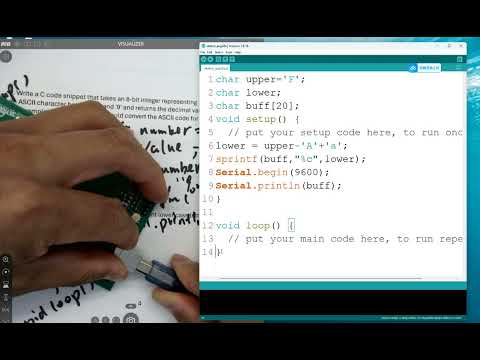
- The exercise declares uppercase and lowercase characters, then computes the lowercase character as uppercase minus 'A' plus 'a'.
- A character buffer of 20 bytes and formatted string output are used because the lesson's serial-print method does not accept format specifiers directly.
- The Arduino sketch prints the result from setup(), initializes Serial at 9600 baud, and leaves loop() empty.
- Li demonstrates selecting the board's port in Tools, checking Device Manager if needed, uploading the sketch, and viewing output in Serial Monitor.
- A variable named i inside setup() is local to that function and does not affect an i declared independently in foo().
- The one-dimensional array exercise stores loop indices 0 through 7, whose sum is 28.
- Dividing 28 by 8 using integer arithmetic produces an average of 3 because the fractional part is discarded.
- For function parameters, a one-dimensional array's size can be omitted; in a multidimensional array parameter, the first dimension can be omitted but later dimensions must be specified.
- The class modifies the previous exercise to use a two-dimensional array, temporarily choosing N = 8 rather than 255 to keep the example manageable.
- An 8-by-8 array contains 64 elements, and the example uses uint8_t values because each stored value is between 0 and 7.
- Nested for loops with indices i and j populate array[i][j] with i, demonstrating row and column traversal.
- Serial.begin(9600) is added before output so the calculated result can be checked in Arduino Serial Monitor.
- The setup() function calls a separate foo() function to keep the main routine concise and passes the array, row count, and column count.
- The 2D-array parameter omits its first dimension while specifying the second dimension, which the compiler needs to interpret array indexing.
- The returned sum is divided by N times N to calculate the average, which is printed once with Serial.println().
- The loop() function remains empty because the calculation and output happen once in setup().
- The foo() function initializes sum to zero and uses nested loops over rows and columns to accumulate array[i][j].
- The function returns the accumulated sum; setup() performs the division to produce the average.
- With each row containing its row index from 0 through 7, the 8-by-8 example's arithmetic average is 3.5, represented as 3 when stored and calculated with integer types.
- A compile error is encountered and corrected during the live coding before the serial output is checked.
- Li considers scaling the example to 255 elements and asks which variables need wider integer types as array size increases.
- A sum of up to 255 byte-sized values can exceed 255, so the accumulator and function return type need more than 8 bits; the lesson proposes 16-bit types.
- The lesson also recommends changing the average variable to 16 bits, although an average of values limited to 0 through 255 can fit in an unsigned 8-bit type.
- The in-class exercise is identified as quiz-two study material for week three; the class then transitions to quiz one on number systems and logic fundamentals.
Transcript excerpt
0:00 So, when you uh a problem, and you have to handwrite on a paper or maybe program on IDE, and it has to be a functional. So, that's why you want to start doing all these complete uh versions of the code instead of just handwriting the main part of it. Okay, let's see. Um Let me close this phone. So, if you look at the syllabus here, we will wrap up in-class number one today. And the for for the next week, we'll just be working from home uh 610 to start to assemble assemble the board. It will take the whole week to to get it done. And after that, we'll start our tutorials by using your Skyboard. So, you have to get it done by the end of
0:47 next week so we can start working on the tutorials starting from week uh number three. Okay? And and there will be a quiz the week after next week about uh C programming. So, you have 2 weeks to to practice on the C programming. Be sure to uh do a good job on the quiz, too. And homework number two is totally just assemble the board, okay? Assemble it and test it. There's a very simple rubric listed on uh Canvas about uh how we want to test it. Uh you can you can see that later, okay? So, that's the whole plan for this and next week. And now, let's move to in-class number what? Number I think we were at number nine. A second.
1:38 Uh uh Well, number 10, okay? Let's do number 10 first. Cover number nine on Wednesday. So, let's do number 10 here. >> You have a copy over there, right? Probably too small on the screen, but you have a copy there, right?
This is the start of the transcript. Save this video free for the whole transcript, searchable and time-coded.
Related notes
Summary, takeaways, and chapters were generated by AI from the video's transcript and may contain errors. The video belongs to its creator, Yiyan Li.