CE 312 Lecture 31: MASTAN2 Demo II, Additional Features & Beam Example (2026.10.30)
 Watch on YouTube →
Overview
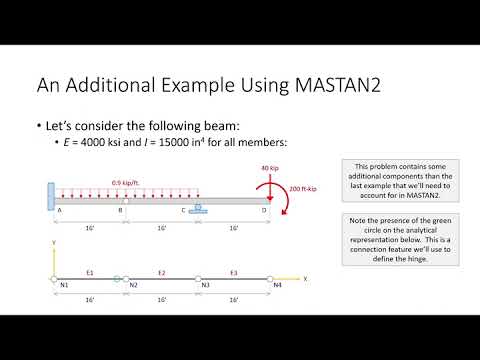
Gregory Michaelson demonstrates MASTAN2 post-processing for a truss and then models and analyzes a beam with a hinge, fixed support, point loads, and distributed loads. He shows how to export MASTAN2 reports into Excel and explains the beam model's key inputs, including E = 4,000 ksi, Izz = 15,000 in^4, and loads converted to consistent inch-based units.
Key takeaways
- MASTAN2 reports can be moved into Excel efficiently by selecting vertical-bar delimiters, saving the report as text, and using Text to Columns with the bar as the separator.
- At an internal beam hinge, release the flexural moment at only one end of one adjacent element; releasing both ends can create an unstable model.
- MASTAN2 does not convert units automatically, so this beam requires inch-based geometry, a -0.9/12 kip/in distributed load, and a -2,400 kip-in moment.
- A 2D fixed support requires restraints in X, Y, and rotation about Z, while the example's roller at node 3 restrains only vertical movement.
- Use the shear and moment diagrams together with the deflected shape to validate the model: the hinge has zero moment and permits a slope discontinuity, while the fixed support has zero slope.
Chapters
- Gregory Michaelson says the first project has been graded, but Blackboard posting and second-exam grading are still pending.
- The class begins with the previously modeled truss, which has pin and roller supports at nodes 1 and 3 and loads at nodes 2, 4, and 5.
- Michaelson introduces three result-review methods: spot-checking values, viewing diagrams, and generating a report.
- The deflected-shape diagram uses a visual scale factor, such as 20 or 50, so small real-world displacements on a 12 ft truss are visible; animation is also available.
- File > Create Report can output all element end forces, with vertical bars selected as delimiters.
- Save the report as text, paste it into Excel, then use Data > Text to Columns with the vertical bar delimiter to separate values into cells.
- For the reported pair of axial-force values, the second value is positive in tension and negative in compression; exporting is especially useful for project trusses with about 50 members.
- The beam example uses four nodes along the X axis at 0, 16, 32, and 48 ft, entered as 0, 192, 384, and 576 inches.
- MASTAN2 treats connected elements as rigid by default, so the hinge at node 2 must be modeled as a flexure connection that releases moment.
- For element 1, select node J and change the end condition from rigid to pinned; releasing node I on element 2 would produce the same hinge.
- Release only one end at a hinge, since releasing both adjacent ends can make the model unstable.
- Use a custom section with Izz = 15,000 in^4 and an area value of 1; area does not affect this example because no axial load is applied.
- Set the material modulus to E = 4,000 ksi, and assign one section across all three beam elements.
- At node 1, define the fixed support with X and Y translations restrained and rotation about Z restrained; node 3 has a vertical roller restraint.
- Apply a -40 kip vertical force and a -2,400 kip-in clockwise moment at node 4, converting the original 200 ft-kip moment by multiplying by 12.
- Apply a downward distributed load of -0.9/12 kip/in in the Y direction on elements 1 and 2.
- Analyze the beam as a planar frame, not a planar truss, because beam and frame elements use the same analysis behavior in MASTAN2.
- A successful run reports analysis complete; the desktop version may also display an applied load ratio of 1 for the linear analysis.
- If the model is unstable, check the support restraints, hinge release, and section assignments before rerunning.
- For mismatched results, verify node coordinates were converted to inches, the distributed load was divided by 12, and the moment was multiplied by 12.
- The shear diagram should change linearly under the distributed loads and show sudden jumps at point loads; the moment diagram has a zero at the internal hinge.
- Moment values such as 7,315 and 10,800 are in inch-kips, so divide by 12 to compare them with diagrams expressed in foot-kips.
- A deflected-shape scale of 10 makes the response visible; the fixed support has zero displacement and zero slope, while the hinge produces a sudden angle change.
- For the homework, submit a formatted Word document listing answers and include MASTAN2 screenshots, which can be inserted using File > Create Photo.
Transcript excerpt
0:03 All right. All right, everybody. Looks like it's one day away from spooky spooky. Um just a couple of uh housekeeping items. I promise I do have your project uh one graded. I just never got a chance to post them. It's been uh uh pretty uh hectic in the Dean's office with priority registration starting yesterday. So, it's just been a lot of students with scheduling issues and questions and whatnot. It's just been kind of hectic up there. Um but, that'll be sort of uh sort of my weekend activity is to sort of clean up uh everything on Blackboard. And I'm going to try and knock out the second exam this weekend as well. So, um we'll see. Something tells me I might be able to do it. Uh if not, I'll I'll definitely be able to put a
0:51 a decent dent into that grading. Um today's uh exercise is going to be another um mast hand example. I'm going to start that here in a little bit. Before I do that though, there are a couple of things I want to finish up on the first example. But, I also want to show you a couple of Excel tips and tricks that can make your life a lot easier when you're doing your project computations. And so, I figured we sort of ended the last lecture with the uh truss analysis for the most part complete, but we didn't do a lot of post-processing. This isn't going to take very long, so I think we can kind of knock it out and then begin our our second example. Okay? Um does that sound good?
1:39 And did everybody, including those two right there, get the QR code? Yeah, I had to call you out. I couldn't help it.
This is the start of the transcript. Save this video free for the whole transcript, searchable and time-coded.
Related notes
Summary, takeaways, and chapters were generated by AI from the video's transcript and may contain errors. The video belongs to its creator, Gregory Michaelson.