fnb100f261028b
 Watch on YouTube →
Overview
Jeff Hunk teaches Excel methods for future value of an annuity, using a $60,000 graduate-school savings goal to show how to calculate an exact monthly payment, solve for an unknown APR with Excel's RATE function, and derive the savings timeline with logarithms. He then reviews course grading and logistics, including Connect chapter problems, late penalties, Brightspace grade reports, and how attendance and participation affect students' weighted averages.
Key takeaways
- For a $60,000 goal over five years at 6% APR with monthly compounding, the required deposit is about $859.97 per month, not a rounded $860.
- Excel's RATE function can solve an annuity's unknown periodic rate through computation; enter payments as negative cash flows and multiply the monthly result by 12 to obtain APR.
- An ordinary annuity uses Excel's RATE type value 0 or a blank, while an annuity due uses 1 to represent one additional compounding period.
- When payment, target future value, and rate are known, logarithms can isolate the number of periods; 60 monthly periods equal five years.
- Connect chapter assignments affect the course grade, and late submissions lose 5% per day; after more than 20 days, the penalty can reduce even a perfect score to zero.
- Students can improve or protect their weighted average through remaining exams, chapter work, attendance, and class participation, so checking Brightspace announcements and grade rows matters.
Chapters
- Jeff Hunk opens the Wednesday class by checking attendance and introducing the future value of annuity lesson.
- The example is saving for a two-year MBA at CUNY, with a target future value of $60,000.
- The baseline plan saves $800 monthly for five years at 6% APR, compounded monthly.
- Alternatives include saving $860 monthly, seeking a higher interest rate, or extending the plan to six years.
- Hunk notes that an 8% bank rate is unrealistic in a competitive market where rate differences are usually much smaller.
- Excel lets students evaluate all four savings scenarios together and identify which meet the $60,000 target.
- The $860 monthly plan and six-year plan meet the target, while the baseline $800 plan falls short.
- Hunk contrasts one extra year of saving for roughly $9,000 more with the potential cost of delaying a high-paying job.
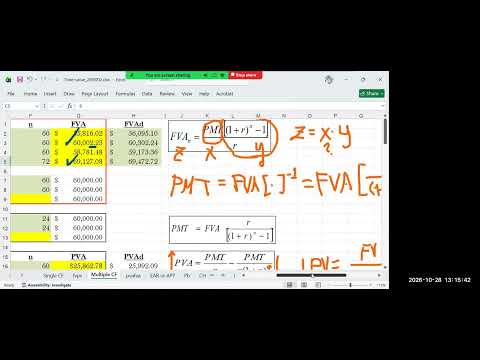
- The future value formula can be treated as Z = X × Y, with payment as the unknown X and target future value as Z.
- Solving for payment means dividing the target future value by the annuity accumulation factor.
- The rearranged formula can find a payment more precise than rounding to a whole dollar.
- The spreadsheet uses a periodic rate of 6% divided by 12 and 60 monthly deposits.
- The exact payment is approximately $859.97 per month, just below the rounded $860 that overshoots the target.
- The calculation demonstrates how a few cents per month can accumulate into a difference over 60 deposits.
- Hunk explains that annuity interest rates lack a simple unique algebraic formula, so Excel's RATE function replaces manual trial and error.
- The function inputs include the number of periods, payment, future value, and type; a present value is not used for this multiple-payment example.
- For an ordinary annuity, type is left blank or set to 0; type 1 represents an annuity due with one additional compounding period.
- The payment is entered as a negative cash outflow, producing a monthly rate that is multiplied by 12 to report a 6% APR.
- When payment, future value, and APR are known, the annuity equation can be rearranged to solve for the number of periods.
- Natural logarithms isolate the unknown exponent in the future value formula.
- The result is 60 monthly periods, or five years, confirming the example's original assumptions.
- Students are assigned a practice case with 7.5% APR, quarterly compounding, a four-year term, and a $60,000 target.
- The table asks students to solve for payment, rate, and number of periods using the annuity relationships.
- Hunk postpones the present value of annuity lesson until the next Monday because it requires a separate extended class.
- Hunk tells students to use the email address posted in Brightspace, since messages sent to his BMCC address may remain undiscovered in junk mail.
- He asks students to follow the posted first-name and last-name format, omitting middle names and using only the first part of a hyphenated surname.
- Students are directed to read the quiz summary statistics and course announcements rather than relying only on the landing page.
- The current weighted average includes Quiz 1 and Quiz 2 at 15% each, while the midterm and final are worth 20% each.
- Hunk says 55% of the weighted grade remains in upcoming assessments and 30% comes from other components, including participation and chapter work.
- Attendance and answering questions contribute points, so students with multiple absences are advised not to miss additional classes.
- Connect chapter averages are part of the grade calculation rather than optional practice.
- McGraw Hill Connect chapter problems are automatically assigned and open and close on designated dates.
- Assignments less than 20 days late may still earn points, but the 5% per-day penalty can reduce a score to zero after 20 days.
- Students are told to prioritize the most recent missed work and complete currently open chapters, including Chapters 4, 5, and 7.
- The class midterm is scheduled to open on November 6.
- Assignment results and grades are located in Brightspace under Assignments, with an announcement explaining the navigation path.
- The ROI self-diagnostic practice was posted in an announcement on September 28; students can search announcements for the keyword ROI.
- Hunk clarifies that displayed assignment scores are raw points, not percentages, and that only the highest of two attempts is reported.
- Students are told to download and inspect the grade file carefully, scrolling to confirm they are reading their own row before reporting a missing score.
- Brightspace assignments covered Quiz 1, while later course work includes Connect chapter problems; students should distinguish the two systems.
- A student who recently purchased Connect can still complete open work, but locked assignments more than 20 days overdue cannot be salvaged.
- Hunk advises completing Chapter 4 immediately because its deadline is imminent, and asks students with unresolved Quiz 1 questions to email the address listed in Brightspace.
Transcript excerpt
1:41 All right. Good afternoon, everyone. Good afternoon. Happy Wednesday. All right. So, let's see who's here. Okay. I see uh Valentina. I see Brandon. And I see uh Tyandre. Um also I see um uh Aaron Leo. >> Hello professor. >> Hello. Hello Aaron. Yani and Malik. >> Good afternoon professor. >> Good afternoon. Good afternoon. Cortez and Ian Haley Blendy. So that's that makes it 11 11. Okay. It's not a full
2:31 house, but that's okay. We need only 11 strong people, right? 11 strong. Now that will make it 12 strong. 12 strong. Okay. There is our Allrighty. So today um uh we're gonna Okay. The next video we're going to watch is you know uh uh future value of annuity part two and of course la in the last class right let me okay so with time value yeah uh we've covered up to Uh I believe yeah
3:27 uh the future value of annuity, right? Uh Excel exercise and also um just to uh just to refresh your memory, right? This was a uh graduate school fund, right? Graduate school fund example. Graduate school fund. Okay. So, uh then we had four possible scenarios, right? Uh remember you you've decided to go to a graduate school for MBA program uh at CUNI because the most affordable uh school, right? And I haven't checked but you know I haven't checked but even
4:14 even uh by 2026 standard uh cur graduate school one cost not you know more than 60k I don't know you you you look it up I don't think it's going to cost more than 60k for two years right uh for NBA program. So I guess it's realistic and reasonable to assume 60k which is your target future value. And to achieve that target future value
This is the start of the transcript. Save this video free for the whole transcript, searchable and time-coded.
Related notes
Summary, takeaways, and chapters were generated by AI from the video's transcript and may contain errors. The video belongs to its creator, Jeff Hunk.