fnb100f261028a
 Watch on YouTube →
Overview
Jeff Hunk teaches how to use the future value of an annuity model and Excel to plan for a $60,000 MBA fund, including solving for the required monthly payment, interest rate, and time. The lesson derives the payment and period formulas, demonstrates Excel’s RATE function with cash-flow signs, and compares ordinary annuity with annuity-due timing.
Key takeaways
- For a $60,000 goal funded over 60 monthly periods, the annuity formula can solve directly for the deposit when the periodic rate and timeline are known.
- The future-value annuity equation has a product structure, so payment equals target future value divided by the annuity accumulation factor.
- Excel’s RATE function uses cash-flow direction: monthly deposits should be negative outflows, while the final accumulated balance should be a positive inflow.
- In Excel’s RATE function, type 0 or a blank indicates an ordinary annuity, while type 1 indicates an annuity due with one additional compounding period.
- A monthly rate of approximately 0.5% corresponds to a nominal annual rate of approximately 6% when multiplied by 12.
- The number of periods can be isolated from the future-value annuity formula with natural logarithms; 60 monthly periods equal five years.
Chapters
- Jeff Hunk checks whether students can play the Module 3 lesson on future value of an annuities.
- Students confirm playback works for them, while Jeff reports YouTube and screen-annotation problems on his computer.
- The class moves on to a live Excel walkthrough after the playback issue interrupts the planned lesson.
- The planning example targets $60,000 for a two-year MBA at Baruch College, referred to in class as part of CUNY.
- The initial scenario saves $800 monthly for five years at 6%, which falls short of the target under both ordinary-annuity and annuity-due timing.
- Among four scenarios, raising the monthly deposit to $860 reaches the goal but exceeds it by about $2.
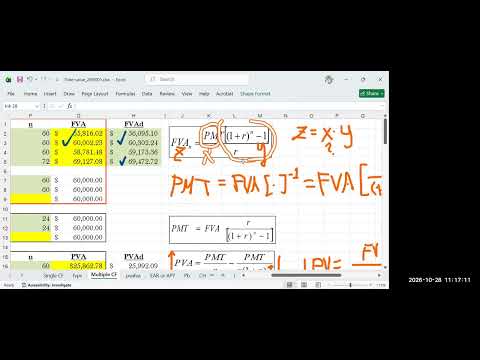
- Jeff identifies the future-value formula as a product: payment multiplied by the annuity accumulation factor.
- With a target future value of $60,000 and known rate and number of periods, payment is the unknown.
- He isolates payment by dividing future value by the annuity factor, equivalently multiplying by the factor’s reciprocal.
- Students open the previously used Excel workbook and enter the target future value, periodic rate, and number of monthly periods.
- The payment formula produces a monthly amount only a few cents below $860, illustrating why rounding the deposit can affect the final balance.
- Jeff captures a screenshot of the formula for students who need to reproduce the calculation after class.
- Jeff identifies four potentially unknown annuity inputs: future value, payment, rate, and number of periods.
- Because solving for rate generally requires trial and error, Excel can test candidate rates quickly using its built-in RATE function.
- In Excel’s Function Arguments window, students choose the financial category and supply the number of periods, payment, future value, and annuity type.
- The RATE calculation requires opposite signs for the monthly deposits and final balance: deposits are cash outflows and the $60,000 goal is a cash inflow.
- For an ordinary annuity, the type argument is left blank or set to 0; an annuity due uses 1 to represent one additional compounding period.
- The monthly rate is converted to nominal APR by multiplying by 12, yielding approximately 6% when the periodic rate is about 0.5%.
- Jeff derives the future-value annuity equation for the unknown number of periods, using natural logarithms to isolate n.
- The period formula uses ln(1 + future value × rate / payment) divided by ln(1 + rate).
- After correcting a missing natural logarithm in the spreadsheet entry, the example returns 60 months, or five years after dividing by 12.
- Students are asked to apply the annuity methods to a six-year scenario with a 7.5% rate and quarterly compounding.
- The practice task is to determine the required payment, APR, number of periods, and time in years.
- Jeff checks for questions, reminds Adam Morales to review an email reply, and ends class.
Transcript excerpt
1:01 Hey, good morning everyone. Good morning. Good morning. Uh let's see who's here first. Let's see. Um okay, I see Laura and Raul. Good morning. Uh, Max, good morning. And Shane, good morning. And Issa, good morning. And, uh, Ellie, good morning. Chris, Chris Parah, good morning. Good morning, everyone. All right. So, good morning. And there's Ali. Ali Hibabu. All right. Um so uh there's some technical to begin with you know I should say happy Wednesday but uh uh I'm
1:52 having some technical issues with YouTube so let me uh and I tried it with different other browsers. I mean can you tell me I mean from your end on your end are you able to uh uh play that uh this video uh future value of annuity too can you play this video for I'm not sure if it is just on my end but uh can you check if you can play this video. Can someone tell me if you can play that video because
2:41 I'm I'm having some, you know, uh YouTube issue, right? >> I wonder if it is just on my end or if it's affecting everyone. So, has anybody tried I'm looking for you should be you should be on this page. You should be on you know uh module three right as soon you know not just log into Zoom but you got to be also um in uh this video. Can you play that? Cuz at my end it is
3:30 I can see I can preview what's in there. >> Uh yeah, I can play it. It's working. >> Yeah, but [clears throat] why is not working on my end? This is driving me nuts. Maybe this is okay. So actually um I guess half of it is basically what we
This is the start of the transcript. Save this video free for the whole transcript, searchable and time-coded.
Related notes
Summary, takeaways, and chapters were generated by AI from the video's transcript and may contain errors. The video belongs to its creator, Jeff Hunk.