Stats 21 - Lecture 11 - Numpy Basics
Overview
Miles Chen introduces NumPy as Python’s library for homogeneous, multidimensional arrays, covering array creation, data types, shapes, random-number generation, reshaping, transposition, flattening, and slicing. The lecture emphasizes practical distinctions that affect results: NumPy’s dtype coercion, the difference between one-dimensional arrays and row or column matrices, and how views share data while copies do not.
Key takeaways
- A NumPy array has one `dtype`; mixed input values are coerced to a shared type, so combining integers with floats yields floats and adding strings can convert all values to strings.
- Array shape distinguishes a 1D length-12 array `(12,)` from a 2D row `(1, 12)` or column `(12, 1)`, and only the 2D forms transpose into each other.
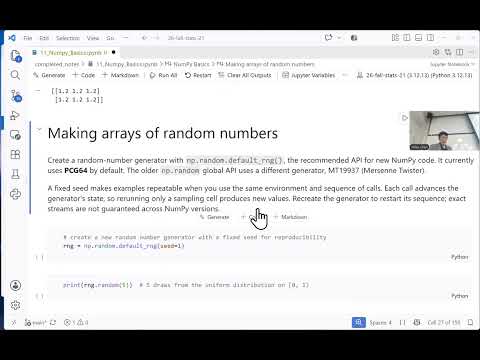
- Use `np.random.default_rng(seed)` to generate reproducible pseudo-random sequences, and remember that `rng.integers(low, high)` excludes `high`.
- `reshape()` can infer one dimension with `-1`, but the requested shape must still contain the same total number of elements.
- `ravel()` and ordinary slicing can return views that share memory with the source; use `.copy()` or `flatten()` when edits must remain independent.
- Assigning a floating-point value into an integer array loses the fractional part, so convert the array to a floating dtype before storing decimal values.
Chapters
- Import NumPy using the conventional alias `import numpy as np`, which makes code recognizable to other Python users.
- Unlike a general Python list, a NumPy `ndarray` stores elements using one shared `dtype` and supports rectangular, multidimensional structure.
- Virtual environments and `requirements.txt` help preserve package versions so projects remain reproducible as software changes.
- Use `np.array()` to convert a Python list or nested lists into an array; printed arrays omit the commas used in list representations.
- A nested list with two rows and three columns becomes a 2D array with `ndim` equal to 2 and `shape` equal to `(2, 3)`.
- Nested lists with inconsistent row lengths are ragged data and cannot form a standard rectangular NumPy array.
- `np.zeros()` and `np.ones()` accept a shape such as `(2, 4)`; their default values are floats unless a different `dtype` is requested.
- `np.full((2, 3), 1.2)` creates a 2-by-3 array filled with a chosen value.
- `np.random.default_rng(seed=1)` creates a reproducible generator; `rng.random(5)` draws five uniform values from 0 to 1, while `rng.normal()` generates normal values.
- `rng.integers(1, 7, size=50)` models 50 six-sided die rolls because the lower bound is included and the upper bound is excluded.
- `np.arange(20)` immediately creates an array containing integers from 0 through 19, unlike Python’s lazy `range` object.
- `np.linspace(0, 100, 11)` returns 11 evenly spaced values including both endpoints, yielding increments of 10.
- The `endpoint=False` option excludes the final endpoint, so the resulting spacing depends on the requested number of values.
- NumPy promotes mixed values to a common dtype: integers, floats, and booleans can become floats, while adding a string can convert every element to a string.
- Inspect an array with `.ndim`, `.shape`, `.size`, and `.dtype`; a 3-by-4 array has 2 dimensions and 12 elements.
- Assigning `1.9` into an integer array discards its fractional part; convert the array to `float` first to preserve the decimal.
- `reshape()` rearranges an array’s existing elements in row-major order and returns a reshaped result rather than changing the original variable.
- A length-12 array can be reshaped to `(3, 4)` or `(3, -1)`, with `-1` letting NumPy infer the missing dimension.
- For a 2D array, `.T` swaps rows and columns; for higher-dimensional arrays, transpose without explicit axes reverses the dimension order.
- A 1D array with shape `(12,)` remains one-dimensional when transposed; reshape it to `(1, 12)` first to transpose it into shape `(12, 1)`.
- `ravel()` converts a 2D array into a 1D array and shares memory with the original when possible.
- `flatten()` also returns a 1D array, but it creates an independent copy.
- For a 2-by-3 array containing 0 through 5, incrementing the result of `ravel()` can change the original array, while changes to the `flatten()` result do not.
- NumPy uses zero-based indexing: index 4 selects the fifth element, and slices such as `1:8:3` specify start, stop, and step.
- For a 3-by-4 array containing 1 through 12, selecting rows `1:` and column index `1` returns the 1D array `[6, 10]`; selecting a scalar index returns a scalar.
- Slices such as a 2-by-2 corner are views, so changing an element through the slice also changes the corresponding element in the original array.
- Calling `.copy()` creates independent data: edits to the copied slice do not affect the source, unlike edits to a view.
Transcript excerpt
0:05 Test, test. What is working? Test speakers. Hold on. All right. Uh well, happy Wednesday and we are going to take a look at NumPy, okay? So, NumPy is a uh a package that brings in a new data type to Python. So, uh in Python we have, you know, lists, dictionaries, tuples, things like that. Uh what we want to do is sometimes we want
0:55 um an array, okay? Which is kind of like a vector in R. So, a lot of you are familiar with vectors in R and one of the properties of vector of an atomic vector in R is that everything in the atomic vector has to be of the same data type. And similarly in NumPy, when you have a NumPy array, everything in the array has to be of the same data type. So, I'm going to load up uh NumPy and uh and we run import NumPy as np. That is a convention and that is um uh that just makes it easier for your
1:42 code to read uh elsewhere. And when you read other people's code, when you see np, uh almost certainly it means NumPy, okay? And I think uh we all have the same version here because that was in the requirements.txt. I think there's a newer version now, but um but anyway, uh again, when you start a project, you want to kind of lock in a little time capsule of the uh the packages as they are, so that in the future, even after packages get updated and things like that, the code that you wrote at that time, um you know, might not be compatible with future uh future versions of the software. And so, by creating a virtual environment, uh and putting in your requirements at
This is the start of the transcript. Save this video free for the whole transcript, searchable and time-coded.
In this course
Related notes
Summary, takeaways, and chapters were generated by AI from the video's transcript and may contain errors. The video belongs to its creator, Miles Chen.