Lecture 6: Redirections; Pipelines; tee; Expansions
 Watch on YouTube →
Overview
Burton Ma explains how Bash connects standard input, standard output, and standard error to files or other commands, then demonstrates pipelines, `tee`, and text-processing tools such as `sort`, `uniq`, `wc`, `less`, and `cut`. He then introduces Bash tokenization and expansion, emphasizing that brace expansion, word splitting, and filename expansion are distinct processes with different roles.
Key takeaways
- Bash assigns standard input, standard output, and standard error stream numbers 0, 1, and 2; `<`, `>`, and `2>` route those streams independently.
- A pipeline connects stdout to the next command's stdin, but commands can execute concurrently, so correctness must not depend on sequential completion.
- `tee` duplicates pipeline input to both a file and stdout, making it possible to preserve an intermediate result while continuing text processing.
- `uniq` checks only adjacent lines, so `sort | uniq` is needed to reliably remove repeated entries from an unsorted list.
- Bash tokenization happens before expansion, and tokenization should not be confused with word splitting; filename matching with `*` and `?` is a separate expansion step.
- Brace expansion generates strings before command execution, enabling compact sequences such as year-month names, but malformed expressions are passed through literally.
Chapters
- Use `>` to send standard output to a file, replacing its existing contents; use `>>` to append instead.
- Standard error is stream 2, so `2>` redirects error messages and `2>>` appends them to a file.
- Redirecting stdout alone does not capture errors: an `ls` error can still appear in the terminal while the stdout file remains empty.
- Use `<` to supply a file as standard input; the stream number 0 is optional.
- `sort` reads from the keyboard when given no file, and Ctrl-D signals that keyboard input is complete.
- A command can combine input and output redirection, such as sorting `unsorted.ext` with `<` and saving results to `sorted.ext` with `>`.
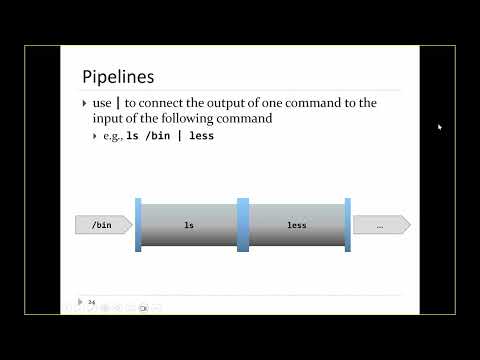
- The pipe operator `|` connects one command's standard output to the next command's standard input.
- `ls /bin | less` displays a large directory listing page by page; press `q` to leave `less`.
- `fortune | cowsay` passes a randomly generated saying to `cowsay`, which prints it in an ASCII cow.
- A pipeline can list files from `/bin` and `/usr/bin`, sort the names, and pass the results to `less` for browsing.
- `wc -l` counts newline-delimited entries; the example listing from two directories contains more than 2,300 lines.
- `uniq` removes only adjacent repeated lines, so sort the input first; `uniq -d` reports duplicated lines.
- The example finds 1,196 unique names and 1,193 duplicated lines, showing the two directory listings are similar but not identical.
- Bash pipelines produce the intended combined result, but commands are not guaranteed to finish one at a time in written order.
- `tee` reads standard input and copies it both to standard output and to one or more files.
- Use `date | tee full-date.ext` to save the date output while still displaying it in the terminal.
- `tee` is useful for saving an intermediate result without interrupting the rest of a pipeline.
- The `cut` command selects fields from delimited text; `-d ' '` sets a space delimiter and `-f` selects field numbers.
- The example pipes `date` through `tee` and `cut` to save the full date while extracting fields such as the weekday, month, or year.
- Field selections can include multiple values or ranges, for example `-f 1,6` or `-f 1-3`.
- `tee` can appear at multiple points in a pipeline, saving the original `fortune` text and the output of `cowsay` to separate files.
- Bash first tokenizes a typed command into words and operators, such as a command name, argument, pipe, redirection, and filename.
- Tokenization is not the same as word splitting, despite the similar-sounding terminology.
- After tokenization, Bash performs expansions that replace tokens with generated strings; filename expansion with `*`, `?`, and bracket patterns occurs last.
- Brace expansion, tilde expansion, word splitting, and filename expansion are different mechanisms, even when their syntax resembles patterns.
- A comma-separated brace expression such as `{a,b,c}` expands to multiple strings before the command runs.
- Preambles and postambles are attached to every generated item, as in `before_{and,also}_after`.
- Sequence expressions such as `{0..9}` generate numbers; a third value sets the step, as in `{10..20..2}`.
- Bash also supports letter sequences, though character ordering can include punctuation between uppercase and lowercase letters.
- Brace sequences can generate repeated date-like names, combining year and month ranges such as `{2019..2022}` and `{01..12}`.
- Brace syntax expands only when Bash recognizes a valid expression; malformed braces remain literal text and can produce unexpected directory names.
- The `*` filename pattern does not match hidden files by default, a detail to remember before running recursive deletion commands.
Transcript excerpt
0:11 All right, good afternoon everybody. So, uh picking up where we left off uh from the previous lecture. So in the previous lecture we were talking about streams um and I was showing you how to redirect um I was showing you how to redirect output from a command to a file right so remember most commands if they generate output they will send the output to standard out which by default is connected to your terminal right if you want to redirect the contents of the if you want to redirect the output to a file instead uh you can use the greater than operator right? And uh redirect the output of the command uh to a file. So in this case uh this uses the cows command to print some text well to
1:00 generate some text which would normally go to standard output but instead we're going to send it to the file moo.ext. And if you try out that command right so now if you run this command it generates no output to the terminal. Why? Because all the output has gone to moo.ext. Right? If you look inside moo.ext, you'll see uh the output of the cows command. Okay? And also remember I showed you this a couple lectures ago. If you when you redirect to a file, it overwrites an existing file. If you want to add to the end of an existing file instead, use greater than greater than. And that will append the output to the end of the file instead of overwriting the existing
1:49 file. Right. Okay. Now, there are occasions where you will want to redirect standard error as well. Right? So, it's often the case you don't want to redirect standard error. If you get an error message, you want to
This is the start of the transcript. Save this video free for the whole transcript, searchable and time-coded.
Related notes
Summary, takeaways, and chapters were generated by AI from the video's transcript and may contain errors. The video belongs to its creator, Burton Ma.