ISE 754 (Fall 2026) 1.2 Julia, LLMs, and Validation
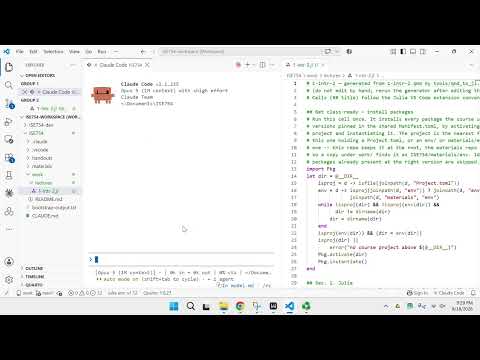 Watch on YouTube →
Overview
Michael G. Kay introduces Julia as ISE 754’s computational engine, explains how to work with Julia scripts in VS Code and Claude Code, and outlines how large language models generate responses and use context. He presents a validation workflow with nine checks grouped into screens, expectations, and confirmations, and recommends requesting Julia scripts so students can inspect and test computational results.
Key takeaways
- Julia’s dotted operators distinguish elementwise array operations from ordinary operations: use A .+ 2 to add to every element, while 2A is valid scalar multiplication.
- Ask Claude Code explicitly for Julia scripts in ISE 754, because it may otherwise choose Python or another language that students are not prepared to inspect.
- Use validation at multiple levels: screen units and natural bounds, design expectation-testing scenarios, and seek stronger confirmation for consequential work.
- Keep unrelated tasks out of a Claude Code session’s context; starting a fresh session can reduce context rot and improve relevance.
- Store logistics problem specifications in Markdown files such as model.md so they remain editable and reusable after a Claude Code session ends.
- Make validation prompts specific: an open-ended request to find any problems can produce slow, overly broad feedback instead of a focused review.
Chapters
- Julia is the course’s main computational engine; students should be able to read generated code even if they do not write it themselves.
- DataFrames, CairoMakie, and CSV are not included in a default Julia installation and must be installed; the course expects roughly 12 to 15 packages overall.
- Each computational lecture has a corresponding .jl script, and lecture materials identify newly used packages.
- Open the ISE 754 project folder in VS Code to access its handouts, material, and work directories.
- The Explorer is the primary VS Code extension for navigating files; the Julia extension can show variables in the current workspace.
- A CLAUDE.md Markdown file can provide Claude Code with folder-specific instructions, while Markdown offers a readable format for project notes and model specifications.
- Run the script’s initialization cell to install required packages and prepare the Julia environment; Alt+Enter executes a cell on Windows.
- Julia variable names can include mathematical symbols such as subscripts and σ², entered through editor autocomplete.
- A Julia cell normally displays only its final expression; the @show macro reveals intermediate expressions and their values.
- In VS Code, Control+Enter executes a line and Shift+Enter executes it while advancing; results appear in the Julia REPL terminal.
- Array operations require dotted operators, such as A .+ 2; omitting the dot can cause a method error, while scalar multiplication can be written 2A.
- A large language model repeatedly predicts the next token, with stochastic probabilities allowing different responses to the same prompt.
- Tokens can represent word fragments, and embeddings place them in high-dimensional spaces where related concepts such as freight, shipments, and trucks are closer than unrelated concepts such as cats.
- The context window contains conversation prompts and other supplied information; Kay notes that modern models can handle around a million tokens.
- Switching topics without clearing or restarting a Claude Code session can cause context rot, as irrelevant material competes with useful context.
- Kay organizes nine validation checks into screens, expectations, and confirmations.
- Screens are quick checks such as verifying units and ensuring results respect natural bounds, for example, a quantity that must be nonnegative.
- Expectations require deliberately constructed scenarios to test model behavior; confirmations add stronger evidence for consequential research, client work, or workplace decisions.
- AI assistants can help with validation, but results still need checks that build confidence before they are presented to others.
- Claude Code may default to Python or use a shell language such as AWK unless the request explicitly requires a Julia script.
- For an example calculating a shipment-size median from a CSV, the Julia approach uses CSV and DataFrames and makes the odd-versus-even row logic inspectable.
- Students can ask Claude Code to add comments or explain unfamiliar Julia lines, then modify input values to test how the calculation responds.
- Saving a logistics model specification in a separate model.md file preserves it beyond the current Claude Code session and makes it editable in VS Code.
- Claude Code can reference a nested file such as model.md using the @ file selector, which helps locate the correct file in the project folders.
- The broad request to report any problems produced a lengthy, ambiguous review; specifying which kinds of problems to check would make the task more efficient.
- A provided Julia check-model script verifies model-format keywords and catches basic formatting issues before they cause problems.
- The review flagged unspecified distance definitions, missing cost-proportionality assumptions, and weekly demand expressed as physical weight rather than money; Claude Code suggested adding missing assumptions.
Transcript excerpt
0:02 Lecture 1.2 will cover three topics. The first is Julia, which is our principal computational engine. It'll be used for scripting. And then we'll have a brief discussion of large language models. And in particular, elements of the operation of a large language model that are relevant for being able to use it effectively throughout the class. And then finally, the last topic is validation. Assuming that the AI assistant does the computational coding aspect of it, our job is to be able to validate the results. So, we'll be talking about different techniques that can be used for that. In the lecture at the top, and this will be
0:50 true throughout the semester, they'll be listed any new Julia packages used. And you It's not displayed automatically, so if you select it, it'll show that for this particular lecture, there's a set of three packages that'll be installed to be able to run the programs in this class. So, that's a nice way to reference for every particular lecture, what are the new packages. And why that's important is that those are the ones you need to install into your system. By default, when you just start Julia, it doesn't have dataframes, CairoMakie, or CSV installed. So, those have to be explicitly installed. I think throughout the semester, we have probably 12 to 15 total packages. So,
1:38 it's not going to be a large number. Later on, not this lecture, we'll be using the Log Jam package. That's the Julia package that was created specifically for logistics engineering. Uh for this lecture, we're not using any of those. And then finally, starting with this lecture, the first lecture, there was no computational aspect to it, so that didn't have a script. But, for this lecture and all the remaining ones,
This is the start of the transcript. Save this video free for the whole transcript, searchable and time-coded.
Related notes
Summary, takeaways, and chapters were generated by AI from the video's transcript and may contain errors. The video belongs to its creator, Michael G. Kay.