UNC COMP 301 - F26/Lec 19 - MVC (Cont.)
Overview
Muhammad Sayeed Ghani explains how Model-View-Controller separates application state and business rules, user-interface rendering, and event handling, then demonstrates the roles with console and JavaFX examples. He compares classic MVC, where views can read and observe the model directly, with an alternate architecture that routes model updates and data access through the controller, highlighting the tradeoff between tighter decoupling and additional communication steps.
Key takeaways
- The model should own application state and business rules, such as validating phone numbers or enforcing the rules of a game like 2048.
- The controller handles input-driven operations and can enforce user mode and authorization checks before changing the model.
- In classic MVC, the view may observe model changes and read model data directly, but it still routes modifications through the controller.
- Alternate MVC removes direct view-to-model access by routing notifications and data requests through the controller, improving control over access at the cost of extra communication steps.
- In JavaFX, an FXComponent can render a scene graph by returning a Parent, while a button's setOnAction lambda forwards events to a controller handler.
- When refreshing a view after user input, update the model first; otherwise the view may read and display stale state.
Chapters
- Ghani notes that the sample midterm questions are intentionally longer than the actual exam and introduces a lecture focused on MVC examples.
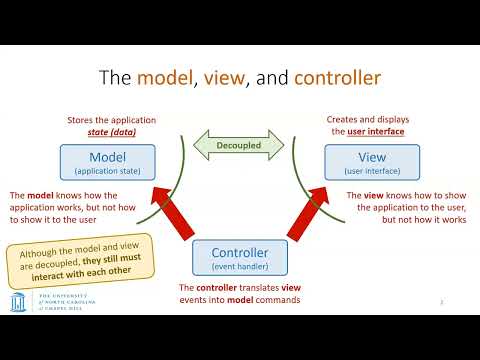
- The model holds application state, the view handles the user interface, and the controller mediates between them.
- Decoupling the view from the model makes it easier to replace an interface, such as Java Swing, JavaFX, or HTML, without rewriting application data logic.
- User input can arrive through a graphical or auditory interface, and interface events can be routed to a controller.
- A button in the view acts as an observer-pattern subject, and its action event invokes a lambda expression that calls the controller.
- The controller typically calls a model method directly to apply a requested change, rather than using an observer pattern for that call.
- After a model change, the model can notify observers; classic MVC may notify the view directly, while alternate MVC routes notification through the controller.
- A model can have multiple observers, allowing multiple interface components to respond to a state change.
- Validation such as requiring a phone number to contain nine or ten digits belongs with the model's business rules.
- The model determines whether data forms a valid application state, rather than relying only on checks in the JavaFX view.
- For a game, rules that preserve valid game state belong in the model, not in the interface or event-handling code.
- MVC is a recommended division of responsibilities, not a guarantee that every application follows the separation perfectly.
- The controller can check whether a user is in edit mode before allowing a profile update.
- Authorization checks belong in the controller, which decides whether the user may invoke a model operation.
- Once checks pass, the controller calls the appropriate model method; the view primarily presents information and interface controls.
- Users generally interact through the view or controller, but should not modify the model directly.
- A 2048 model can store the tile grid, current score, and best score, with getters for reading state and methods for moves such as swiping up, left, or right.
- Keyboard arrow keys on a desktop or swipe gestures on a mobile device can trigger the corresponding model operation through the controller.
- The view renders model state for the user and can learn about model changes directly or through the controller, depending on the MVC architecture.
- JavaFX-specific code belongs in the view, so changing the interface technology need not change the model or controller.
- Ghani introduces an FXComponent interface with a render() method that returns a JavaFX Parent.
- A Parent is a container for child nodes and can define layouts such as VBox, HBox, or GridPane.
- The returned Parent serves as the root of a scene graph that can contain nested layouts and controls.
- A view can hold a controller reference so a button's action lambda can call a controller handler.
- The first implementation uses a counter model with a count field, a getter, and an increment method.
- The console view prints the current count, while the controller interprets a plus sign and requests an increment.
- The user enters input through the main method, which passes non-quit input to the controller; Q exits the loop.
- In this classic-style example, the view receives the model and reads its count directly.
- The counter controller holds references to both the model and view, increments the model, then asks the view to display the result.
- The model must change before the view refreshes, because the view reads the current count from the model.
- The main method creates the model, view, and controller, then injects the model into the view after construction.
- The sequence diagram shows input passing from main to the controller, then to the model, followed by a view refresh and another read of the count.
- The student example stores a name in the model and exposes it through getter and setter methods, without including JavaFX presentation code.
- The view implements FXComponent and renders a VBox containing a title, details area, and name row.
- The name row uses an HBox, while the details area uses a GridPane with labels and a text field.
- Changing the text field alone does not update the model; clicking the button triggers the change.
- The button is the observer-pattern subject, and its setOnAction event activates a lambda expression.
- The lambda expression is the observer; it calls the controller's name-change handler with the event.
- The controller reference in the JavaFX view lets the event handler forward user input without putting model-update logic in the button itself.
- Distinguishing the button subject from the lambda observer clarifies how JavaFX events connect the view to the controller.
- The student controller receives both the model and view through its constructor.
- When the name-change handler runs, the controller updates the model first and then calls a view method to refresh the display.
- The refreshed view reads the updated name directly from the model in this example.
- The sequence diagram traces the button event through the controller, model setter, view refresh, and model getter.
- In classic MVC, a user action still travels from the view to the controller, which handles the request and modifies the model.
- After a change, the model notifies the view directly, bypassing the controller for the refresh notification.
- The view can then request only the data it needs from the model instead of receiving the model's entire state.
- Direct model access in this architecture is for reading and refreshing; model modifications still go through the controller.
- The alternate architecture keeps the view and model fully separated, routing model-change notifications through the controller.
- The view also requests display data through the controller, which then reads from the model.
- Centralizing access can let the controller enforce authorization or limit which model data a view may see.
- The extra controller steps can add communication overhead compared with the direct model-to-view path in classic MVC.
- The alternate MVC UML diagram has no direct view-to-model access, unlike the classic diagram.
- The alternate design uses observer relationships from the view to controller, model to controller, and controller to view.
- A counter demo behaves the same under both architectures, even though its internal communication paths differ.
- Ghani closes by inviting students to inspect the 2048 implementation and identify which MVC architecture it follows.
Transcript excerpt
0:00 So, I hope everybody is getting ready for the midterm on Thursday. Um, and uh you've managed to take a look at the sample exam that I released a couple of days ago and I believe Vidur has had a review session I believe yesterday. So, do take a look at those. Um, apologies for the slightly delayed release of the sample questions but hopefully it's not too late. Now the sample questions uh if you've already attempted those you might have noticed that those are rather long. So the sample exam that wasn't supposed to depict the actual length but I tried to give you a whole bunch of questions so that you have more practice uh questions but uh the exam shouldn't be that long. Um the last in the last lecture I had
0:50 something really weird happen in which um Zoom didn't capture the video as it normally does. It's first time it's happened. I don't know why that happens. First time it's happened in the last 5 years I've been using Zoom, but I guess there's always the first time it happened with both of the um sessions. So anyway, um let's see how it goes today. So today, uh we'll be continuing on our discussion on the model view controller. Uh we had a quick introduction in the last lecture and today we'll be completely focused on that. We'll take a look at a whole bunch of examples and um we'll also see um a couple of different uh models which are referred to as the classic versus the
1:36 alternate architecture. All right. So let's go ahead and take a look. Um so this is what we had in the last lecture. We had three components in the model view controller. you had the model which essentially represented the
This is the start of the transcript. Save this video free for the whole transcript, searchable and time-coded.
In this course
Related notes
Summary, takeaways, and chapters were generated by AI from the video's transcript and may contain errors. The video belongs to its creator, Muhammad Sayeed Ghani.