UNC COMP 301 - F26/Lec 17 - JavaFX (part 2)
Overview
Muhammad Sayeed Ghani develops the JavaFX concepts introduced in COMP 301 by showing how to configure IntelliJ to run and debug JavaFX, how scene graphs organize UI nodes, and how event handlers switch scenes. He also demonstrates VBox, HBox, BorderPane, and GridPane layouts, then explains inline and external CSS styling, including JavaFX's -fx- property names and reusable label selectors.
Key takeaways
- JavaFX applications may need an explicit module path because JavaFX is separate from the JDK; configuring VM options in IntelliJ enables both execution and debugging.
- A JavaFX Scene graph is a tree rooted at a Node, commonly a Pane, and recursive traversal with indentation produces a readable depth-first view of its structure.
- JavaFX scene changes can be handled with button setOnAction lambdas that call Stage.setScene, letting one window switch between distinct layouts.
- BorderPane provides five named regions and expands the center when border regions are unused; GridPane.add takes column before row when placing controls.
- Inline JavaFX CSS uses -fx- properties, while an external stylesheet with selectors such as .label applies consistent styling across many controls.
Chapters
- Assignment 7 was issued the previous night, with its late due date a couple of days after Midterm 2.
- Midterm 2 is scheduled for the following week and covers lectures through Thursday, with Tuesday's lecture excluded.
- The lecture reviews JavaFX and covers IntelliJ configuration, scene graphs, scene switching, layout panes, and CSS.
- A JavaFX Stage contains a Scene, and each Scene can contain a single Label or a Pane holding multiple components.
- A Stage can hold multiple Scenes but displays only one at a time, allowing the application to switch between them.
- VBox and HBox arrange child components vertically and horizontally, while button clicks invoke lambda expressions through setOnAction.
- JavaFX is distributed separately from the JDK, so IntelliJ needs a module path pointing to the JavaFX modules on the computer.
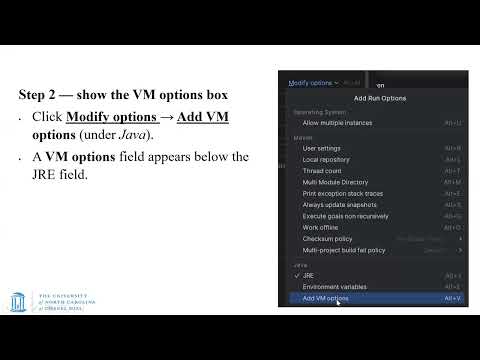
- In Run/Debug Configurations, use Modify Options and Add VM Options to enter the module-path configuration.
- Replace the example username in the supplied path and verify that the referenced directory exists, typically under the user's .m2 directory.
- Adding the JavaFX module path to IntelliJ's run configuration lets the application run and supports breakpoints and variable inspection.
- The module-path option can be added to the IntelliJ application template so it is available for future configurations.
- An alternative launcher class can call Application.launch with the target application class, but this workaround did not reliably support debugging in the demonstrated setup.
- A Scene's first constructor argument is the root node of a scene graph, usually a Pane that contains the rest of the interface.
- The scene graph is a tree: a root Pane can have child Panes and controls, which can themselves contain further children.
- The Stage and Scene provide the outer window and content container, while the root node organizes the visible UI.
- JavaFX controls such as Label inherit through classes including Labeled, Control, Region, and Parent before reaching Node.
- Node is the common base class for components in a scene, analogous to Object as the root class for Java objects.
- Parent represents a node that can contain children, which is why layout panes commonly act as scene-graph parents.
- A TextField accepts user input, unlike a Label, which displays text that users do not directly edit.
- The example's VBox contains a TextField and an HBox; that HBox contains an Okay button and a waiting Label.
- Reading the component declarations from the Scene construction upward reveals the UI's nested layout and resulting scene-graph tree.
- The printTree method accepts a Node and indentation level, prints the node's class name, and recursively visits children of Parent nodes.
- The recursion uses the call stack for a depth-first traversal; indentation indicates each node's depth in the tree.
- The example also builds class inheritance chains, showing controls such as Button and VBox leading back to Node.
- The first Scene uses a VBox with a Label and a button, while the second uses an HBox with its own Label and return button.
- The demonstration switches the contents of one Stage between the two Scenes rather than opening a different Scene within the same window.
- Scene switching is implemented by setting the Stage's current Scene in response to a button action.
- Each button uses setOnAction with a lambda expression that calls stage.setScene(sceneTwo) or stage.setScene(sceneOne).
- IntelliJ's Allow Multiple Instances run option permits several application windows to remain open, so their scene states can be compared.
- The debugger exposes JavaFX objects such as Label, Button, and VBox, each with many properties; useful values include Label text and Button text.
- VBox, HBox, and StackPane are introduced as layouts already seen, while BorderPane and GridPane provide additional placement options.
- BorderPane offers top, bottom, left, right, and center regions; unused border regions disappear and the center expands into the available space.
- GridPane places components by column and row coordinates, while AnchorPane can keep components attached to specific scene locations.
- The sample BorderPane assigns an HBox toolbar to the top, a VBox of Home, Profile, and Help labels to the left, and a Ready status Label to the bottom.
- Its center contains a GridPane for Name and Email labels and their TextFields, with horizontal and vertical gaps for spacing.
- GridPane.add uses column index first and row index second: Name is at (0,0), its TextField at (1,0), Email at (0,1), and its TextField at (1,1).
- Java code defines JavaFX content, layout, and behavior, while CSS controls visual properties such as font size, text color, and background color.
- JavaFX CSS property names use the -fx- prefix, distinguishing them from similarly named web CSS properties.
- Centralizing styles makes presentation easier to maintain and lets multiple controls share a consistent appearance without changing their content.
- A control's setStyle method applies inline CSS, with properties written as a name, colon, and value.
- The examples use -fx-text-fill for font color, demonstrate named colors, and show that a later assignment to the same property overrides an earlier one.
- A hexadecimal RGB value such as #00FF00 represents green; semicolons separate multiple declarations such as text color, 24-point font size, and background color.
- A Scene can load a CSS file from the application's resources, allowing its rules to style controls throughout that Scene.
- A class selector such as .label defines a shared style for Label instances, avoiding repeated setStyle calls on every label.
- The resource-based stylesheet association is recommended over the shorter alternative because it resolves the package location dynamically instead of hard-coding it.
Transcript excerpt
0:00 I hope you're aware that assignment number seven was issued last night. Um, it's going to be due the late due date is a couple of days after the second midterm, which as you hopefully know uh is coming up a week from Thursday. Um, so as usual I should be giving out some sample questions regarding midterm two. We should be having a review session as well by we do hopefully sometime. I don't think it's been scheduled as yet. Um, what else? Uh, so as usual it will cover all the material from lecture one up till uh this Thursday. Tuesday's lecture will not be covered.
0:46 Um, and however I do focus normally on stuff which is covered which has been covered after the first midterm. All right? Um, any questions regarding the midterm? If not, let's proceed. Um, so in the last lecture we had our initial discussion on JavaFX. Today we're going to be spending more time on JavaFX and presumably hopefully mostly completing everything regarding JavaFX. We might have a bit of stuff left over for the next lecture and then we might start um a new topic on model view controllers on Thursday and we'll see how much of that is covered as far as the midterm is
1:33 concerned. Right, so in the last lecture we went over JavaFX and we had a fair number of examples. We'll be looking at a whole bunch of other examples today starting with taking a look at how we can actually run JavaFX slightly in a slightly more organized manner. Manner, um so in the previous scenario we were using a plugin to run JavaFX. so out a way to avoid that and also that also allows us to be able to debug and take a look at the
This is the start of the transcript. Save this video free for the whole transcript, searchable and time-coded.
In this course
Related notes
Summary, takeaways, and chapters were generated by AI from the video's transcript and may contain errors. The video belongs to its creator, Muhammad Sayeed Ghani.