CIS 1051- Lecture 2
Overview
Professor Rosen introduces the CIS 1051 course workflow in Canvas and Runestone Academy, then uses an interactive Python image-processing project to preview programming concepts. Students explore RGB pixels, loops, functions, arguments, and composing image effects while learning to use Runestone's code runner, timeline, and participation grading.
Key takeaways
- Students should register for Runestone Academy under their Canvas name, or use a Temple email address, so Professor Rosen's CSV-merging script can match grades across platforms.
- Runestone's code timeline provides a recovery mechanism for accidental edits, and its share-code feature can distribute working examples directly into students' workspaces.
- Python indentation defines code blocks, while `#` comments are ignored by the interpreter; both conventions are introduced through the image-processing example.
- The grayscale demonstration visits image pixels with nested row-and-column loops, averages RGB values from 0 to 255, and thresholds brightness at half of 255.
- Image functions 5 and 6 require numeric arguments, and large scale factors can create oversized images that time out; testing with small values is safer.
- Applying image transformations through named intermediate steps preserves effect order and makes programs easier to read and debug than dense nested calls.
Chapters
- Canvas's home page contains the syllabus, lecture recordings, Zoom information, and Professor Rosen's email.
- Students are responsible for watching OBS-recorded lectures when absent; recordings can also support note-taking.
- The course generally covers one module per week, with Module 2 and Lab 2 scheduled for the following week.
- Most exams are planned for paper, while some visible quiz and exam entries are legacy Canvas material.
- Students create a free Runestone Academy account and enroll in the course named "Fall 2026 Rosen."
- Use the name listed in Canvas, or at minimum a Temple email address, so Professor Rosen's Python script can match Runestone and Canvas gradebooks.
- Professor Rosen exports both gradebooks as CSV files and merges them with a Python script; mismatched accounts require manual grade entry.
- Runestone may offer an optional donation during enrollment, but the textbook remains free.
- Runestone's textbook combines reading, questions, runnable Python code, and graphics in one browser-based environment.
- The code timeline lets students restore earlier versions, while the share-code button can add Professor Rosen's examples to a student's workspace.
- Students are encouraged to read Chapters 1 and 2, covering variables, variable names, operations, division, and modulo.
- The project list at the bottom of the book organizes the in-class work; listed due dates are soft targets rather than strict cutoffs.
- The opening project demonstrates a program that converts a color image, including the Luther Bell example, into black and white.
- Professor Rosen uses the project to show that students can begin interpreting code before understanding every Python feature.
- The textbook warns that programming requires progression from fundamentals to harder work, much like learning to walk before running.
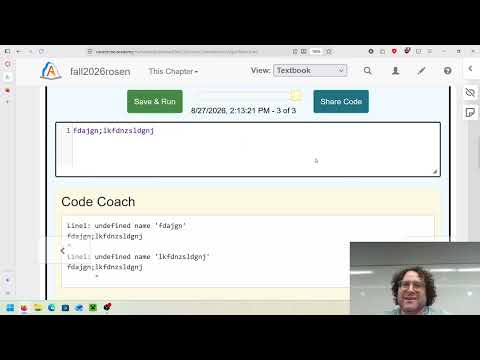
- Python reports what the code says, not what the programmer intended, so syntax mistakes and trial-and-error debugging are expected.
- The statement `import image` loads image tools only when needed, rather than loading every available Python module into every program.
- A `def` statement defines a function, which Professor Rosen describes as a new verb or command; `process_11` is the example function.
- Python uses indentation to mark code inside a function, unlike languages such as Java that use curly braces for code blocks.
- A `#` comment is for human readers and is ignored by Python, making comments useful for explanations or temporarily disabling code.
- The image program uses nested `for` loops over rows and columns to visit each pixel in an image.
- A pixel is a picture element, and a screen image is composed of a grid of these small elements; a 1920 by 1080 display has over two million pixels.
- Each pixel's color is represented by red, green, and blue light intensities, commonly stored as values from 0 to 255.
- In additive screen color, all three channels off produces black, while all three at full intensity produces white.
- The example reads each pixel's red, green, and blue values and averages them to estimate its brightness.
- It compares that average with half of 255: brighter pixels become white, and darker pixels become black.
- The program assigns the same new color-channel values to each pixel, then displays the transformed image.
- Runestone's save-and-run controls let students execute examples and receive credit for interacting with the exercise.
- The exercise supplies 10 image-processing functions and two images, including a yawning squirrel and the Luther Bell.
- Students change the function call, run the code, and match each result to an effect using a randomized drag-and-drop activity.
- Functions 5 and 6 require extra numeric arguments: function 5 takes one number, while function 6 takes two scaling values.
- Large scaling factors such as 6 and 10 can time out because the program allocates a much larger output image; the timeline can restore earlier code.
- The class identifies function 3 as grayscale, function 4 as a 90-degree rotation, and function 7 as high-contrast black and white.
- Function 5 rotates by a specified number of 90-degree turns, while function 6 scales an image along its X and Y dimensions.
- Function 8 lightens an image and function 9 darkens the whole image; function 1 darkens the corners, creating a vignette effect.
- Function 10 restricts the image to black, white, red, green, and blue, producing the unusual limited-color squirrel.
- Image effects can be nested, or applied step by step by storing each intermediate image and passing it into the next function.
- The step-by-step pattern preserves the previous effect, for example darkening an image before rotating that darkened result.
- Descriptive names such as `vignette` or `rotate` make code easier to understand later than generic names such as `process_1` and `step_1`.
- In-class exercises are generally graded for participation, and Runestone records progress automatically when students complete the interactions and poll questions.
Transcript excerpt
0:00 recording. And first we're going to we're basically two parts this is uh Uh today's lecture is going to be three parts. The first is in is just kind of overview of our Canvas website very quickly. The second is an overview of RuneStone. Um if there's some error I might I might have seen some errors that have been occurring and I don't know if it's just my computer or somebody else's, so I'm going to double-check with Rune's and if there are I'm going to double-check and see that over the weekend, but suffice to say um it should be we'll we'll figure it out and then we'll get together and sorry and then I'll show you my um sorry my exercise for the day where we're going to kind of demystify a bit of the programming you're going to be learning.
0:48 So um the on the home page of our Canvas site has most of the really important information. You can find a copy to the syllabus from yesterday here. Um the lecture recordings can be accessed either by going to here or under the other important links over here. Um I record all these lectures using OBS um which is uh stream open-source streaming software very popular one. If uh you miss your a lecture for some reason, it's your responsibility to make sure you watch uh the recorded lecture. Um it also is very useful for just like note-taking uh reasons. Um but what I found is that I have to go through the um the previous semesters
1:36 because apparently Canvas or YouTube, I'm not sure which one uh to blame for this, but probably YouTube on this one, changed the way the embeds are working. So uh I have so my videos went from showing the entire
This is the start of the transcript. Save this video free for the whole transcript, searchable and time-coded.
In this course
Related notes
Summary, takeaways, and chapters were generated by AI from the video's transcript and may contain errors. The video belongs to its creator, Professor Rosen.