Lecture 23: Regex 2
Overview
The lecture explains Python regular-expression syntax and practical use, including raw strings, greedy non-overlapping matches, character classes, quantifiers, alternation, and `re.findall` and `re.sub`. A file-redaction exercise builds a pattern for InsureCare IDs, which contain 2 to 3 uppercase letters and a dash followed by 12 digits, either contiguous or in three four-digit groups separated by dashes; the lecture also covers reading and writing files and introduces a regex extra-credit assignment.
Key takeaways
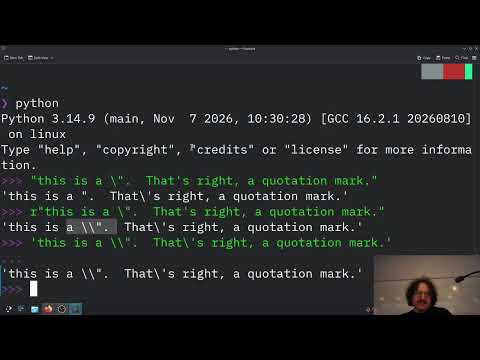
- Python raw strings, written with an `r` prefix, avoid conflicts between backslashes in regex syntax and backslashes used to escape characters in ordinary Python string literals.
- `re.findall` returns non-overlapping matches, and greedy quantifiers such as `+` consume the longest available run that fits the pattern.
- A precise ID pattern uses `[A-Z]{2,3}-` followed by either 12 digits or three four-digit groups separated by dashes, joined with alternation.
- Alternation is necessary when punctuation must appear consistently across a whole format; making individual dashes optional can incorrectly accept mixed dashed and undashed layouts.
- `re.sub(pattern, "redacted", text)` can redact sensitive strings in a file while preserving similar-looking numbers that fail the full pattern.
- Substring-based content filters can produce false positives, as illustrated by the Scunthorpe problem; accurate filtering must distinguish whole intended patterns from harmless text.
Chapters
- Java and Go provide regular-expression libraries, and Java string methods such as `matches` and `replaceAll` accept regex patterns.
- Python's `re` module follows syntax influenced by Perl, with support for Unicode strings and byte strings.
- Regex features are integrated into common programming tasks, including searching, matching, splitting, and replacement.
- A regex backslash can conflict with Python's string-literal escaping, sometimes requiring multiple backslashes to express one literal backslash.
- Prefixing a Python string with `r`, as in `r"\d+"`, preserves the backslashes for the regex engine.
- Raw strings are the recommended way to write regex patterns in Python.
- `re.findall(pattern, text)` returns a list of all non-overlapping matches.
- Quantifiers such as `+` are greedy by default, so a run of four `a` characters is matched as one group rather than four separate matches.
- After finding a match, the search continues from its end, so overlapping matches are not returned.
- `re.sub(pattern, replacement, text)` uses a similar search process but replaces each match instead of returning it.
- The example in *Automate the Boring Stuff with Python*, chapter 9, checks phone numbers written as three digits, a dash, three digits, a dash, and four digits.
- A non-regex solution must check string length, inspect individual characters, and repeat checks across each possible 12-character segment.
- A regex expresses the format more compactly; compiling patterns and using match objects are alternatives when more detailed analysis or repeated matching is needed.
- An old online exam included deliberately distinctive solution patterns to reveal copied answers, such as unnecessary parentheses and a space before a closing parenthesis in Python code.
- The InsureCare exercise uses input and expected-output text files to demonstrate redacting sensitive health-insurance IDs.
- The target is to remove qualifying IDs without redacting unrelated numbers, such as case IDs.
- A valid ID begins with 2 or 3 uppercase letters, followed by a dash.
- The remaining 12 digits may appear together or as three groups of four digits separated by dashes.
- Case IDs that do not follow the complete format must remain unchanged, so a broad pattern such as `.*` would redact far too much.
- Without regex, checking letter counts, digit positions, and alternative layouts would require tedious conditional code.
- The pipe character `|` means alternation, allowing a pattern to match one complete format or another.
- Alternation keeps the dashed and undashed digit formats distinct, preventing partial combinations such as a dash in only one of the required positions.
- The character class `[A-Z]` matches uppercase letters, while `\d` matches digits.
- Regexr.com provides a browser-based way to test patterns against examples before putting them into Python.
- The letter prefix uses `[A-Z]{2,3}` to enforce exactly two or three uppercase characters, rather than an unrestricted `+` or `*`.
- The dashed format uses three groups of four digits with literal dashes between them; the undashed format uses `\d{12}`.
- The complete pattern combines the two digit layouts with `|`, while keeping the required prefix and separator consistent.
- Both a duplicated full-prefix pattern and a parenthesized alternative for the number portion can express the formats; a longer working regex is still correct.
- The Python script imports `re`, stores the pattern as a raw string, and opens `insurecareinput.txt`.
- Calling `data.read()` loads the text, and `re.findall(pattern, text)` returns the three matching IDs in the sample input.
- Printing the results first verifies that the pattern finds the intended strings before any redaction occurs.
- `re.sub(pattern, "redacted", text)` replaces every matching ID while leaving nonmatching case numbers intact.
- Opening `redacto.txt` with write mode `"w"` and calling `writer.write(new_text)` saves the transformed text.
- Closing the writer flushes the output; the lecture checks the file from an integrated terminal using commands such as `ls` and `cd`.
- The terminal overview distinguishes Unix-style `ls` from Windows `dir` and briefly explains file permissions for the owner, group, and others.
- The optional regex assignment uses `words.txt`, a spell-checking dictionary containing about 45,000 lines.
- Questions include counting words with `cat` or `dog`, four-letter words, endings such as `ing` and `ion`, and `q` not followed by `u`.
- Later regex tasks ask for words with no vowels, only vowels, or two consecutive vowels, plus a pattern for strong passwords.
- The assignment discusses the Scunthorpe problem, where substring-based filters can block harmless names or text.
Transcript excerpt
0:03 All right. So, Sorry, don't mean to cut you off, but I need to get started with the lecture. So, we are going to continue with our discussion of regular expressions, right? To remind you, we have this we we we stopped off by talking about the fact that we have these regular expressions and we have these libraries in every different language. For instance, regex in Java, right? Here's school for Here it is for Java 8, right? Regex in Let's go with something fun, Go in Go Lang, right? Which is Google's programming language Go or one of their programming languages that that they did, right? Package regex implements regular expression search,
0:51 right? With Python Sorry, with Java, right? They have this entire thing on how to use these patterns, which is part of the regex field. But also, and I know we aren't learning Java right now, but let's just go ahead and like talk about just I want to show this. Java String, okay? This is just I want to emphasize why this is potentially important, right? If we go into the String class in Java, right? I can control F this page, find and look for takes in String regex. Tests whether this string matches the given regular expression. So, you can use So, strings the String library uses you know, it has a use for regex even if you don't import it, right? That's
1:39 So, that kind of gives an indication of just how baked in these things are. Um similarly, you've got our match it So, we've got our matches, we've got replace first, replace all, which is one I use plenty in String operations, which says, hey, given a regex, a pattern, let's replace all the of that. Now let's take a look in at the Python language,
This is the start of the transcript. Save this video free for the whole transcript, searchable and time-coded.
In this course
Related notes
Summary, takeaways, and chapters were generated by AI from the video's transcript and may contain errors. The video belongs to its creator, Professor Rosen.