Lecture 3: Variables
 Watch on YouTube →
Overview
The lecture introduces Python’s core value types and operators, explaining how integers, floats, booleans, and strings behave in calculations and assignments. It then applies variables and objects in a Turtle graphics exercise, using commands for movement, turning, pen control, and color to create simple drawings.
Key takeaways
- Python’s / operator always returns a float, while // returns the whole-number quotient and % returns the remainder.
- Python assignment evaluates the right side first and then replaces the variable’s current value, which makes x = x + 1 a valid increment operation.
- Strings support concatenation with other strings and replication with integers, but adding a string directly to a number is invalid.
- Python variables can be reassigned across data types, and consistent naming conventions such as snake_case make programs easier to read.
- Turtle graphics gives learners a direct way to connect code to output: movement and turning control position, while penup() and pendown() control whether movement draws.
Chapters
- Because of the university calendar, Lab 3 begins at the start of week four, and students should think of course weeks as starting Tuesday.
- The lecture recommends completing assigned textbook readings, which cover about half of Lab 2.
- A Thursday exercise will practice converting years to seconds and seconds to years.
- The lecture introduces Python programming through data types, arithmetic, variables, and a first graphics exercise using Turtle.
- Python’s four basic data types are integers, floats, booleans, and strings.
- Unlike languages that distinguish among short, standard, and long integers, Python handles very large integers without requiring students to manage fixed integer sizes.
- An int represents a whole number without a decimal point, including zero and negative values.
- A float represents a number with a decimal point, such as 0.5 or 5.0.
- Python floats use finite binary representations, so some decimal values, such as one third, cannot be represented exactly.
- Integer operations generally produce integers, float operations produce floats, and mixing ints with floats produces a float.
- Python uses + and - for ordinary addition and subtraction, including subtracting negative numbers.
- The * symbol performs multiplication, as in 7 * 2, which evaluates to 14.
- Multiplication must be written explicitly: 7(2) is interpreted as trying to call 7 like a function, causing a TypeError.
- The / operator returns a float even when the division has no remainder, so 10 / 5 evaluates to 2.0.
- Unlike many languages, Python’s regular division preserves fractional results, so 5 / 2 evaluates to 2.5.
- The approximation in results such as 10 / 3 comes from representing decimal fractions in finite binary floating-point storage.
- The int() function can convert a suitable result such as 2.0 into the integer 2.
- The // operator returns the quotient without its fractional part, as in 10 // 3, which gives 3.
- Floor division by 10 can discard a number’s final digit, making it useful for processing digits individually.
- The % modulo operator returns the remainder: 10 % 3 gives 1 and 65 % 3 gives 2.
- Modulo 10 extracts the ones digit, while modulo 2 can distinguish even numbers, which leave remainder 0, from odd numbers, which leave remainder 1.
- Python follows order of operations: 2 + 5 * 3 evaluates to 17, while parentheses can change the grouping.
- Parentheses can make an expression’s intended order explicit even when they are not strictly necessary.
- Python uses ** for exponentiation, so 5 ** 2 means five squared.
- The ^ symbol is not exponentiation in Python; it is a bitwise XOR operator.
- Boolean expressions evaluate to True or False, as with 2 < 5 or 5 * 3 > 100.
- Strings are sequences of characters enclosed in matching single or double quotes.
- Python strings can contain Unicode text, including Japanese characters and emoji, rather than only English letters.
- The ord() function returns a character’s numeric code point, an idea that becomes useful when studying encryption.
- Input received as text can be converted to a number with int() or float(), while str() converts a value into text.
- Adding two strings concatenates them, so the strings "2" and "5" combine into "25" rather than the number 7.
- Python does not allow adding a string to a number without converting one of the values first.
- Multiplying a string by an integer performs replication, as in "apple" * 3, which repeats the text three times.
- The = symbol is an assignment operator, not a mathematical equality: Python evaluates the right-hand expression and stores its result in the variable on the left.
- In x = 5 + 6, Python calculates 11 before assigning that value to x.
- Python variables can be reassigned to values of different types, unlike a statically declared int variable in Java or C.
- The lecture describes Python as dynamically typed and emphasizes that a variable acts as a label for a value.
- After x = 5 and y = x, y receives the current value of x; changing x to 6 later leaves y at 5.
- Assignments copy the value rather than creating a permanent algebraic relationship between variable names.
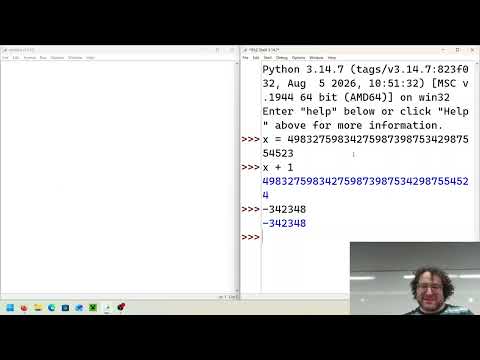
- The statement x = x + 1 is valid because Python reads the old value, adds 1, then assigns the result back to x.
- This reassignment pattern is called incrementing and is a common programming operation.
- Variable names must be one word and cannot begin with a number; descriptive names can be easier to understand than x or y.
- Python permits uppercase letters and, in some cases, Unicode characters in variable names.
- Python convention favors snake_case for multiword variables, while camelCase is another style; consistency within a program matters most.
- Names in all caps, such as PI, commonly signal constants that should not be changed.
- The Turtle graphics system originated in the Logo programming language as a child-friendly way to teach coding.
- A Turtle moves across a drawing surface and can leave a line as if dragging a pen behind it.
- The drawing area uses a two-dimensional Cartesian plane, with the turtle initially at coordinate (0, 0).
- Importing turtle and assigning turtle.Turtle() to a variable such as Bob creates a Turtle object to control.
- Commands such as forward(50) and backward(100) move the turtle by pixels, while left() and right() turn it by a specified number of degrees.
- The penup() and pendown() commands lift or lower the turtle’s drawing pen, allowing movement without leaving a line.
- The shape and color attributes can change the turtle’s appearance and drawing color; color names and hex-code strings are supported.
- The class exercise invites students to experiment with Turtle commands, change colors, and create their own designs.
Transcript excerpt
0:00 All right. So, the question was, what do we do since uh next week's uh we have no we have no lab on Monday, right? Uh and the answer is is that normally this I I I account for that and I do account for that this semester, but normally it's accounted for earlier. Um I unfortunately a bunch of you do have your lecture before you have you know each week before you have the lab and typically the only time that happen us some semesters the only time that happens is the Monday. >> [laughter] >> But we typically deal with that uh or that typically is taken care of by the fact that Labor Day is normally the second Monday uh the second week of class. This times it's the third. Um and the answer is is that um the C is that your lab three will essentially be at
0:47 the beginning of week four. So it basically Mondays will start will um starting next week or starting module 3 Mondays will have the last will be the final lab in the series. So um think of this we basically the easiest way to look at that is think of the week of the week of each week for this class beginning on Tuesday. Okay. um rather than Monday. And the reason for that is that the university calendar, if you look at it, uh we make up this Monday with a ve with a Monday at the very end that's just kind of all by itself. And then you have one or two study days depending on the semester and then you have finals. So, and and again, the exact arrangement depends from semester
1:33 to semester. Past couple semesters, it's only been one study day. So it's
This is the start of the transcript. Save this video free for the whole transcript, searchable and time-coded.
In this course
Related notes
Summary, takeaways, and chapters were generated by AI from the video's transcript and may contain errors. The video belongs to its creator, Professor Rosen.