cs6465 Advanced OS - Lecture 07 - Virtual and Physical Devices (part 2)
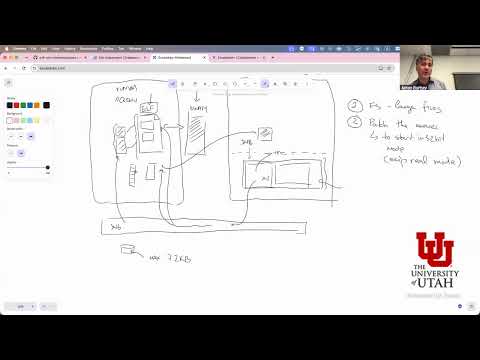 Watch on YouTube →
Overview
Anton Burtsev connects physical-device operation to virtualization, explaining how PCI devices use DMA ring buffers, why polling can outperform interrupts, and how the IOMMU limits device access to memory. He compares Virtio data paths in KVM/QEMU and Xen, including shared memory, vhost, and isolation tradeoffs, then applies the concepts to planning an xv6 guest that needs kernel loading, I/O emulation, and interrupt handling.
Key takeaways
- PCI network devices use DMA ring buffers to exchange packet descriptors and payloads with memory; the driver notifies the device through BAR registers and avoids copying each packet in the device-to-memory path.
- Polling can outperform interrupts at high packet rates because interrupt handling may cost thousands of cycles, while tight-loop packet processing can approach roughly 100 cycles per packet; DPDK and SPDK build on this approach.
- An IOMMU is essential for limiting DMA to operating-system-approved pages, but page-level mappings can still expose unrelated kernel data if sensitive allocations share a page with a DMA buffer.
- Virtio reduces device-emulation overhead with shared descriptor and completion rings, while KVM’s vhost kernel backend avoids the additional QEMU userspace transition.
- Xen’s grant table enables temporary, selective page sharing between isolated domains; shared privileged backends can otherwise turn a device-emulation flaw into a broader guest compromise.
- Booting xv6 as a guest requires more than loading its kernel: the project must address image-size limits, 32-bit startup assumptions, port-I/O emulation, UART output, and timer and device interrupt delivery.
Chapters
- Anton Burtsev welcomes the class back from fall break and checks in before returning to virtual and physical devices.
- The lecture later connects device virtualization to the current homework and a proposed xv6 guest project.
- Office hours are scheduled Friday from 3:30 to 4:45 and another day from noon to 1:00, with 15-minute appointments booked through a link.
- Students should use the course discussion page instead of Piazza and start homework early; submission instructions are expected by the following day.
- For the optional hardware experiment, Burtsev recommends debugging in small steps with single-stepping through tools such as GDB and QEMU.
- A PCI device exposes registers through a Base Address Register, or BAR, so CPU writes can become transactions on the PCI bus.
- Network drivers place packet descriptors in memory rings, then notify the device through a BAR register.
- The device uses DMA to read descriptors and packet payloads without requiring the CPU to copy each packet.
- High-speed network cards can provide multiple rings, often assigning one ring to each CPU core to scale throughput.
- A tight forwarding loop can saturate a 100 Gbps device with roughly two to three cores, while additional packet processing raises the CPU cost.
- Drivers track ring head and tail pointers to detect work and completions, reducing the need for frequent device interrupts.
- Interrupt handling can cost thousands of CPU cycles, compared with roughly 100 cycles per packet in a highly optimized processing loop.
- DPDK uses polling for fast network data-plane workloads, while SPDK applies a similar polling approach to storage devices.
- Polling is especially useful when application work per packet is small; interrupts can be reasonable when each batch requires substantially more processing.
- Unrestricted DMA can let a compromised or malicious device read or overwrite system memory, as in an evil maid attack using a device connected to a laptop.
- An IOMMU translates device virtual addresses to physical addresses and restricts DMA to pages the operating system has mapped for the device.
- Operating systems map and unmap DMA pages or reuse a pool, but incorrect page sharing can expose sensitive data in adjacent kernel allocations.
- Virtio replaces repeated emulated BAR accesses with shared descriptor, available, and completion rings designed to reduce VM exits.
- A descriptor identifies a packet buffer by address and length; chained descriptors support scatter-gather layouts such as separate headers and payloads.
- A guest advertises ready descriptors through the available ring, which the device backend can inspect and complete.
- In the described Linux KVM setup, QEMU allocates guest RAM and maps it into its own process, allowing a user-space Virtio backend to follow guest ring pointers.
- When a guest packet is submitted, QEMU can read its descriptor and payload, then pass the packet into the host Linux networking stack.
- The host network stack represents packets with an SKB and commonly copies guest packet data into that structure before sending it onward.
- The vhost path handles Virtio networking in the host kernel, avoiding an exit from KVM to QEMU and a subsequent trip back into the kernel.
- KVM associates a guest doorbell exit with a handler that wakes a host kernel worker thread to process the Virtio rings.
- QEMU supplies a mapping of guest physical memory so the vhost worker can reach packet buffers; the host networking path can still copy data into an SKB.
- KVM is integrated with the existing Linux host kernel, while Xen is a type-one hypervisor with a small privileged hypervisor layer.
- Xen commonly runs a privileged domain 0 for device backends and management, while guest VMs run as peers with separate memory.
- Xen’s grant table allows a guest to temporarily grant another domain access to selected pages, rather than sharing all guest memory by default.
- Virtualization can be attacked through hypercalls or bugs in device emulation such as QEMU or a Virtio backend.
- A compromised shared backend can threaten multiple guests, which motivates running separate QEMU instances or even isolated VMs for individual device backends.
- Xen’s grant-and-revoke model supports narrower memory sharing, while a KVM backend’s privileges depend heavily on host-kernel isolation.
- The guest writes a descriptor and available-ring entry, then uses a doorbell to trigger a KVM exit.
- KVM identifies the registered handler and wakes a vhost worker, which reads guest memory through the mapping provided by QEMU.
- The worker builds a host-side packet representation and passes it to the physical network device driver.
- The class shifts from device virtualization theory to designing a second homework that boots xv6 as a guest instead of running only a Hello World image.
- The guest launcher must obtain a kernel image from the host file system and provide it to the VM through the existing system-call interface.
- The plan must account for kernel boot assumptions, device I/O, and interrupts rather than treating the guest as a simple standalone binary.
- One option is to parse an ELF file, load its sections into guest memory, and pass the assembled image to the VM.
- A simpler assignment option is to compile xv6 into a ready-to-run binary blob at a fixed address, such as 1 MB.
- The xv6 file system’s small maximum file size, described as roughly 32 KB, must be increased because the kernel image is larger.
- The homework VM is expected to start in 32-bit mode, so xv6’s early boot path may need changes to skip its normal real-mode startup.
- The guest will execute x86 IN and OUT instructions for devices such as the IDE controller and UART; those instructions can cause VM exits that the launcher must emulate.
- UART output can be handled by routing guest serial writes through an emulator handler to the host terminal, while interrupt-controller setup may require additional support.
- The xv6 guest will need timer interrupts as well as interrupts from devices such as the IDE controller and keyboard.
- Restricting the first implementation to one guest CPU avoids inter-processor interrupts and simplifies interrupt injection.
- Students are asked to submit a design plan before the next class, when the interrupt and device-emulation plan will be discussed further.
Transcript excerpt
0:30 cheering as usual. You better. Hey, we are here. So, how are you guys?
1:22 Welcome back after this the fall break. I hope everyone had fun. And uh was uh you had a time to catch up a little bit. I'm using whole marks and everything. So, a couple of things which I wanted to to start with. So, I actually added my office hours which are now um So, let's just quickly take a look at this. So, I updated the syllabus to say like look uh my office hours like I tried to pick two two two two two times each week. and I think 3:30 to 4:45 on Friday and noon to 1:00. Uh and I I mean some people like like I I don't know if everyone answered the poll, but those times were at least like
2:10 allowing like at least I don't think there was a an intersecting group of people who were not available at a specific time, although I cannot guarantee anything. But the way it works is that you actually have to click this link and book an appointment with me. So, it allows you to book a 15-minute slot. If no one is around, I will stay with you for as long as as needed, but this way at least I know whether I need to connect or not. Make sense? So, it's available from uh from I think the link is uh unrestricted, so maybe don't share it. Uh otherwise, we'll be some kind of a Zoom bombing attack. Uh that's number one. And second, I I said that I will set up a Piazza, but it seems that for such a small class, let's just use this discussion page. So, I set it up that you can start
2:58 discussions and you can start uh
This is the start of the transcript. Save this video free for the whole transcript, searchable and time-coded.
In this course
Related notes
Summary, takeaways, and chapters were generated by AI from the video's transcript and may contain errors. The video belongs to its creator, Anton Burtsev.