10.2 - File I/O (2026-11-02)
Overview
Chris Bourke introduces C binary file I/O with fwrite and fread, then applies line-based text processing to a Goodreads-derived CSV of books. The exercise uses fgets, strtok, atoi, atof, and deep copies to find the highest-rated book, Thud by Terry Pratchett, and concludes by previewing structures as a way to group each book’s fields.
Key takeaways
- For binary arrays in C, fwrite(buffer, sizeof(element), count, stream) and fread with the matching arguments preserve raw values; 10 four-byte integers occupy 40 bytes.
- fgets returns NULL at end-of-file and retains a line’s newline, so remove the trailing newline before checking whether a line is empty.
- strtok’s first call receives the input buffer and its later calls receive NULL; because token pointers refer into the buffer, copy fields that must survive the next read.
- A reusable deep-copy helper can allocate strlen(source) + 1 bytes and use strcpy, preserving a token independently of the line buffer.
- To find a maximum in a 1-to-5 rating dataset, initialize the best rating to 0 and update the rating and associated record fields whenever a larger value appears.
- A C struct can group a book’s ID, title, author, rating, and other fields into one record, avoiding separate updates for every field when a new best book is found.
Chapters
- Chris Bourke contrasts everyday plain-text file I/O with binary files such as images and video, which are often handled with libraries.
- Binary I/O uses fwrite and fread rather than text functions such as fprintf, fgets, and fgetc.
- fwrite takes a buffer, the byte size of each element, an element count, and a FILE pointer; sizeof(int) supplies the element size for integers.
- Writing 10 integers at 4 bytes each produces a 40-byte numbers.bin file, compared with a longer text representation.
- fread uses the same size-and-count pattern to restore the integers, and the file is opened, processed, then closed.
- A hex dump reveals the stored bytes, including values represented in hexadecimal.
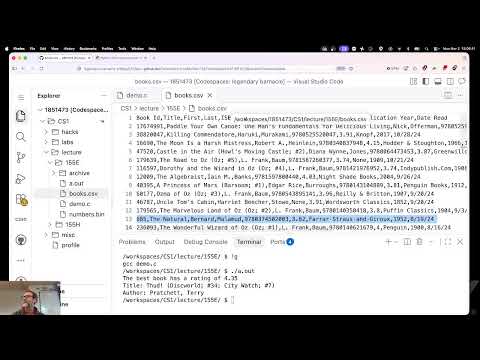
- The books.csv records contain a book ID, title, author names, ISBN, average rating, publisher, publication year, and read date.
- The first row is a header, and blank lines must be excluded from record processing.
- fgets reads each line into a 1,000-character buffer and returns NULL when no more input is available.
- A fixed 1,000-byte buffer is adequate for this dataset but can truncate longer lines in a general-purpose program.
- The program reads the header once before entering the loop, so the first row processed is the book Paddle Your Own Canoe.
- fgets retains the newline character, so the code replaces a trailing '\n' with '\0' before printing or measuring the line.
- After removing the newline, strlen(buffer) greater than zero distinguishes records from blank lines.
- strtok splits each CSV line at commas; its first call receives the buffer, and subsequent calls receive NULL to continue through the same string.
- atoi converts the book ID token to an integer, while later fields such as the title and author names are retrieved as tokens.
- A token pointer is only a shallow reference into the reusable line buffer, so its contents can be overwritten when the next line is read.
- A helper function allocates strlen(string) + 1 bytes with malloc and copies the token with strcpy to preserve it as a deep copy.
- The average-rating field is converted from its CSV token with atof and compared against best_rating.
- Initializing best_rating to 0 works for this dataset because its ratings use a 1-to-5 scale.
- The maximum rating is 4.35; looking up that value identifies Thud by Terry Pratchett.
- The program updates and retains the best title and author names whenever it finds a higher rating.
- Tracking each winning field separately becomes tedious as questions expand to ISBN, publisher, publication year, and read date.
- Chris Bourke previews typedef struct as a way to combine related fields such as book ID, title, and author into one book record.
- The CSV exercise is left incomplete for now: publisher, original publication year, and read date have not yet been parsed.
- Accessing and updating structure fields is deferred to the next lesson.
Transcript excerpt
0:02 [music] [music] [music] [music] [music] [music] [music] [music]
0:59 [music] [music] >> All right, so we're going to take a real quick look at binary files. Uh you'll get more practice in your lab tomorrow. Uh but for the most part again, you're going with file IO, you're going to be dealing with uh plain text files uh because if you're going to be dealing with binary files like say image files or a video files or something like that, you generally bring in a library to do it because it's way more complicated, all right? Uh but you can read and write binary. You won't use Fprintf or uh you know, the Fgets or Fgetc. Instead, you use Fwrite to write binary. And there are four
1:48 there are actually four arguments to this function. Uh the first one is buffer. That's the thing that you are actually going to write. The the thing or array or uh element uh that you are writing to a file, right? Uh and then uh the other two are very much like uh like um malloc, uh where you know, you have to specify how many bytes is each thing, and then how many things are there. Like if I was only writing one thing, then the count would be one. But if I were writing an entire array, then the count would be however big the array is. And then the size here, that's the number of bytes that each one takes because it needs to know how many bytes am I actually going to write here. Uh so size is the is the number of bytes each element each
2:37 element takes. So in other words, I use size of, right? Use size of to determine the number of bytes in each one.
This is the start of the transcript. Save this video free for the whole transcript, searchable and time-coded.
In this course
Related notes
Summary, takeaways, and chapters were generated by AI from the video's transcript and may contain errors. The video belongs to its creator, Chris Bourke.