MIME 4450 Lec 13 10 13 26
 Watch on YouTube →
Overview
The MIME 4450 lecture reviews PLC quiz logic, then introduces practical FANUC robot programming through teach-pendant procedures, motion and position data, I/O, subroutines, and coordinate frames. Its central programming principle is to build robots that track their state, handle faults, and recover safely to a known position rather than relying on operators to jog them home.
Key takeaways
- PLC sequences need explicit initialization: a scale-based task must save the starting weight or tare the scale before checking for a 100-pound increase.
- For a FANUC robot, a safe recovery path is more important than merely reaching programmed points; blindly commanding HOME can cause a collision from an unsafe pose.
- FANUC motion choices encode path and stopping behavior: J uses joint motion, L follows a straight line, FINE stops at a point, and CONTINUOUS blends through it.
- FANUC position records include X, Y, Z, W, P, and R, but configuration data is also needed because the same tool-center-point coordinates can be reached with different arm postures.
- Groups sharing a FANUC controller should reserve separate ranges within its 200 numeric registers and document their programs to prevent conflicts.
- Robot-to-PLC control can use UOP handshaking and mapped I/O; the planned Siemens-side network for the course is PROFINET.
Chapters
0:00
Course Plan: Weekly Questions Instead of Frequent Tests
- At week seven, the instructor plans to replace the usual test-every-three-weeks schedule with weekly question sets for the next three weeks.
- The questions are intended to be answerable from course materials, giving students time to rebuild scores; the instructor says 10 five-percent components make up 50% of the grade.
- A set of lab-book questions due over break has answers in the back of the book, making the assignment a relatively accessible 50 points.
4:00
PLC Quiz Review: Logic, Initialization, and Completion Conditions
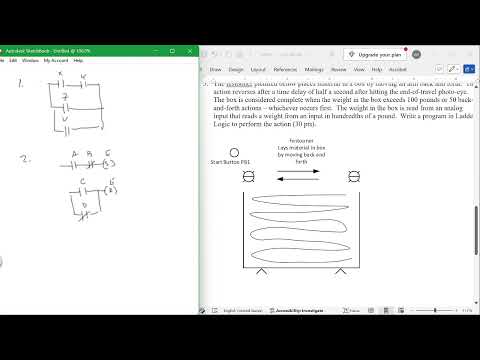
- The quiz's logic example uses X and Y with Z; the instructor accepted a reasonable alternative interpretation of the negated inputs.
- A set/reset example uses the same E coil, with one rung setting E and another resetting it through C or the negation of D.
- For a weight-control sequence, the program must initialize by zeroing the scale or saving the initial weight before adding 100 pounds.
- A conveyor example alternates direction using a counter, responds to a photoeye and timer, and stops when the count reaches at least 100 or weight exceeds the saved starting weight by 100.
16:00
Robot Availability, Cameras, and Lab Equipment
- The instructor asks whether students can load the Siemens software after several troubleshooting iterations.
- Planned camera options include four cameras with the 385 system or 10 with the 782 system, with lower- and higher-end configurations.
- Additional cameras and robots with advanced vision capabilities are still on order; three of four yellow FANUC robots currently work.
20:00
Choosing Practical FANUC Instruction Over Robotics Theory
- FANUC's KAREL language is presented as a high-level programming option, supported by a reference manual of about 912 pages.
- Siemens TIA Portal version 14 documentation is described as roughly 10,000 pages, illustrating the scale of industrial software references.
- The course focuses on teach-pendant programming rather than KAREL or robotics mechanics, emphasizing practical application over theory already covered extensively elsewhere.
26:00
Combining FANUC Training Materials into a Working Guide
- The instructor's assembled “Bobot” resource combines material from multiple robotics books, FANUC slides, and an introductory programming text.
- A FANUC HandlingTool course book is recommended for teach-pendant fundamentals; the PDF version is about 320 pages.
- Material from instructor Michael Egan at Erie Community College is used to cover safety, hardware, jogging, motion instructions, and frames.
30:00
FANUC Robot Axes, Teach-Pendant Safety, and Controller Controls
- The yellow FANUC arm is a six-axis robot: X, Y, and Z are the major axes, while W, P, and R describe the smaller rotational axes.
- The teach pendant's deadman switch must be held in its middle position; fully pressed or released positions prevent operation.
- The controller panel supports program execution, single-stepping, and fault indication, while its emergency stop shuts the system down.
- Students are told not to open the controller cabinet; Ethernet is already connected, so routine operation can be done with the cabinet closed.
34:00
Creating FANUC Programs and Understanding Motion Instructions
- Students will create, edit, and run teach-pendant programs; existing programs are being cataloged as examples.
- FANUC motion instructions include joint (J) movement, which follows an efficient joint path, and linear (L) movement, which follows a straight line.
- Termination choices distinguish stopping at a point with FINE from blending or passing through with CONTINUOUS, affecting whether the robot pauses.
- Fault status appears in the display's status bar and must be cleared before normal operation resumes.
40:00
Designing Safe Motion and Robot Recovery Paths
- A robust robot program must do more than move between points: it should recover safely if a cycle faults or the robot crashes.
- A blind command to move home can damage a tool or part if the arm's current pose makes that path unsafe.
- Programs should track the robot's current state and define a safe extraction path, especially when handling fragile items such as glass.
- Repeated collisions can damage equipment and interrupt production, so recovery planning is a core programming responsibility.
48:00
Teaching FANUC Points and Controlling End-of-Arm Tools
- Points can be taught by jogging the robot to a location and recording it, or by entering coordinates into a position register.
- FANUC uses P for a taught position and PR for a position represented by register values.
- A robot cycle typically moves point-to-point while operating an end-of-arm tool that grips, uses suction, or magnetically holds a part.
- Circular motion is also available by programming a path through intermediate points, although joint and linear moves are the more basic options.
52:00
Position Registers, Tool Coordinates, and Robot Configuration
- Position data includes X, Y, Z, W, P, and R values, but identical tool-center-point coordinates can correspond to different arm postures.
- Configuration data is therefore needed in addition to the six coordinate values to identify the robot's posture.
- Jogging the robot to a target and recording its position is a practical way to obtain starting register data.
- FINE stops at the target, while CONTINUOUS can blend through a point; high-speed motion may swing past rather than stop on it.
58:00
Sharing FANUC Registers and Selecting Robot Platforms
- Each FANUC controller provides 200 numeric registers; groups sharing a robot should agree on separate ranges, such as 50 registers per group.
- The newer Universal Robots 5e is described as easier to integrate with vision and Siemens PLC systems than the older Universal Robots 5.
- Collaborative robots, including Universal Robots and the white FANUC model, can be manually positioned and taught quickly.
- The older FANUC interface is less user-friendly than newer tablet-style pendants, though students can still learn it through practice.
1:02:00
Robot I/O, UOP Signals, and PROFINET PLC Integration
- Robot I/O can control end effectors such as grippers and vacuum tools; both the robot and its controller provide I/O options.
- UOP signals allow a PLC to start and stop a FANUC program through defined handshaking signals.
- The planned PLC communication method is PROFINET; PROFIBUS is identified as the older Siemens network, while Ethernet/IP and DeviceNet are other industrial options.
- Configuration documentation and AI assistants can help with setup, but the control relationship is implemented through mapped I/O.
1:06:00
Organizing Programs with Subroutines and Coordinate Frames
- Subroutines such as GRIP and UNGRIP keep the main program shorter and make each operation easier to read and troubleshoot.
- A user frame shifts the robot's coordinate origin to a work surface or fixture; a tool frame describes the tool's coordinate reference.
- Frames avoid recalculating all six position values for repeated tasks such as adding layers to a stack.
- Students may encounter both user and tool frames on the lab robots and should understand their role even if a project uses simple coordinates.
1:11:00
Mature Robot Programs Recover, Signal Faults, and Return Home
- The example “intelligent robot” program prevents a sequence from starting until the robot confirms it is home.
- Its pick-and-place cycle monitors inputs, alerts the operator to problems, and handles stop requests at a point that allows a safe return.
- A mature program should log or communicate faults and recover to home or another known-safe position without requiring manual jogging.
- Focused routines make the code easier to understand and troubleshoot.
1:13:00
FANUC Vision Examples and Reusable Programming Patterns
- The instructor includes an additional magazine example with frames, routines, and a longer, nontrivial FANUC program.
- FANUC's camera system is another possible vision option, although the instructor is less enthusiastic about it than other camera approaches.
- Different programmers may use different techniques, but safe recovery, clear fault reporting, and focused routines remain common design goals.
1:15:00
Coordinating Shared Robots, Programs, and Register Use
- Groups sharing a FANUC robot should document which registers and programs they use so other users do not overwrite their work.
- The instructor plans to place a notebook and reference book at each robot station to record register allocations and program details.
- A signup process may reserve particular robots and clarify which programs groups intend to run.
Summary, takeaways, and chapters were generated by AI from the video's transcript and may contain errors. The video belongs to its creator, Wm_T Evans.