Lecture 13: Loops
 Watch on YouTube →
Overview
Bash loops use command exit statuses as conditions and include `while`, `until`, for-each, and C-style counting forms. The lecture builds examples including countdowns and a Collatz sequence, then shows how quoting, word splitting, globs, `"$@"`, `shift`, and `read` affect loop inputs. It ends with Bash function syntax and explains that a function's positional parameters are separate from the script's arguments.
Key takeaways
- Bash loop conditions are commands evaluated by exit status: zero is true, so `until false` is an infinite loop and `while false` never enters its body.
- Use C-style `for ((init; condition; update))` for arithmetic counting, such as printing 10 down to 0, rather than generating numbers with `seq`.
- Quote `"$@"` when iterating over command-line arguments to preserve each argument as one item, including filenames or values containing spaces.
- A nonmatching Bash glob such as `*.pdf` normally remains a literal string, which can make a loop run once even when no files match.
- Use `while IFS=, read -r ...` to process comma-separated file records line by line, and use `continue` to skip headers.
- Bash functions receive their own positional parameters and `$#`; calling a function does not overwrite the script's original command-line arguments.
Chapters
0:00
Bash Loop Types and Exit-Status Conditions
- Bash provides for-each loops, C-style counting loops, `while`, and `until`; unlike Java, it does not have a `do-while` loop.
- A Bash condition is the exit status of a command: status 0 means true, while a nonzero status means false.
- `while` repeats while its condition succeeds; `until` repeats while its condition fails, so `until false` runs indefinitely.
- `break` exits a loop, and `continue` skips to the next iteration.
6:23
Countdown Loops and the Collatz Conjecture
- An `until` loop starting at 10 and decrementing until the count is below zero prints 10 through 0.
- A `while` loop can produce the same countdown by continuing while the count is greater than -1.
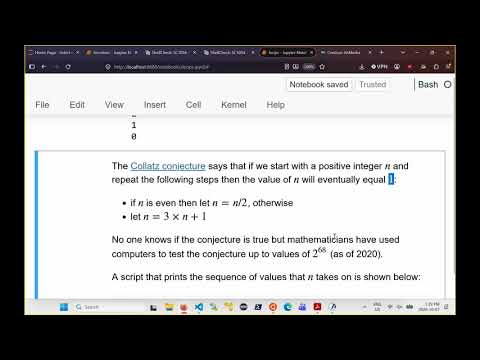
- The Collatz process halves even positive integers and transforms odd integers with `3n + 1`.
- The Collatz conjecture remains unproved, although tested starting values have been observed to reach 1, including values reported up to 2^68 as of 2020.
9:25
Validating Inputs for a Bash Collatz Script
- The Collatz script checks that at least one command-line argument is supplied, sends errors to standard error, and exits with a nonzero status on failure.
- A regular expression anchored with `^` and `$` checks for an optional sign followed by one or more digits; a separate numeric check rejects values below 1.
- The loop continues while the value is not 1, tests evenness with the remainder after division by 2, and otherwise applies `3n + 1`.
- The script prints each value in the sequence; starting at 27 takes roughly 50 iterations to reach 1.
15:51
For-Each Loops, Word Splitting, and Filename Globs
- Bash's `for name in ...` loop assigns each space-separated string in its input list to the loop variable in turn.
- An unquoted variable such as `$str` undergoes word splitting, so a string containing spaces becomes multiple loop items; quoting it keeps it as one item.
- A glob such as `scripts/loops/*.sh` expands to matching filenames, allowing a loop to process each script.
- When a glob matches no files, Bash normally leaves the pattern unchanged, so the loop may run once with a literal value such as `*.pdf`.
22:53
Brace Expansion, Command Substitution, and Counting Loops
- Brace expansion such as `{10..0}` generates a space-separated sequence that a for-each loop can consume.
- Command substitution with `seq` can generate loop input, but a C-style loop is preferable for counting operations.
- The C-style form separates initialization, arithmetic condition, and per-iteration update inside `for (( ... ))`.
- A countdown from 10 through 0 uses initialization at 10, the condition `i >= 0`, and a decrement after each iteration.
27:00
Preserving Script Arguments with `"$@"` and `shift`
- A for-each loop over `"$@"` processes each command-line argument as one item, even when an argument contains spaces.
- Leaving `$@` unquoted allows word splitting, so three original arguments can become nine loop items when two contain spaces.
- `shift` moves positional parameters left by one, discarding the former `$1` and making the former `$2` the new `$1`.
- A `while` loop conditioned on `$#` being greater than zero can process `$1` and then call `shift` until all arguments are consumed.
34:03
Reading and Splitting File Lines with `read`
- A `while read -r line` loop with input redirection reads a file one line at a time; `-r` keeps backslashes as ordinary characters.
- A regular-expression check can skip header lines beginning with `#`, using `continue` to advance to the next line.
- `read` can split each line into multiple variables according to `IFS`, which normally contains spaces, tabs, and newlines.
- Setting `IFS=,` lets a loop parse comma-separated fields such as student number, last name, and first name.
38:23
Declaring and Calling Bash Functions
- A Bash function can be declared with `function name { ... }`; the lecture recommends this form for compatibility across shells.
- The alternative `name() { ... }` form is valid in Bash but may not be portable to every shell.
- Function bodies require spacing and line breaks around braces; malformed spacing can produce syntax errors that ShellCheck helps diagnose.
- A function is invoked like a command, for example `greet`, and arguments can be supplied by writing `greet a b c`.
43:00
Function Arguments and Script Positional Parameters
- Inside a function, `$1`, `$2`, `$3`, and `$#` refer to that function call's arguments and argument count.
- Calling a function with zero through four arguments demonstrates that the function can inspect its own arguments and ignore any it does not use.
- The script's positional parameters remain distinct from the parameters of a called function; a script invoked with one argument still has that original argument afterward.
- The lecture closes by noting that Bash function return behavior and variable scoping require further explanation.
Summary, takeaways, and chapters were generated by AI from the video's transcript and may contain errors. The video belongs to its creator, Burton Ma.