Lecture 11: tr command; Arrays
 Watch on YouTube →
Overview
Burton Ma explains Bash’s `tr` command for character-by-character translation, deletion, and squeezing, then shows how Bash arrays work—including sparse indexes, safe expansion, iteration, concatenation, and input. The practical emphasis is avoiding silent array-reference mistakes and quoting variable expansions, especially filenames with spaces.
Key takeaways
- `tr` performs character-by-character translation, deletion, and squeezing—not substring replacement—and typically receives input through a pipeline.
- For portable `tr` translations, avoid relying on GNU behavior when character sets differ in length; explicitly extend the replacement set with syntax such as `[X*]`.
- Bash arrays can be sparse, so `${#arr[@]}` counts present elements while `${!arr[@]}` returns their actual indexes.
- Use quoted `"${arr[@]}"` to preserve each array element as one argument, especially when elements are filenames or contain spaces.
- Use braces and an explicit index such as `${arr[0]}` for array access; `$arr[0]` silently combines index-zero expansion with literal bracket text.
- Quote variable expansions used in redirections, such as `"$file"`, to prevent spaces in filenames from causing word splitting and ambiguous redirects.
Chapters
0:00
Using Bash `tr` for Character-by-Character Replacement
- `tr` reads from standard input, so Bash scripts commonly feed it through a pipeline.
- In its default mode, `tr 'a' 'A'` replaces each lowercase `a` with uppercase `A`; Ctrl-D ends interactive input.
- The two arguments are character sets, so `tr 'abc' 'ABC'` maps each character individually rather than searching for the substring `abc`.
- Command substitution can capture pipeline output in a variable, as in translating every `p` in a string to `t`.
6:00
Character Ranges, Unequal Sets, and Duplicate Characters in `tr`
- GNU `tr` accepts ranges such as `A-Z`; POSIX character classes are a more portable alternative for uppercase letters.
- Translation pairs characters by position, so lowercase `a-z` can map to uppercase `A-Z` to capitalize a string such as `cis220`.
- When the replacement set is shorter, GNU `tr` repeats its final character; the portable form uses syntax such as `[X*]` to extend the set.
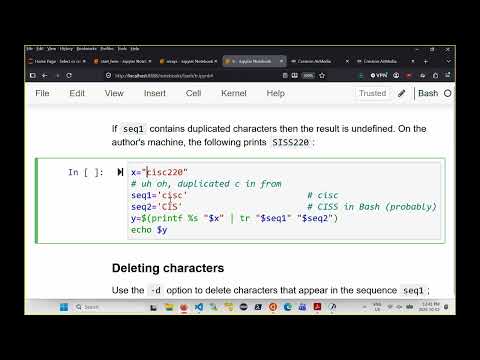
- Duplicate characters in the first set make the mapping ambiguous and can produce undefined behavior; keep that set unique.
10:30
Deleting Characters and Squeezing Repeated Spaces with `tr`
- `tr -d` deletes every input character that appears in its first set; deleting `012-` from a date leaves only the remaining digits.
- `tr -s` squeezes each run of a selected character into one character, making it useful for collapsing repeated spaces.
- Deletion and squeezing can be combined; deletion occurs first, followed by squeezing.
- `tr` is suited to individual-character transformations, not replacing multi-character substrings.
15:00
Creating Bash Arrays and Accessing Sparse Integer Indexes
- Bash indexed arrays hold strings and default to zero-based indexes, but elements do not need to start at zero or occupy consecutive indexes.
- Assign an element with `arr[index]=value`; Bash creates the array and element as needed.
- Retrieve an indexed element with `${arr[index]}`, such as `${arr[0]}`; an unset index expands to an empty string rather than raising an error.
- Writing `$arr` expands only index zero, so an array containing a value only at index 5 appears empty through that shorthand.
20:00
Avoiding Bash Array Dereference Mistakes and Declaring Arrays
- Always use braces and an index—`${arr[5]}`—to retrieve a specific element; `$arr[5]` instead expands index zero and appends the literal text `[5]`.
- Bash may silently produce misleading output for malformed array references rather than issuing an error or warning.
- `declare -a` identifies a variable as an indexed array, while single parentheses create array values; double parentheses indicate arithmetic instead.
- Bash also supports associative arrays, whose keys are strings rather than integer positions.
25:00
Initializing Arrays and Counting Their Elements
- A space-separated assignment such as `y=(10 20 30)` places values at indexes 0, 1, and 2.
- Indexed assignments inside parentheses can create sparse arrays, including elements at indexes 100, 0, and 1.
- Use `${#arr[@]}` to count the elements actually present; sparse indexes do not make the count equal to the largest index.
- `${arr[@]}` and `${arr[*]}` both expand array contents, but quoting them changes how Bash preserves elements.
30:00
Choosing Safe `[@]` and `[*]` Array Expansions
- Unquoted `${arr[@]}` and `${arr[*]}` undergo word splitting, so elements containing spaces can break into multiple words.
- Quoted `"${arr[@]}"` preserves each element as a separate string, making it the usual choice for filenames or other values with spaces.
- Quoted `"${arr[*]}"` produces one string containing all elements joined by spaces rather than a separate argument for each element.
- With an array containing `a dog`, `a cat`, and `a fish`, an unquoted expansion makes a `for` loop iterate over six words instead of three elements.
36:00
Iterating Over the Indexes Actually Used by an Array
- Use `${!arr[@]}` to expand the indexes present in an array, which is essential when indexes are sparse.
- Bash lists the used indexes for arrays such as one containing positions 0, 1, and 100.
- A loop over `${!months[@]}` can use each index to retrieve the corresponding month with `${months[i]}`.
- Iterating over indexes avoids assuming that every position between zero and the array’s length exists.
39:00
Concatenating Bash Arrays and Appending One Element
- Use `array1+=("${array2[@]}")`-style array concatenation to append the elements of one array to another.
- When the target array’s last used index is 100, appended elements follow that index rather than being placed at 0, 1, and 2.
- To append a single value such as `May`, turn it into a one-element array before concatenating it to a months array.
- Bash concatenates arrays; a single string must first be represented as an array element.
42:00
Reading Input into Arrays and Quoting Filenames
- `read -a arr` reads one line from standard input, splits it according to shell word splitting, and stores the resulting words in an array; `read -p` adds a prompt.
- `mapfile -t arr` reads standard input line by line into array elements, with `-t` removing each trailing newline.
- Redirecting a filename stored in a variable requires quoting it, as in `mapfile -t students < "$file"`, to prevent spaces from splitting the filename.
- A filename such as `sum students.ext` can cause an “ambiguous redirect” when its variable expansion is unquoted; test scripts with filenames containing spaces.
Summary, takeaways, and chapters were generated by AI from the video's transcript and may contain errors. The video belongs to its creator, Burton Ma.