Homework 1a - Flex Site Layout (8-28-2026) | CIS311
 Watch on YouTube →
Overview
Kenan Casey walks through organizing the CIS311 homework as one project with separate flex and grid folders, then demonstrates the browser Popover API for a responsive navigation menu using HTML and CSS rather than custom JavaScript. He also explains CSS state styling with :popover-open and :has(), outlines the grid-layout assignment, and shows how GitHub Pages can publish both versions from one repository.
Key takeaways
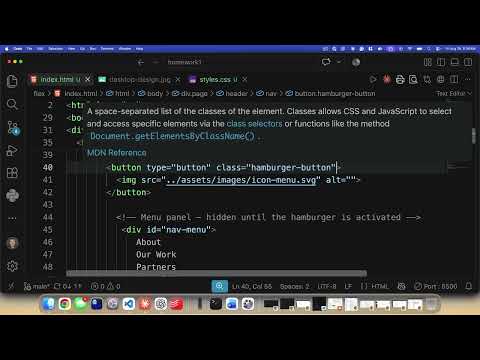
- A browser-native popover needs a button with popovertarget="nav-menu" and a corresponding target with id="nav-menu" and the popover attribute; the default action toggles its visibility.
- Moving a page into a child folder changes relative asset paths: references such as assets/image.png must become ../assets/image.png when the assets directory remains at the project root.
- The :popover-open pseudo-class exposes a popover's visible state to CSS, while :has() lets a parent header style its hamburger and close buttons based on that descendant state.
- The Popover API's ::backdrop pseudo-element can dim the page behind a menu without a manually maintained overlay element or custom z-index handling.
- The homework structure is one repository with flex and grid subfolders, allowing both layouts to be viewed under one published site; the grid version should use CSS Grid for the main five-box layout.
- GitHub Pages can publish a static site from the main branch and repository root, automatically refreshing the public site after code is pushed; Netlify remains an acceptable submission alternative.
Chapters
0:00
Separate the Flex Assignment and Repair Relative Asset Paths
- Create a flex folder in the project and move the existing index.html and stylesheet into it.
- Moving the files changes their paths to shared assets, so update references from assets/... to ../assets/....
- Use find and replace carefully, checking for existing ./assets paths that could become incorrect after a blanket replacement.
3:10
Why the Browser Popover API Replaces Custom Menu Code
- Kenan Casey introduces the Popover API as a built-in way to place a menu above other page content.
- The API provides common popover behavior, including dismissal with Escape, without building the interaction from scratch in JavaScript.
- Casey notes that the feature has been available in modern baseline browsers since 2024.
6:30
Connect the Hamburger Button to an HTML Popover
- Give the hamburger control type="button" and a hamburger-button class for clear behavior and styling.
- Set the button's popovertarget attribute to nav-menu, matching the target element's ID.
- Define the target element with the popover attribute; the popovertargetaction="toggle" behavior is optional because toggle is the default.
- Remove display: none from the menu's ordinary CSS, which otherwise conflicts with showing it as a popover.
18:00
Style the Popover Menu as a Right-Aligned Vertical List
- Apply position: fixed to the nav menu and use top, right, and bottom positioning to make it a full-height panel.
- Use left: auto so the panel stays aligned to the right edge rather than occupying the full width.
- Make the menu's ul a flex container with flex-direction: column and list-style: none.
- Refine the panel with a defined width, spacing, and controlled margin and padding.
23:00
Use :popover-open, Transforms, and ::backdrop for Menu States
- Target #nav-menu:popover-open to style the menu only while its popover is showing.
- A translateX(100%) starting position can place the menu offscreen, while translateX(0) brings it onscreen; transition can animate the change.
- Style #nav-menu::backdrop to dim content behind the popover without creating a separate overlay element or managing its z-index.
- The backdrop color can use modern RGB syntax with a slash-separated opacity value.
31:00
Use :has() to Toggle Hamburger and Close Buttons
- The menu's open state is inside the popover, while the hamburger and close controls are elsewhere in the header.
- CSS :has() lets the header respond to a descendant matching #nav-menu:popover-open.
- Hide the hamburger button and reveal the close button when the popover is open, reversing those display states when it is closed.
- Match the menu's and backdrop's top spacing to the header height; Casey adjusts the example toward three rems so their edges align.
41:00
Wrap Up the Menu and Transition Back to the Assignment
- Casey describes the slide-in transition as an optional enhancement because the style guide does not require a specific animation.
- The basic animation approach is to position the menu offscreen by default and move it into view when open.
- The core menu work uses the browser Popover API, CSS state selectors, and layout styling rather than a custom JavaScript toggle.
43:00
Create the Grid Version Without Rebuilding the Page
- Add a grid folder at the project root and copy the flex version's HTML and CSS files into it.
- Restyle the copied page for the grid assignment, keeping the HTML mostly unchanged where possible.
- Use CSS Grid for the main layout of five boxes, with the header and footer included in the overall composition.
- Replacing every use of flex with grid is an optional challenge, not the central requirement.
45:00
Publish Both Layouts with GitHub Pages
- In the GitHub fork's Settings, open Pages and configure deployment from the main branch and the repository root.
- GitHub Pages hosts static HTML, CSS, and JavaScript; pushing a commit updates the published site.
- The intended submission is one public site with separate /flex and /grid paths, each containing an index file.
- Netlify is an acceptable alternative if GitHub Pages setup is too complicated; Casey asks students to submit a public-site link.
Summary, takeaways, and chapters were generated by AI from the video's transcript and may contain errors. The video belongs to its creator, Kenan Casey.