CS110A Week 6 Day 2 lesson on 09/24/2026
 Watch on YouTube →
Overview
Indika Walimuni introduces CS110A Chapter 5 by completing a CodeCheck name-tag exercise and teaching how user-defined functions organize reusable code. The lesson distinguishes keyboard input from function parameters and printing from returning, demonstrates exact-output debugging and clean-code practices, then applies functions to a pattern exercise and an equilateral-hexagon drawing task.
Key takeaways
- Collect keyboard input in the main program and pass it into a function as parameters; this keeps the function independent of keyboard interaction.
- Automated output checking is most effective when students compare actual and expected text line by line, correcting ordering, spaces, punctuation, and literal labels.
- A function definition creates reusable behavior, while a function call executes it; naming repeated work prevents copying large blocks of turtle code.
- Python’s print() displays a value but returns None, so a function must use return when its result needs to be used in another expression.
- Readable names and self-explanatory code make programs easier to maintain; comments should be used thoughtfully because outdated comments can mislead future readers.
- CodeCheck supports repeated submissions and sends automated results to Canvas, but the assignment plan still matters because it accounts for 20% of the grade.
Chapters
0:00
Read the CodeCheck Name-Tag Requirements
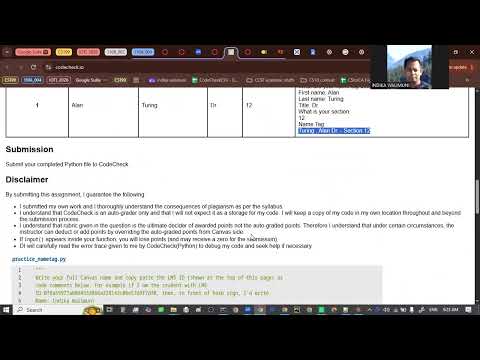
- The exercise asks students to write a function that produces a name tag from first name, last name, title, and section information.
- Indika Walimuni gives students about 10 minutes to read the detailed instructions and compare the required output format.
- The task separates input collection in the main program from name-tag generation in the function.
3:30
Launch CodeCheck with a Canvas LMS ID
- CodeCheck connects submissions and grades to Canvas similarly to zyBooks, but requires no separate user account or payment.
- Students copy their unique course LMS ID into CodeCheck so Canvas can identify their work.
- Indika demonstrates entering a full name and LMS ID in the student workflow.
6:30
Plan Name-Tag Inputs and Expected Output
- Students identify the four inputs—first name, last name, title, and section—from the prompt before writing the function.
- The specified output order determines how the main program should prompt for and collect the information.
- The initial problem page contains a mismatched instruction; Indika corrects it by using the actual name-tag prompt.
11:00
Separate Keyboard Input from Function Parameters
- The Python input() function reads from the keyboard, while the broader idea of function input refers to values passed as parameters.
- Collect keyboard input in the main program, then pass those values into the function rather than calling input() inside it.
- A function docstring should describe what the function does and refer to the inputs it receives.
14:00
Write the Name-Tag Function and Main Program
- The function prints the name-tag details using its parameters; the main program handles prompts and input collection.
- Students arrange first name, last name, title, and section according to the requested format.
- The exercise provides the function call so students can focus on implementing the function body.
18:40
Compare Actual and Expected CodeCheck Output
- CodeCheck displays actual output alongside expected output, allowing students to locate formatting differences.
- The first test reveals that title and section information are misplaced because the prompts and collected values are in the wrong order.
- The debugging process proceeds by comparing each output line rather than guessing at changes.
24:20
Fix Name-Tag Line Breaks, Commas, and Labels
- An empty print() call can create a blank line when the name-tag output needs to begin on a new line.
- Indika adds the missing comma and the literal label "section" after comparing the actual and expected strings.
- A syntax error caused by an extra comma is fixed by checking the reported line and nearby code; the corrected program passes.
28:00
Submit CodeCheck Work and Troubleshoot Indentation
- CodeCheck reports automated results to Canvas, but the assignment plan is separately worth 20% and receives instructor review.
- Students can submit repeatedly, use feedback to correct errors, and resubmit for regrading.
- Class troubleshooting covers missing brackets, indentation errors, alignment, and the common four-spaces-per-indent convention.
38:30
Begin Chapter 5: Treat Python as a Language
- Indika frames programming as learning a language through immersion and practice, comparing Python learning with studying Spanish or Mandarin.
- Natural languages such as English evolve without one inventor; formal languages such as Python have defined structures and creators.
- The A-M-P-E-R problem-solving approach helps students connect familiar language concepts to Python.
44:30
Use Functions to Abstract Repeated Rectangle Code
- A function gives a name to related code that performs one task, allowing the name to stand in for the full procedure.
- Indika removes the rectangle-drawing function and uses pass as a Python statement that does nothing while leaving a valid function body.
- The demonstration sets up a comparison between reusable function calls and repeatedly writing the same turtle instructions.
47:42
Clean-Code Advice: Readability, Names, and Comments
- The embedded software-development talk argues that programmers spend far more time reading code than typing it, so readability can reduce debugging and maintenance time.
- Its advice includes taking responsibility for code quality and using meaningful variable names and function names that express intent.
- Comments can become misleading when code changes; prefer self-explanatory code where possible, while retaining comments for details such as third-party API behavior.
- The talk recommends leaving existing code cleaner than you found it, for example by improving a variable name or splitting an oversized method.
55:30
See Why Repeated Turtle Code Becomes Messy
- Without a function, drawing multiple rectangles requires repeating the turtle commands and manually setting values such as color, position, length, and width.
- Indika runs a rectangle example and then adds another drawing, showing how repeated code and adjusted parameters become cumbersome.
- A named function makes the single task reusable and avoids copying the full set of drawing instructions for each rectangle.
1:03:50
Distinguish Function Definitions from Calls
- The function definition creates the reusable operation; a later function call executes it.
- Indika compares defining a function to manufacturing a microwave and calling it to using the appliance to warm pasta.
- Python function definitions begin with the def keyword, use a function name, and indent the function body by four spaces or one tab.
1:10:00
Introduce Return Values with a Microwave Analogy
- A return value is the result a function provides after doing its work, comparable to warmed food coming out of a microwave.
- Python’s return keyword sends a value back to the code that called the function.
- Printing output and returning a value are different operations, a distinction students will apply in the next exercise.
1:11:30
Debug a Square Function That Prints Instead of Returning
- The class writes a square function and first uses print() to display the square of a number such as 2.
- Calling the function inside another square operation raises a TypeError because the first call provides no usable numeric result.
- Checking type(square(2)) reveals NoneType: print() displays the number but does not return that number to the calling expression.
1:20:20
Return the Square So Function Calls Can Compose
- Replacing print() with return makes the square function produce a numeric result that another operation can use.
- Squaring the returned result of squaring 2 gives 16, demonstrating that returned values can participate in larger expressions.
- Indika recommends returning values when a function’s result will be used elsewhere, and printing a function call in the main program when the value needs to be displayed.
1:24:00
Call get_pattern Twice and Start the Hexagon Exercise
- The get_pattern exercise requires a function to return a five-character string, then calls it twice and prints both results.
- The hexagon task begins with starter code copied into Trinket; students are asked to draw an equilateral hexagon themselves.
- Indika shows students how to bookmark their Trinket workspace before replacing its contents with the starter code.
1:28:39
Announce the City College REU Club
- Indika announces plans for a City College REU (Research Experiences for Undergraduates) club focused on introducing students to research internships.
- The club aims to invite internship hosts as speakers and provide guidance on how to apply, drawing on Indika’s experience supporting students through a California workforce program.
- Students can express interest in the General Q&A forum and volunteer as a committee liaison for their class.
Summary, takeaways, and chapters were generated by AI from the video's transcript and may contain errors. The video belongs to its creator, indika walimuni.