CS110A Week 6 Day 1 lesson on 09/22/2026
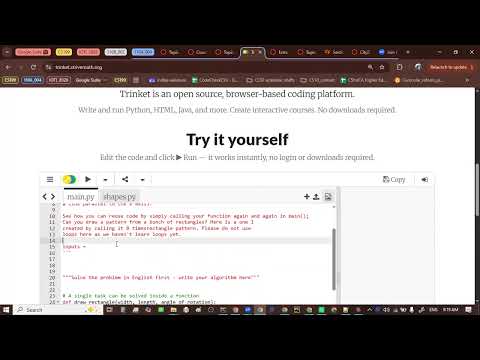 Watch on YouTube →
Overview
The CS110A lesson applies the UMPIRE problem-solving approach to a Python Turtle task: identify inputs, output, and constraints; match the task to prior drawing problems; plan the steps in English; then implement and test them. The class builds a rectangle-drawing function with rotation and fill-color parameters, uses repeated calls at 45-degree intervals to create an eight-rectangle pattern, and reviews Python concepts, common errors, code style, and assignment submission. A viewing of Angela Duckworth’s talk introduces grit and growth mindset as ideas relevant to persistence in learning.
Key takeaways
- The UMPIRE workflow separates understanding, matching, planning, and implementation so beginners can solve a programming task in English before translating it into Python.
- For a rectangle with turtle graphics, the three inputs are width, length, and rotation angle; the repeated 90-degree corners are fixed by the shape’s definition.
- A symmetric pattern of N rotated rectangles uses an interval of 360/N degrees; eight rectangles therefore use 45-degree steps.
- Python Turtle fills a shape by setting `fillcolor`, calling `begin_fill()` before drawing, and calling `end_fill()` afterward.
- Runtime errors such as `ZeroDivisionError` and `NameError` stop execution, while logical errors can produce an incorrect result even when the program runs.
- Angela Duckworth’s account connects persistence with long-term goals and presents growth mindset—the belief that ability can improve with effort—as a potential support for perseverance.
Chapters
- The class opens Module 4 and prepares the rectangle-pattern programming task.
- Copying the problem statement into the editor keeps the requirements visible while coding.
- The Understand stage discourages translating English directly into Python before clarifying the task.
- The rectangle function takes width, length, and angle of rotation as inputs; the word “given” signals provided values.
- The required output is a turtle-drawn rectangle, and the explicit constraint is not to use loops.
- The Match stage asks whether a similar problem or reusable concept has appeared before.
- An equilateral-triangle drawing is a prior turtle example; a square is an even closer match for a rectangle.
- The Plan stage produces an English algorithm, also described as a recipe or step-wise refinement.
- The turtle begins facing east on a Cartesian grid, so the first move is a turn by the supplied rotation angle.
- A hand-drawn rectangle reveals the repeated sequence: move length, turn left 90 degrees, move width, then repeat.
- The completed plan contains nine steps, including the initial rotation and the four side movements.
- The English plan is translated into Python one instruction at a time, beginning with a function that accepts width, length, and rotation angle.
- The code imports the turtle module and creates a turtle with the `turtle.Turtle()` constructor.
- Turtle methods such as `left(angle)` and `forward(length)` implement the planned turns and movements; a test call uses width 50, length 100, and angle 60.
- Each corner uses a 90-degree turn because the task specifies a rectangle; 90 is a constant, not an input.
- The class connects this fixed value to domain knowledge: a rectangle has right angles.
- Function-body lines must align consistently, and running the turtle program after incremental changes helps catch mistakes.
- The function is extended with a color input so callers can choose the rectangle’s fill color.
- The turtle uses `fillcolor(color)`, `begin_fill()`, and `end_fill()` around the drawing sequence.
- Passing the string literal `"red"` produces a red-filled rectangle.
- For a symmetric pattern, divide a full 360-degree rotation by the number of rectangles.
- Four rectangles use 90-degree intervals, six use 60-degree intervals, and eight use 45-degree intervals.
- Each function call draws one rectangle at a selected rotation angle.
- The eight-rectangle example uses rotation angles from 0 through 315 degrees in 45-degree increments.
- Different color arguments, such as alternating red and yellow, customize the repeated shapes.
- Because each function call creates a new turtle, the finished pattern shows eight turtle cursors; a later lesson will draw with one turtle.
- The screen assignment creates the turtle drawing window, and `exitonclick()` keeps it open until a click closes it.
- The rectangle program includes integer values such as 90 and 100, as well as a color string such as `"red"`.
- The class traces execution from the main-program call into the function, which runs its body from top to bottom.
- Angela Duckworth defines grit as passion and perseverance toward long-term goals, comparing it to a marathon rather than a sprint.
- Her research examples include West Point cadets, National Spelling Bee contestants, teachers, salespeople, and Chicago public-school students.
- Duckworth describes growth mindset, associated with Carol Dweck, as the belief that ability can change through effort and that failure is not permanent.
- A variable name, literal value, and function call can each be an expression; the turtle constructor call is an example.
- The class distinguishes assignment statements from the `import` statement and notes that `pass` is another statement type.
- Python reserved words discussed include `def` and `import`; `if` is previewed as a keyword for a later lesson.
- Dividing by zero produces a runtime `ZeroDivisionError`; using an uninitialized variable such as `price` produces a `NameError`.
- A percentage formula that runs but produces an incorrect result is a logical error, distinct from a runtime error.
- Python can run in an online environment such as Trinket; installing a local IDE such as PyCharm is optional.
- Consistent indentation and blank lines separating functions or sections make Python code easier to read.
- PEP 8 and the Google Python Style Guide provide recommendations for naming and spacing.
- Style guides describe how code is composed; they are not Python syntax rules.
- The individual graded discussion asks students to choose one of seven practice questions, solve it, and post an answer.
- The programming module includes an online lab with step-by-step instructions and a submit-for-grading action.
- Students are advised to follow the same understand, match, and plan process used for the rectangle problem.
- A programming-assignment tool opens in a new tab and returns automatic code-check feedback and grades to Canvas.
- Students enter their LMS ID and name, then complete the required algorithm and code fields; the plan portion is worth 20% in the practice example.
- The code check runs the submission, while Reset deletes entered code and should be used cautiously.
Summary, takeaways, and chapters were generated by AI from the video's transcript and may contain errors. The video belongs to its creator, indika walimuni.