CS110A Week 4 Day 2 lesson on 09/10/2026
 Watch on YouTube →
Overview
Indika Walimuni reviews Linux remote-login commands, then introduces operating-system responsibilities, memory management, troubleshooting, and core software-development concepts. The lesson connects encoding, consolidation, and retrieval to study strategies, contrasts waterfall with iterative spiral development and Agile, and ends with instructions for logging into the Hills server and completing related assignments.
Key takeaways
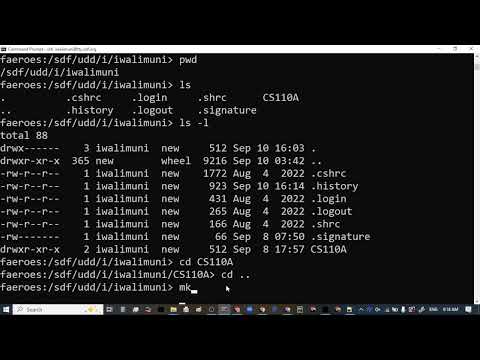
- Linux command-line practice centers on pwd, ls, ls -l, cd .., and mkdir, with ls used to verify directory creation and dot-prefixed names marking hidden files.
- Operating systems coordinate CPU scheduling, memory, files, power, and peripherals; Windows Task Manager exposes resource usage and can end unresponsive processes.
- A useful troubleshooting method is to list plausible causes and test the simplest one first, as illustrated by checking power and a bulb before assuming a more complex electrical fault.
- The lesson's learning framework has three stages: encode new information, consolidate it by connecting it to prior knowledge, and retrieve it through repeated practice.
- Waterfall delays testing until the end, making late discovery of design or implementation errors expensive; spiral development tests small increments and adds features across cycles.
- The Hills server assignment requires SSH access and a password derived from account instructions, while the troubleshooting discussion asks students to document a problem, hypotheses, and tests.
Chapters
- Reviews remote Linux access and explains that clear moves existing terminal text out of view without deleting it.
- Demonstrates pwd, ls, and ls -l to inspect the current path, directory contents, and file permissions; dot-prefixed names indicate hidden files.
- Uses cd .. to move up one directory and mkdir to create a directory, then verifies it with ls and pwd.
- Shows Windows+Shift+S for a screenshot and advises inserting the image into the assignment rather than attaching it.
- Describes an operating system as software that coordinates computer hardware and provides the platform for other programs.
- Uses disk file management to explain how an OS creates, saves, and retrieves files.
- Contrasts command-line DOS with the graphical interface popularized by Microsoft Windows, mentioning Windows 95, 98, and XP.
- Explains that an operating system schedules CPU work so many applications appear to run simultaneously through interleaving.
- Notes that multiple processor cores can handle tasks in parallel, while the OS also schedules work on each core.
- Identifies the keyboard, screen, mouse, and microphone as peripheral devices managed through the operating system.
- Describes browser tabs as competing for resources and cites Chrome reclaiming memory from inactive tabs.
- Places Unix in the 1960s and Microsoft DOS in the early 1980s as milestones in operating-system history.
- Identifies Linus Torvalds as the creator of Linux and explains that sharing its source code enabled multiple distributions.
- Names Debian, Ubuntu, SUSE, and Red Hat as examples of Linux distributions.
- Contrasts open-source Linux with proprietary software whose source code is kept private, using Adobe products as an example.
- Recommends keeping free disk space because low capacity can slow a computer, especially when it uses a spinning hard drive.
- Demonstrates Windows Task Manager for viewing CPU, memory, disk, and GPU activity, and ending an unresponsive task.
- Defines a memory leak as an application retaining memory it no longer needs, potentially reducing available memory over time.
- Explains that restarting clears volatile memory and that later programming courses address reclaiming memory explicitly.
- Recommends identifying plausible causes and testing them systematically instead of changing code or settings at random.
- Uses a light bulb that will not turn on to illustrate checking simple causes such as power, a burned-out bulb, and a loose connection.
- Connects troubleshooting to beginner programming, where repeated unstructured fixes can create frustration.
- Notes that hardware knowledge can help diagnose software problems, such as a failing USB drive preventing file access.
- Presents a three-step learning model: encoding new information, consolidating it with prior knowledge, and retrieving it for use.
- Uses a library analogy: encoding is first encountering a book, while consolidation is deciding where it belongs and connecting it to other knowledge.
- Explains that retrieval practice strengthens access to information and supports faster recall and deeper understanding.
- Encourages choosing learning strategies that help organize new concepts and revisit them regularly.
- Defines a client as the consumer of a service and a server as the system that provides it.
- Uses Gmail as an example: Google's server delivers email pages to a laptop or smartphone client.
- Extends the model to software: a user-facing main program acts as the client, while supporting code written by an engineer provides services.
- Previews using this distinction when writing programs with a main function and other functions.
- Introduces the Software Development Life Cycle, or SDLC, as a structured path for building software.
- Lists analysis, design, implementation, and testing as the four stages.
- Compares analysis to a feasibility study and design to creating a blueprint before construction begins.
- Clarifies that troubleshooting can arise during implementation or testing, while analysis happens before planning and building.
- Explains the waterfall method as completing analysis, then design, then implementation, and finally testing.
- Uses the image of water flowing downward to emphasize the one-directional progression through SDLC stages.
- Contrasts this sequence with iterative methods that produce and test smaller working increments.
- Describes spiral development as repeating analysis, design, implementation, and testing in cycles.
- Uses a text editor example: first deliver typing and saving, then add copy-and-paste and other features in later iterations.
- Explains that each cycle produces a small testable product, with later cycles expanding functionality.
- Identifies a key waterfall risk: major mistakes may not be discovered until final testing, after substantial effort has been spent.
- Mentions Windows Vista as an often-cited example of a troubled release, while noting that its development process is debated.
- Compares software with physical projects such as a dam, where discovering weak surrounding soil after construction can require costly repairs.
- Connects iterative development with Agile and Scrum practices that deliver and validate smaller increments.
- Compares building a lab for 80 students all at once under waterfall with first setting up and testing 10 workstations under spiral development.
- Adds further workstations in later cycles after the initial network and equipment are verified.
- Notes that beta testing can occur before public release under either development approach.
- Describes developers as central contributors who benefit from understanding analysis, design, implementation, and testing.
- Distinguishes a product manager, who owns the product, from a project manager, who coordinates the team and schedule.
- Explains how client meetings, wireframes, and UX design shape interfaces and interactions before implementation.
- Assigns QA engineers testing responsibilities and technical support a role in gathering client feedback for later development cycles.
- Directs students to the Module 3 instructions for connecting to the CCSF Hills server using SSH.
- Emphasizes carefully reading the first paragraph to determine the Hills account password before attempting login.
- Recommends trying the command-line method first and using PuTTY only if that approach fails.
- Notes that Canvas content may require refreshing before the instructions appear.
- Introduces the Hills server activity as running a first Python program remotely after logging in.
- Explains that a separate individual graded discussion asks students to describe a real troubleshooting problem, their hypotheses, and the tests they performed.
- Advises following the provided example and rubric because the rubric will be used for grading.
- Invites students to work together on the team discussion and ask for help when needed.
- Advises students who cannot determine their Hills password to locate the reset option through their MyRAM student account.
Transcript excerpt
0:00 Good morning guys. Um this is our agenda today. Okay. So I'm going to uh repeat that what we did um Tuesday. Okay. So if you couldn't get it done so you can follow me right now. Okay. So going to go over here. Okay. Sorry. Yeah. So I already logged into FDS server. Okay. And then clear is like you know it's a command. If you see if you entire screen is now filled and then if you want to clean it up it's just um clear sorry um clear um we'll kind of do this but you know you can if you scroll you'll see everything on top okay so it's just everything pushed to the top and and then you have now space on the
0:48 bottom okay all right so so what we supposed to do um it's open it. So this was the assignment. Okay. And then this is like you know uh both of these assignment and including the today's one. Today we're going to do the same to log to hills server. So kind of you're practicing three times because one of your your assignment also see that graded discussion using hills Linux kind of similar so you will do this three times so it's good practice okay so and because the thing is I'm pretty sure for the rest of the this course you will never come to um log to health
1:36 server okay so that's just uh that's why it's good to practice three times you kind of get the feeling well future CS classes some instructors do use you manually logging into hills and and running things and then running your programs. Okay, so it's good it's good to um get that experience right now. Okay, so um this was the assignment. Okay, so um so
This is the start of the transcript. Save this video free for the whole transcript, searchable and time-coded.
Related notes
Summary, takeaways, and chapters were generated by AI from the video's transcript and may contain errors. The video belongs to its creator, indika walimuni.