CS110A Week 4 Day 2 lesson on 09/10/2026
 Watch on YouTube →
Overview
Indika Walimuni reviews Linux command-line access and introduces operating-system concepts, including file and CPU management, multitasking, memory leaks, and systematic troubleshooting. The lesson then covers encoding, consolidation, and retrieval as a learning framework, client-server architecture, and the software development life cycle, contrasting waterfall with iterative spiral development. Students finish by preparing to access the CCSF Hills server over SSH, run a first Python script, and complete troubleshooting and server-access assignments.
Key takeaways
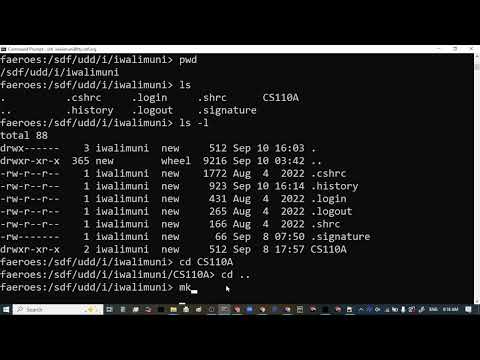
- The Linux command sequence pwd, ls, ls -l, cd, cd .., and mkdir lets beginners confirm their location, inspect files, navigate directories, and create folders on a remote server.
- An operating system coordinates files, CPU scheduling, memory, power, and peripherals; Task Manager provides a practical way to inspect resource use and stop unresponsive processes.
- Systematic debugging works by testing plausible causes one at a time, starting with easy checks, rather than applying random changes that obscure the source of an error.
- Encoding, consolidation, and retrieval describe a practical learning cycle: take in information, connect it to existing knowledge, and practice recalling and applying it.
- Waterfall postpones final testing until the end, while spiral development tests incremental products; building and checking 10 of 80 workstations illustrates how iteration can limit project risk.
- The Hills server assignment combines SSH practice with a first Python script, while the troubleshooting discussion requires students to document a problem, hypotheses, and tests.
Chapters
0:00
Reviewing Remote Login and the Linux clear Command
- Indika Walimuni resumes practice on the FDS server, which students accessed remotely using a command-line connection.
- The clear command moves prior terminal output out of view, leaving a cleaner screen without deleting the command history.
2:57
Using pwd and ls to Inspect a Linux Account
- pwd prints the current directory path, helping identify the user's location in the server's folder structure.
- ls lists directory contents, while ls -l displays a detailed listing that includes file and folder permissions.
- Names beginning with a dot, such as hidden configuration folders, are hidden by default in many graphical file browsers.
5:50
Navigating Directories and Creating Folders with mkdir
- The cd command enters a directory, and cd .. moves up one level to its parent directory.
- mkdir creates a directory; Walimuni demonstrates making a small-letter CS1 folder and checking it with ls.
- pwd verifies the current location after changing directories.
9:30
Capturing a Terminal Screenshot for the Linux Assignment
- Students need a screenshot showing their completed server commands as evidence for the assignment.
- On Windows, Windows + Shift + S opens the snipping interface; the captured image can be pasted into Paint and saved.
- Walimuni advises inserting the image into the submission rather than attaching it, and shows that excess Paint canvas can leave unwanted white space.
16:21
The Operating System as Computer Manager
- An operating system provides the software platform that lets users and applications work with computer hardware.
- File management is a core responsibility: the OS supports creating, saving, finding, and retrieving files on a drive.
- The lesson uses MS-DOS as an early Microsoft operating system that relied on text commands rather than a graphical interface.
21:40
How Operating Systems Manage CPUs, Memory, and Peripherals
- Modern operating systems coordinate CPU work so many applications can appear to run at once.
- The OS also manages power and peripheral devices, including keyboards, mice, screens, and microphones.
- Walimuni describes Chrome reducing memory use for inactive tabs; a displayed tab indicated about 138 MB freed.
28:00
Multitasking Across CPU Cores
- A CPU can interleave work from applications so users experience apparent simultaneous activity even when tasks take turns.
- Multiple CPU cores can process separate tasks in parallel, with the operating system distributing work across them.
- The OS can also schedule and interleave tasks within each core.
30:03
From Unix and MS-DOS to Open-Source Linux
- The lesson places Unix in the 1960s and MS-DOS in the early 1980s as milestones in operating-system history.
- Linus Torvalds created Linux in the early 1990s and made its source code available for others to use and modify.
- Linux distributions include Debian, Ubuntu, Red Hat, and SUSE, while proprietary Windows source code is not publicly available.
35:37
Mobile Operating Systems and Disk Space
- Mobile devices use operating systems too; the lesson names Android and Apple's iOS as major phone and tablet platforms.
- Android is based on the Linux kernel; iOS is Apple's separate operating system.
- Leaving free storage space can help system performance, particularly on computers using spinning hard drives.
37:51
Monitoring CPU and Memory with Windows Task Manager
- Windows Task Manager displays running processes and performance information for the CPU, memory, disk, and GPU.
- Walimuni shows a system with 16 GB of memory, about 10 GB in use, and four logical processors.
- Task Manager can end an unresponsive or resource-intensive process; comparable monitoring facilities exist in Linux and macOS.
40:45
Memory Leaks and Why Restarting Can Help
- A memory leak occurs when an application no longer needs data but fails to release the memory it occupied.
- Unreclaimed memory can accumulate over long sessions and contribute to slowdowns or crashes.
- Restarting clears volatile memory; later programming courses teach techniques for releasing memory explicitly.
43:28
Troubleshooting by Testing Hypotheses in Order
- Walimuni recommends identifying likely causes and testing them systematically instead of trying random fixes.
- In the light-bulb example, check whether other devices work, test whether the bulb is burned out, and verify the connection.
- Starting with simple, easy-to-test explanations can resolve problems faster and reduce frustration when debugging code.
49:58
Break Discussion: CPU Heat and Cooling Systems
- A brief discussion connects processor speed and power use with heat generated by a CPU.
- Laptops commonly use fans and airflow for cooling, while some high-performance desktop systems use liquid cooling.
- The class resumes after the break to continue the module.
58:20
Learning Through Encoding, Consolidation, and Retrieval
- An instructional animation compares memory to a library and presents three learning processes.
- Encoding forms an initial memory trace from new sensory information; consolidation organizes it and connects it to prior knowledge.
- Retrieval means recalling and using learned information; regularly practicing retrieval makes future recall and application easier.
1:05:27
Client-Server Architecture in Web Services and Programs
- A client requests or uses a service provided by a server; a browser accessing a school Gmail account is one example.
- Walimuni uses a restaurant analogy, describing diners as clients and the service provider as the server.
- For later programming work, the lesson previews a main program calling functions written by a programmer.
1:10:00
The Four Stages of the Software Development Life Cycle
- The software development life cycle, or SDLC, organizes work into analysis, design, implementation, and testing.
- Analysis determines what is needed and whether a project is feasible; design produces a plan or blueprint before construction begins.
- Testing checks the implemented product before it is delivered, similar to testing systems before opening a newly built facility.
1:13:50
Waterfall and Spiral Development Compared
- Waterfall completes the analysis, design, and implementation stages in sequence before reaching final testing.
- Spiral development repeats analysis, design, implementation, and testing in cycles, producing a small testable product after each iteration.
- A text editor could begin with basic typing and saving, then gain features such as copy and paste in later cycles.
1:17:20
Why Iterative Development Reduces Waterfall Risk
- Waterfall can reveal a major design or implementation error late, after substantial work has already been invested.
- Spiral development tests smaller increments; an example scales an 80-computer lab by first building and checking 10 workstations.
- Agile and Scrum are presented as industry project-management approaches associated with iterative development; each cycle can incorporate feedback and new features.
1:26:10
Product, Project, UX, QA, and Support Roles
- Developers benefit from understanding analysis, design, implementation, and testing, and may participate in meetings with clients and project managers.
- Product managers own the product direction, while project managers coordinate the team and project work.
- UX designers develop interfaces and interactions, QA engineers test implementations, and technical support gathers client issues and feature requests.
1:31:00
Opening the Hills Server and Explaining the Assignments
- The class shifts from the FDS practice server to the CCSF Hills Linux server and uses SSH for remote access.
- Students should read the account instructions carefully to find their Hills password before attempting to log in; PuTTY is a fallback if command-line access fails.
- Walimuni previews running the class's first Python script on Hills and distinguishes the individual graded troubleshooting discussion from the team discussion.
1:35:33
Finding Hills Passwords and Writing a Troubleshooting Example
- Students who cannot identify their Hills password can reset it through their student account and should change the initial password when prompted.
- The individual discussion asks students to describe a real troubleshooting problem, state their hypotheses, and explain the tests they performed.
- Walimuni directs students to follow the assignment example and rubric, which will guide grading.
1:40:12
Resolving Access Issues and Wrapping Up the Session
- Walimuni helps students with account access, SSH command entry, and a student reinstatement issue related to the course book and enrollment.
- Students are advised to check email for account details and can stay after class for help completing the Hills login.
- Walimuni notes that the Tuesday recording is posted, while an earlier recording still needs private conversations removed before publication, then dismisses the class.
Summary, takeaways, and chapters were generated by AI from the video's transcript and may contain errors. The video belongs to its creator, indika walimuni.