CE351 lec16 A music game box Task 2.3 and PWM introduction
 Watch on YouTube →
Overview
Yiyan Li walks through the CE351 music-copy game in Task 2.3, showing how timer interrupts, song-state flags, and active-low button presses coordinate playback and compare the timing of a player's presses. The lecture then introduces pulse-width modulation (PWM), explaining duty cycle, why digital PWM can replace a DAC for many loads, and the limits of Arduino's analogWrite() when output frequency must be controlled.
Key takeaways
- The music game's playback design separates note generation from song sequencing: timer interrupts run independently, while flags determine whether a note or song should play.
- Task 2.3 measures copied rhythm by saving a first TCNT reading, then subtracting consecutive timer readings and checking each interval against a tolerance.
- The button is active-low, so pressed-state handling waits while the input is low to sustain a note, then waits while it is high before accepting the next press.
- With the demonstrated timer setup, an overflow after roughly 0.5 seconds can cause a failure before the player completes the sequence, making timeout behavior part of the game's difficulty.
- PWM adjusts average power through duty cycle, allowing a digital microcontroller pin to control loads such as motors and LEDs without a separate DAC.
- Arduino analogWrite() provides 8-bit duty-cycle control but limited frequency selection, so it is unsuitable when a device requires a specific PWM carrier frequency.
Chapters
0:00
Timer Interrupts Coordinate Note and Song Playback
- A note-playing interrupt updates the timer counter and toggles an output pin to generate sound.
- Song playback uses a state sequence for idle, note, and rest, with the song routine setting timer counts for note and rest durations.
- Separate play-song and play-note flags let the interrupts continue running while controlling whether notes are emitted.
3:00
Serial Command R Starts the Copy Song
- Receiving the serial character R enters the matching case in the provided Task 2.3 template.
- The handler selects the copy-song number and sets the play-song flag so the existing timer interrupt begins playback.
- After the song finishes, the interrupt clears the play-song flag; the main code can wait on that flag before disabling Timer 3's overflow interrupt.
11:00
Disable Timer 3 After the Copy Song
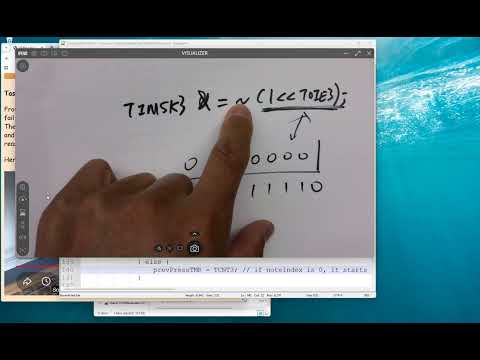
- Timer 3's overflow interrupt enable is controlled by the TOIE3 bit in TIMSK3.
- Setting TOIE3 with a bitwise OR enables the interrupt; clearing it with a complemented bit mask and AND disables it.
- Once the copy song ends, disabling the interrupt prevents unwanted playback while the game waits for button input.
12:00
Initialize the Game and Record the First Press
- The player waits for the active-low push button: an unpressed button reads high, while pressing it connects the signal to ground.
- The note index starts at zero, so the first press records the current TCNT timer count as a reference rather than comparing it with a previous press.
- Recording that first count makes the player's later timing measurable even if they wait an arbitrary amount before beginning.
18:00
Use Button Holds to Replay Notes and Capture Timing
- On a press, the main loop sets the play-note flag true and waits in a loop while the active-low button remains low.
- Releasing the button clears the play-note flag, stopping the sound and letting the player hear each reproduced note.
- After release, the code waits while the button reads high; the next press advances the note index and captures another timer count.
22:00
Compare TCNT Intervals and Handle Timer Overflow
- For each press after the first, the program subtracts the previous TCNT value from the current value to obtain an elapsed-count interval.
- The interval is compared with the target timing using a tolerance, allowing for imperfect human button timing.
- Li notes that a timer overflow can trigger failure if the player waits too long; the demonstrated setup overflows at roughly half a second, which can make the game unforgiving.
29:00
Play Success or Failure Songs from the Interrupt Routine
- After the required presses, the success flag selects the success song; otherwise, the code selects the failure song.
- Both outcomes use the existing song-playback interrupt structure, changing the song index and setting the play-song flag.
- Li advises following the supplied Task 2.3 template and debugging the code directly; the assignment is due Wednesday.
31:00
PWM Duty Cycle, analogWrite(), and Frequency Limits
- PWM changes the fraction of each period spent on, called duty cycle; a larger duty cycle can make a motor spin faster or an LED appear brighter.
- Digital PWM can approximate variable output power without adding a digital-to-analog converter, reducing circuit complexity and component footprint.
- Arduino analogWrite(pin, value) accepts an 8-bit value from 0 to 255: 0 gives an off output and 255 gives a continuously high output.
- The standard analogWrite() interface sets duty cycle but offers limited control over frequency; common Arduino PWM frequencies are about 490 Hz or 980 Hz, so applications needing a specific carrier frequency may require timer-level configuration.
Summary, takeaways, and chapters were generated by AI from the video's transcript and may contain errors. The video belongs to its creator, Yiyan Li.