UNC COMP 301 - F26/Lec 1 - Intros, Syllabus, 301 Overview, Java Workflow & Maven
 Watch on YouTube →
Overview
Muhammad Sayeed Ghani introduces COMP 301 as a foundational software course focused on writing modular, extensible, maintainable applications, then outlines its syllabus, assessment structure, and topics including object-oriented design, testing, design patterns, JavaFX, and asynchronous programming. He also explains Java’s source-to-bytecode workflow and demonstrates how IntelliJ, Maven, `javac`, classpaths, dependencies, and JAR packaging fit into building Java programs.
Key takeaways
- COMP 301 focuses on software qualities that go beyond algorithm correctness: code should be modular, extensible, clear, and maintainable by other programmers.
- Students complete nine programming assignments worth 5% each, with the lowest dropped; all assignments require Google Java Format and GitHub submission.
- Java’s portability comes from compiling source into bytecode once and executing that bytecode through a JVM available on each target platform.
- Maven standardizes Java project organization, including separate production, resource, and test directories, and places generated build output in `target`.
- For command-line builds with precompiled dependencies, `javac -cp` supplies the classpath and `javac -d` directs generated class files into a chosen output directory.
- Maven dependency coordinates—group ID, artifact ID, and version—identify external libraries such as JUnit and JavaFX for retrieval and inclusion during builds.
Chapters
0:00
Muhammad Sayeed Ghani Introduces COMP 301 and the Teaching Team
- Ghani welcomes students to COMP 301, Foundations of Programming, and notes that this is his first time teaching the course.
- Office hours are scheduled Tuesdays and Thursdays from 11:30 a.m. to 12:30 p.m. in Fred Brooks Building room 144.
- The course has two TAs and a group of undergraduate TAs; Ghani expects their office hours to begin early the following week, pending I-9 paperwork.
8:36
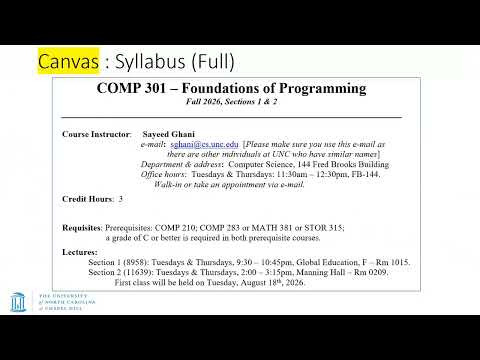
Student Background Survey and the Full COMP 301 Syllabus
- Students report their year, prior COMP 210 credit, majors and minors, programming confidence, and familiarity with Java.
- Ghani distinguishes the public-facing Simple Syllabus from the full course outline in Canvas’s Files directory; the catalog’s course name is incorrect, and the proper title is Foundations of Programming.
- Recommended references include The Mythical Man-Month and the Gang of Four design-patterns book; neither is required for purchase.
12:55
Announcements, Grading Weights, and Exam Expectations
- Students should verify that Canvas announcements reach their email, since they contain important course instructions.
- Nine programming assignments are worth 5% each, with the lowest assignment dropped; both midterms are required, and the final exam is cumulative.
- Ghani says midterm dates are largely fixed and asks students with serious scheduling conflicts to contact him early; alternate final-exam sections may be considered for documented reasons.
18:35
Assignment Deadlines, Grace Days, and Required Development Tools
- Assignments are expected to be longer and harder than COMP 210 work, typically with seven days to complete them and three grace days for late submissions.
- Canvas lists the initial due date, while Gradescope provides late deadlines; Ghani generally does not grant extensions after the late deadline except for extraordinary circumstances.
- The ungraded setup assignment is due to be released by 5 p.m.; IntelliJ is recommended, Google Java Format is required, and GitHub is required for assignment distribution and submission.
23:24
COMP 301 as a Gateway to the Software Curriculum
- After prerequisites such as COMP 210 and COMP 283, students branch toward software-focused COMP 301 or hardware-focused COMP 311.
- Ghani describes COMP 301 as a foundational gateway with more than 30 courses listing it as a direct prerequisite.
- Among the usual systems, theory, and applications categories, COMP 301 belongs closest to applications while also serving as a foundational software course.
25:58
The Course’s Core Goal: Writing Maintainable Applications
- Where COMP 210 emphasizes implementing specific algorithms or data structures, COMP 301 emphasizes how to write good software.
- The target is code that is modular, extensible, clear, maintainable, and understandable by other programmers.
- The course frames these practices as a principled approach to software engineering rather than simply completing a coding task.
29:23
Java’s Compilation Model and the JVM Bytecode Strategy
- Native compiled languages such as C and C++ execute machine code quickly but generally require builds for each target platform.
- Interpreted languages such as Python can run from source across platforms but may execute more slowly and reveal syntax errors at runtime.
- Java compiles `.java` source files into platform-independent bytecode, which a platform-specific Java Virtual Machine executes.
34:05
JDK, Class Files, and Platform-Specific Java Execution
- The Java Development Kit includes the compiler that converts source code into `.class` bytecode files.
- End users generally need a JVM to run bytecode, rather than the complete JDK used for development.
- Java bytecode is designed for execution through a JVM available on the target platform, balancing portability with compiled execution.
37:36
Java Dependencies, JAR Archives, and Application Packaging
- Larger applications combine many Java source files with external dependencies; COMP 301 expects students to use JUnit for testing and JavaFX for graphical interfaces.
- Dependencies are commonly distributed as `.jar` archives, which builds use alongside compiled classes.
- Packaging gathers compiled application code into a distributable JAR; dependencies can be supplied separately or bundled into a larger standalone “fat” JAR.
43:03
Decompiling Java Bytecode and Introducing Maven
- Java `.class` files can often be decompiled into source-like code, although original variable names and formatting may not survive.
- Recompiling decompiled code will usually preserve behavior, but Ghani cautions that exact equivalence is not guaranteed in every case.
- Maven is introduced as a build-automation tool for coordinating project compilation and other build tasks.
45:11
Maven Project Structure and IntelliJ Build Integration
- An IntelliJ-native project differs from a Maven project, which includes a `pom.xml` file and a Maven-managed directory layout.
- Maven separates production code under `src/main/java`, resources under `src/main/resources`, and tests under `src/test/java`.
- In IntelliJ, the Maven tool window exposes lifecycle actions; running a project creates a `target` directory containing compiled class files, while `clean` removes generated output.
53:00
Compiling and Running Java from a Terminal
- Ghani demonstrates navigating project folders in Windows PowerShell and notes that macOS users may use a shell environment instead.
- The `javac` command compiles a Java source file into a `.class` file; the resulting class can be inspected as bytecode data.
- The `java` command runs the compiled program by class name, without the `.java` or `.class` extension.
56:21
Compiling Multiple Java Files with `javac` and Classpaths
- A `Main` class that calls a method in `Hello` cannot compile if `Hello` is unavailable; compiling both source files together resolves the dependency.
- The `-d` option directs compiled output into a separate directory, preserving package subdirectories.
- The `-cp` or `-classpath` option tells `javac` where to find previously compiled dependencies before compiling the dependent `Main` class.
1:03:18
Maven `pom.xml`, Dependency Coordinates, Packages, and Imports
- A Maven `pom.xml` specifies project metadata and dependencies; Maven identifies each dependency using its group ID, artifact ID, and version, then retrieves it from a repository.
- The POM can distinguish Java source and target versions, allowing newer development code to target an older runtime for backward compatibility.
- Java package names map to directory structures, and `import` statements avoid repeatedly writing fully qualified class names.
- The lecture closes by connecting the Maven build lifecycle—from cleaning generated output through producing a distributable JAR—to the project and classpath examples.
Summary, takeaways, and chapters were generated by AI from the video's transcript and may contain errors. The video belongs to its creator, Muhammad Sayeed Ghani.