CSCE145 F2026 08 Exceptions
 Watch on YouTube →
Overview
Java exceptions are objects that signal runtime problems through messages; the lesson explains how to create custom exception classes, declare and throw exceptions, and handle them with ordered catch blocks and optional finally blocks. A console calculator applies these techniques with custom DivideByZeroException and UnknownOpException classes, a precision-based near-zero check, and recovery that keeps the program running after invalid operations.
Key takeaways
- A custom Java exception extends a predefined exception class, and its constructor should pass a useful diagnostic message to super.
- throws documents possible exceptions in a method signature, while throw new ExceptionType(...) raises an exception at the point where an error condition occurs.
- Catch subclasses before superclasses; placing a broad Exception catch first can make specific catches unreachable and cause a compile-time error.
- Floating-point division guards can compare a denominator against positive and negative precision thresholds instead of relying on exact equality with 0.0.
- The calculator recovers from divide-by-zero and unknown-operator errors by catching them around evaluate, allowing later operations to continue.
- A general Exception catch can also handle unexpected input failures such as Scanner's InputMismatchException, while finally can perform cleanup and display the current result.
Chapters
0:00
Java Exception Objects and Custom Exception Classes
- Exceptions are Java objects with messages describing runtime problems; creating, throwing, and handling them are the three main tasks.
- A custom exception extends a predefined class such as Exception and defines constructors that call super with an informative message.
- The DivideByZeroException example provides default and parameterized constructors, including a message such as “attempted to divide by zero.”
3:29
Declaring Exceptions with throws and Raising Them with throw
- Place throws followed by exception class names in a method signature to notify callers of possible exceptions; separate multiple types with commas.
- Use throw inside the method body, followed by new and an exception constructor, to create and raise an exception when its error condition occurs.
- The evaluate method declares that it may throw DivideByZeroException and UnknownOpException.
8:42
Handling Exceptions with Ordered catch Blocks and finally
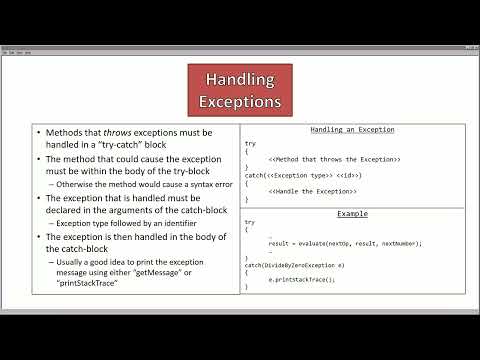
- Put calls that may throw exceptions inside a try block and declare the exception type and an identifier in each catch block.
- Order catches from specific to general: catch DivideByZeroException before its superclass Exception to avoid unreachable-code errors.
- Use getMessage or printStackTrace to inspect an exception; printStackTrace also reports the call stack.
- An optional finally block runs whether or not an exception occurs, and execution continues after the try-catch sequence.
11:45
Building a Console Calculator and Guarding Division
- The calculator tracks a running result and reads console input in operator-space-number format, such as “+ 3”; entering E exits.
- A Scanner reads the operator with next() and the operand with nextDouble(), while evaluate uses a switch for +, -, *, and /.
- Division checks whether the denominator lies between negative and positive precision thresholds, treating sufficiently small double values as zero.
20:05
Creating Calculator Exceptions for Zero Division and Unknown Operators
- DivideByZeroException extends Exception and passes a division-by-zero message to the superclass constructor.
- UnknownOpException also extends Exception and offers constructors for a default message or a message identifying the unrecognized operator.
- The evaluate method throws DivideByZeroException for a near-zero denominator and UnknownOpException from the switch default case.
26:40
Catching Calculator Errors and Testing Continued Execution
- runCalculator wraps evaluate in try-catch blocks for DivideByZeroException and UnknownOpException, followed by a general Exception catch.
- A finally block calls keyboard.nextLine() to clear Scanner input after nextDouble(), then prints the current result.
- Tests show division by zero and an unsupported “mod” operator report stack traces without ending the calculator; a missing numeric operand triggers InputMismatchException, which the general catch handles.
Summary, takeaways, and chapters were generated by AI from the video's transcript and may contain errors. The video belongs to its creator, UofSC_CSCE145_CSCE146.