CSCE145 F2026 05 Methods
 Watch on YouTube →
Overview
JJ Shepherd explains how Java methods organize functional code into reusable actions, covering method declarations, access scope, return types, parameters, calls, and the call stack. A worked unit-converter program applies these ideas through input validation, six inches/feet/centimeters conversions, and separate methods for prompting and displaying results.
Key takeaways
- A Java method declaration specifies where it can be called, what value it returns, its name, the information it accepts, and the code it executes.
- Use parameters to pass values into methods and a non-void return type to send computed information back; for example, inchesToFeet(double inches) returns inches divided by 12.
- Java methods called from main in this example require constructing an instance with new, then calling the method through that object.
- The call stack is last-in, first-out: nested methods finish in reverse order and return control to their caller.
- The converter's isValidUnit method centralizes case-insensitive checks for inches, centimeters, and feet, avoiding repeated validation logic in the main loop.
- Splitting the converter into methods for prompts, validation, conversions, and results makes each action easier to locate and debug.
Chapters
0:00
Why Java Programs Need Methods
- Methods organize growing programs so code can be reused, extended, and debugged more easily.
- Java code is structured in projects, classes, and methods; functional statements such as loops and conditionals belong inside method bodies.
- The system calls main as the program's entry point; programmers can define additional methods for distinct actions.
3:57
Method Declarations: Scope, Return Types, and Names
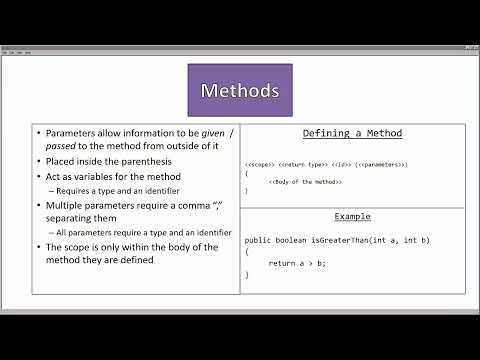
- A method declaration combines scope, return type, identifier, parameter list, and a body enclosed in braces.
- public methods can be called inside or outside their class; private methods can only be called within their class.
- A return type such as String or double requires a matching return statement; void indicates that the method returns no value.
- Method names follow variable identifier rules and use lowercase starts with camelCase for multiword names, such as getGreetingString.
8:09
Parameters and Method-Local Variables
- Parameters pass information into a method and are declared with both a type and an identifier, such as double inches.
- Multiple parameters are separated by commas; the inches-to-centimeters example returns inches multiplied by 2.54.
- The body holds functional code, including local variables, branching statements, and loops; method parameters and locals are limited to their method.
- Methods can return computed values, as in a boolean comparison that checks whether integer A is greater than integer B.
11:12
Calling Methods and Constructing Java Objects
- Calling or invoking a method transfers execution to its body, then resumes at the call site when the method completes.
- A method called within its defining class uses its identifier and arguments; calls across classes require public access and an instance.
- An instance is constructed with new, as in Scanner keyboard = new Scanner(System.in), then its methods are called with dot notation.
- The main method creates a GreetingsProgram object before calling its printGreetings method.
15:49
How Nested Calls Use the Call Stack
- The main method begins on the call stack; each invoked method is pushed on top and removed when it completes.
- Because the stack is last-in, first-out, nested calls such as start → printOne → printTwo → printThree finish in reverse call order.
- Changing the order of method calls changes console output, while each completed method returns execution to the statement that invoked it.
21:09
Building the Converter: Startup, Options, and User Input
- The MeasureConverter example starts by constructing an object in main and calling its public void start method.
- The start method creates a Scanner for System.in and calls printGreetings to display a welcome message.
- Public static final String constants represent inches, feet, and centimeters; printOptions lists the available unit pairs inside a while loop.
- The loop reads two unit names with Scanner.nextLine and stores them in unit1 and unit2.
29:32
Validating Units and Implementing Six Conversions
- isValidUnit(String input) returns a boolean by comparing input case-insensitively against inches, centimeters, and feet.
- The converter checks both unit names before proceeding; invalid input displays an error and continue restarts the loop.
- printInput(unit1, unit2) prompts for the amount, which is read as a double with nextDouble; nextLine clears the remaining newline.
- Separate double-returning methods handle inches↔feet, inches↔centimeters, and feet↔centimeters; examples include inches divided by 12 and inches multiplied by 2.54.
40:19
Displaying Results, Repeating Conversions, and Testing
- Conditional branches select a conversion method based on unit1 and unit2; matching units use the original value as the result.
- printResults receives both unit names and the computed double, keeping output formatting separate from conversion logic.
- The program asks whether to continue or quit, compares the response case-insensitively, and prints goodbye after the loop ends.
- JJ Shepherd tests inches to centimeters with 1, feet to centimeters with 2, and an invalid inches-to-miles request that triggers validation.
Summary, takeaways, and chapters were generated by AI from the video's transcript and may contain errors. The video belongs to its creator, UofSC_CSCE145_CSCE146.