CSCE145 F2026 03 Loops Part 02
 Watch on YouTube →
Overview
Java for loops combine a one-time initialization, a Boolean condition, and an update to express count-controlled repetition; examples show how they correspond to while loops and how nested loops can draw a box. The lesson also compares while, do-while, and for loops, then explains break, continue, and sentinel values through concrete Java examples, including averaging entered values until a negative number stops input.
Key takeaways
- A Java for loop initializes its counter once, checks its condition before each body execution, and updates the counter after the body.
- To print multiples of eight below an input, either test i % 8 == 0 while incrementing by 1 or increment directly by 8; both methods print 0 through 96 for input 100.
- Nested loops map naturally to console output: the outer loop controls box rows, the inner loop prints each row’s stars, and a newline follows each completed row.
- A for-loop counter declared in its header is limited to that loop’s scope, and an inner loop’s counter is reinitialized each time the outer loop runs.
- Use while when the iteration count is unknown, do-while when the body must run at least once, and for when repetition is count-controlled.
- A negative sentinel can terminate input in an otherwise infinite loop; averaging 2, 4, 6, 8, and 10 before the -1 sentinel yields 30 / 5 = 6.
Chapters
0:00
Java for-Loop Structure and Its While-Loop Equivalent
- A Java for loop has three semicolon-separated parts: initialization runs once, the Boolean condition is checked before each iteration, and the update runs after the body.
- The execution order is initialization, condition, body, update; subsequent iterations repeat the last three steps until the condition is false.
- A for loop is a count-controlled form of a while loop, and both can express the same repetition logic.
5:04
Counting Multiples of Eight with Two For-Loop Strategies
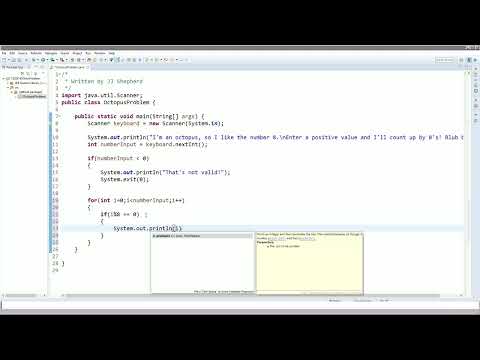
- The octopus-themed Java program reads an integer with Scanner and rejects negative input using a conditional check and System.exit.
- One approach starts i at 0, increments by 1 while i is less than the input, and prints i when i % 8 equals 0.
- A second approach increments i by 8 each iteration, so every value is a multiple of eight and no remainder test is needed.
- For an input of 100, both approaches print the multiples of eight from 0 through 96.
14:08
Drawing a Console Box with Nested For Loops
- The box program reads length and width with Scanner and rejects either value when it is less than or equal to zero.
- An outer for loop repeats once per row using length; an inner for loop prints width asterisks with System.out.print.
- System.out.println runs after the inner loop to end each row, producing a box—for example, a 2-by-3 input prints two rows of three stars.
20:24
Tracing Nested Loops and Counting-Variable Scope
- For a 2-by-3 box, the inner loop’s j takes values 0, 1, and 2 for each outer-loop iteration.
- After j reaches 3, the condition j < width is false; execution leaves the inner loop, prints a newline, then updates i.
- The counting variables declared in the for-loop headers are scoped to their loops and are unavailable after those loops end.
25:00
Choosing Loop Types and Controlling Iterations
- A while loop may execute zero or more times and suits cases where the iteration count is unknown; a do-while loop always executes at least once.
- A for loop is suited to count-controlled repetition when the number of iterations is known or tracked by a counting variable.
- The break statement exits its current loop immediately; in nested loops, it exits only the loop containing it.
- The continue statement skips the rest of the current iteration; the example increments A from 0 to 10 and prints only odd values, 1, 3, 5, 7, and 9.
28:47
Using Negative Sentinel Values to Stop Input and Compute an Average
- A sentinel is a value chosen to be distinct from valid inputs and signal that a loop should stop.
- The averaging example uses while (true) to read values, then breaks when an entered value is negative.
- For inputs 2, 4, 6, 8, and 10 followed by -1, the program accumulates sum = 30 and count = 5, producing an average of 6.
Summary, takeaways, and chapters were generated by AI from the video's transcript and may contain errors. The video belongs to its creator, UofSC_CSCE145_CSCE146.