CSCE145 F2026 01 Branching Statements Part 01
 Watch on YouTube →
Overview
Java branching statements use Boolean conditions to choose which code runs, with flowcharts, if/else syntax, comparison operators, and compound logic clarifying those decisions. A console-based math challenge demonstrates the ideas using Scanner input, string comparisons, Random.nextInt bounds, constants, and Math.pow with a cast.
Key takeaways
- In Java, an if condition must evaluate to a Boolean; if runs its body when true, while a linked else runs only when that condition is false.
- The Boolean operators && and || differ in their truth requirements: AND needs both conditions true, whereas OR needs at least one.
- Use == for primitive integer comparisons, but avoid it for checking String contents; use equals() or equalsIgnoreCase() instead.
- Random.nextInt(bound) includes zero and excludes the bound, so nextInt(100) generates 0–99 and nextInt(10) generates 0–9.
- Math.pow(base, exponent) returns a double, and casting it to int can discard the fractional part; also keep exponent ranges modest to avoid enormous results.
- A named constant such as RNG_RANGE prevents duplicated magic numbers and lets one edit change multiple random-number bounds.
Chapters
0:00
Flowcharts and Java if/else Branching
- Flow control determines program action order: branching selects among actions, while loops repeat until a stopping condition.
- Flowcharts use boxes for statements, diamonds for true/false decisions, and arrows to show execution paths.
- An if statement runs its curly-braced body only when its Boolean expression is true; an else requires a preceding if and runs when that condition is false.
- Java if/else statements do not take a trailing semicolon, and curly braces are recommended for their bodies.
5:00
Boolean Comparisons, Compound Conditions, and Truth Tables
- Java comparison operators include ==, !=, <, >, <=, and >=, each producing a Boolean true-or-false result.
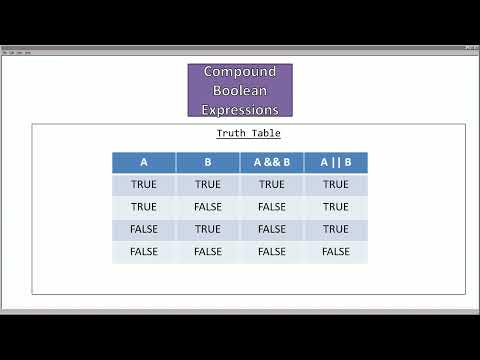
- The && operator is true only when both conditions are true; || is true when at least one condition is true.
- A truth table for A and B shows that both AND and OR are false when both inputs are false, while only AND is false when exactly one input is true.
- Negating comparisons reverses their relationship: !(A < B) means A >= B, and !(A == B) means A != B; negating AND and OR swaps the operators.
11:13
Collecting Boolean Input with Scanner and Choosing a Branch
- The math challenge program imports java.util.Scanner and connects a Scanner named keyboard to System.in.
- The prompt uses the string escape sequence \n for a new line and \" to display literal quotation marks.
- keyboard.nextBoolean() stores the user's true-or-false response in a Boolean variable; if (play) starts the challenge, while else prints a refusal and System.exit(0) stops execution.
- Testing true and false confirms that the selected branch runs and the other branch is skipped.
18:56
Checking Integer Answers and Comparing Floating-Point Values
- The program computes 2 + 3, reads an integer answer with keyboard.nextInt(), and compares it with the result using ==.
- A correct answer prints a win message; an incorrect answer reaches the else branch.
- Integer equality is suitable for this exact addition check, but double values are approximations and can make direct == comparisons unreliable.
- For floating-point comparisons, use a tolerance so values within a chosen plus-or-minus range count as equal; use object methods such as equals() to compare object contents.
25:04
String Input, equals(), and Case-Insensitive Responses
- Changing the prompt from true/false to yes/no requires reading a String with keyboard.nextLine() instead of nextBoolean().
- The condition play.equals("yes") returns a Boolean suitable for an if statement and compares string contents rather than object references.
- equals() is case-sensitive, so an input of YES does not match "yes".
- equalsIgnoreCase("yes") accepts uppercase or lowercase variations without changing the intended branch.
28:41
Random Math Problems with Random.nextInt and a Constant Bound
- Import java.util.Random and construct a Random object to generate operands instead of assigning fixed values.
- nextInt(100) returns values from 0 through 99: zero is inclusive, while the bound 100 is exclusive.
- A public static final int constant named RNG_RANGE centralizes the random bound, so changing it updates both operand generators.
- The randomized addition examples produce varying problems, such as 85 + 23 and 10 + 6.
33:42
Exponentiation with Math.pow, Casting, and Maintainable Bounds
- Java's ^ operator is exclusive OR, not exponentiation; Math.pow(num1, num2) performs the power operation.
- Math.pow returns a double, so the example casts its result to int before storing it in an integer variable.
- A bound of 100 permits operands as large as 99, which can produce an impractically large result such as 99 to the 99th power; reducing RNG_RANGE to 10 limits operands to 0–9.
- Using RNG_RANGE instead of repeated magic numbers makes one constant change update both random operand calls.
Summary, takeaways, and chapters were generated by AI from the video's transcript and may contain errors. The video belongs to its creator, UofSC_CSCE145_CSCE146.