CSCE145 F2026 01 Basic Computation Part 02
 Watch on YouTube →
Overview
Java class types group data and methods into objects, which identifiers access through references; strings, scanners, and wrapper classes provide common functionality for handling text and input. The lecture applies these tools to parse a multiplayer-player record containing a name, integer ID, and three double coordinates, comparing manual String operations with a second Scanner.
Key takeaways
- Java class-type variables hold references to objects, so an unconstructed reference is null and cannot be used as an object.
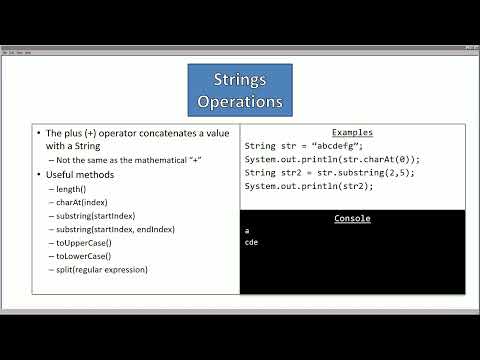
- String indexes are zero-based, and substring(start, end) includes start but excludes end; substring(2, 5) selects three characters.
- Scanner's next() reads a whitespace-delimited token, whereas nextLine() reads to the newline; after numeric reads, nextLine() can consume the remaining line break.
- Integer.parseInt() and Double.parseDouble() convert numeric text into primitive values that can participate in arithmetic.
- A player record such as "Ada 23 2.2 3.3 4.4" can be parsed either by repeatedly locating spaces and trimming substrings or by scanning typed tokens in sequence.
Chapters
0:00
Java Objects, References, and Method Calls
- Primitive types hold simple values, while class types group data and methods into objects.
- A class defines a classification; an object is an instance that must be constructed before use.
- A class-type identifier stores a reference to an object's memory, not the object's contents; an uninitialized object reference defaults to null.
- Call an object's method with identifier.methodName(arguments); methods run reusable code and provide object functionality.
3:23
String Literals, Character Arrays, and Zero-Based Indexes
- Java String values use double quotes, while individual char values use single quotes.
- A String can be viewed as a contiguous array of characters, so the first character is at index 0 and the last at length - 1.
- For the example string "ABCDEFG", indexes run from 0 through 6, and each character can be accessed by its index.
- Strings group characters into words and sentences, supporting formatted output and text input.
6:11
String Methods, Substrings, and Escape Characters
- String's plus operator concatenates text; common methods include length(), charAt(), indexOf(), equals(), and case-conversion methods.
- substring(start, end) includes the start index but excludes the end index; for "ABCDEFG", substring(2, 5) returns "CDE".
- The Java Development Kit documentation lists class methods, their arguments, and their return types; for example, equals() returns a boolean.
- Escape sequences such as \n, \t, \", and \\ represent a newline, tab, quote, and literal backslash; each escape sequence functions as one character.
12:25
Scanner Input, Whitespace Delimiters, and Wrapper Classes
- Import java.util.Scanner, then construct a console reader with new Scanner(System.in); whitespace such as spaces, tabs, and line breaks separates tokens by default.
- Scanner methods include next(), nextLine(), nextInt(), nextDouble(), and nextBoolean(); next() reads a token, while nextLine() reads to the line terminator.
- After nextInt() or nextDouble(), a following nextLine() can consume the leftover newline before later line-based input.
- Wrapper parsing methods convert text to primitives: Integer.parseInt("256") produces 256, which can then be multiplied as an integer.
19:54
Define the Player Record and Capture Console Input
- The player-record format is name, model ID, X, Y, and Z, with fields separated by spaces and the record ending at a newline.
- The PlayerParser example imports java.util.Scanner and reads the complete record into an input String using keyboard.nextLine().
- A copy of the input is retained for parsing so that extracted fields can be removed from the working text.
- The example treats the name as text, the model ID as an integer, and the three coordinates as doubles.
24:30
Parse Player Fields with String Indexes and Substrings
- Find the first field boundary with copyInput.indexOf(" "), then extract the name with substring(0, workingIndex).
- Remove each parsed field and its following space by assigning the remaining text from substring(workingIndex + 1).
- Extract the model ID as a String, then convert it with Integer.parseInt(); convert coordinate text with Double.parseDouble().
- For input "Ada 23 2.2 3.3 4.4", the program recovers the name, ID, and coordinates, then formats output with newline and tab escape sequences.
33:40
Parse the Same Player Record with a String Scanner
- A second Scanner can scan the input String itself: construct it with new Scanner(input), rather than System.in.
- Read the fields in order with next() for the name, nextInt() for the model ID, and nextDouble() for X, Y, and Z.
- The Scanner-based parser produces the same results for the example record "Ada 23 2.2 3.3 4.4" with less manual substring handling.
- Choosing a parsing approach depends on the known input format; checking Java documentation helps identify useful class methods.
Summary, takeaways, and chapters were generated by AI from the video's transcript and may contain errors. The video belongs to its creator, UofSC_CSCE145_CSCE146.