CS50 2D - Lecture 5 - Legend of Zelda (live, unedited)
 Watch on YouTube →
Overview
CS50's "Legend of Zelda" lecture explores 2D game development concepts inspired by the classic franchise, covering dungeon generation, hitboxes/hurtboxes, screen scrolling, and stenciling. David Malan and Colton Ogden demonstrate implementing these features in Lua using the Love2D framework, showcasing data-driven design and coroutines for complex algorithms like dungeon generation.
Key takeaways
- Data-driven design, using external definition tables for entities and animations, significantly speeds up game development iteration.
- Coroutines in Lua provide a powerful mechanism for debugging complex algorithms like dungeon generation by allowing step-by-step execution.
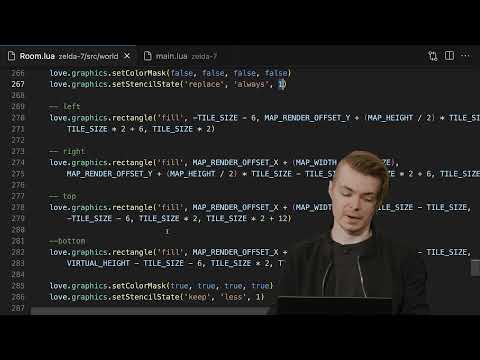
- Stenciling, implemented via `love.graphics.setStencilState` and `setColorMask`, enables advanced graphical effects like masking pixels to create illusions of depth and corridors.
- The distinction between hitboxes (can be struck) and hurtboxes (inflict damage) is crucial for fine-tuning combat mechanics and game balance.
- Screen scrolling in Zelda-like games often involves a clever illusion: loading the next room off-screen and resetting the player/camera to (0,0) after a tweened transition.
Chapters
0:05
Introduction and Nintendo Console Preferences
- CS50's first live stream focusing on The Legend of Zelda.
- Discussion of favorite Nintendo consoles: Nintendo 64, Super Nintendo, and Wii.
- Zelda's gold cartridge and open-world exploration were groundbreaking for its time.
0:07
The Legend of Zelda: Core Mechanics and Evolution
- The original Zelda featured discrete screens and an early open-world concept.
- Link to the Past expanded the formula with multiple worlds and items like the boomerang.
- Modern Zelda titles like Tears of the Kingdom (2023) and Breath of the Wild (2017) remain top sellers.
0:09
Top-Down vs. Side-Scrolling Game Perspectives
- Side-scrollers (like Mario) primarily use the Y-axis for gravity-based jumping.
- Zelda's top-down (bird's-eye) view allows full movement across X and Y axes.
- This lecture focuses on dungeon generation, hitboxes/hurtboxes, screen scrolling, and stenciling.
0:11
Live Demo: Legend of 50 Gameplay
- Audience volunteer Damon demonstrates "Legend of 50" gameplay.
- Features include character movement, sword swings, and collecting the Triforce.
- Initial demo shows a dungeon without doorways, requiring a restart.
0:22
Second Live Demo: Dungeon Navigation and Game Over
- Damon navigates a generated dungeon with switches and doorways.
- Pressing 'M' reveals a dungeon layout map.
- The demo concludes with a stylized "Game Over" screen after losing all health.
0:24
Recap of Gameplay Elements and Core Concepts
- Classic screen scrolling, strikable enemies with hurtboxes, and AABB collision detection are discussed.
- Game objects like switches and doorways, along with game states and player animations, are highlighted.
- Player entity states include walking, idle, and sword-swinging.
0:25
Zelda Zero: Day Zero Update - Top-Down Rendering
- The initial "Zelda Zero" update focuses on top-down rendering and player movement.
- Includes basic character animations for different directions and a health display (hearts).
- Core 2D movement from a bird's-eye perspective is established.
0:26
Orthographic vs. Isometric Graphics and Tile Rendering
- Top-down perspectives can be isometric or orthographic.
- Tiles simulate lighting and perspective with different highlight colors.
- Tiles have unique textures and indices, similar to Mario's rendering approach.
0:27
Character Sprite Sheets and Animation Frames
- Sprite sheets contain numerous frames for character actions (walking, picking up objects).
- Problem set involves implementing throwable pots.
- Sword-wielding sprites are larger (32x32) than walking sprites (16x16 or 16x24).
0:29
Entity Component System and Data-Driven Design
- Entities are containers for behavior and attributes, subclassable for specific types (player, enemy).
- Data-driven design uses definition tables (e.g., entity defs) to define animations and attributes externally.
- This approach separates programmer and designer tasks, allowing for easier iteration.
0:30
Entity Attributes: Health and Invulnerability
- Entities have attributes like health, managed via hearts (2 health per heart).
- Player invulnerability mechanic (phasing in/out) prevents rapid damage accumulation.
- This mechanic provides a buffer for players to escape or defeat enemies.
0:32
Entity Definitions: Animations and Data Tables
- Entity definitions (e.g., `entitydefs.lua`) store animation data, intervals, and texture names.
- This allows designers to modify game elements without touching core code.
- The system supports defining various creature types and their behaviors.
0:34
Sprite Sheet Splitting and Programmatic Loading
- Sprite sheets are split into uniform sizes (e.g., 16x32) for programmatic loading.
- This simplifies animation management by using indexable frames (e.g., `gframes.character_walk`).
- Data-driven animation definition reduces manual coding.
0:35
Play State: Entity States and Graphics Transformations
- Player uses state machines (walk, idle) similar to Mario's implementation.
- `love.graphics.push` and `love.graphics.pop` manage graphics states for transformations.
- This allows UI elements (like hearts) to remain fixed while the game world scrolls.
0:38
Zelda Zero: Player Movement and State Machines
- Demonstrates player movement with directional animations (up, down, left, right).
- Idle and walk states are managed via state machines.
- The system allows designers to influence game behavior through data.
0:40
Zelda One: Tile Set Update and Dungeon Rendering
- Introduces rendering dungeon tiles, building on Mario's tile-based approach.
- No tile-based collision implemented; boundary checks handle room limits.
- Tile sets can be complex, with variants for aesthetic variety (e.g., floor, wall tiles).
0:41
Tile Set Structure and Composition
- Tiles are typically 16x16 pixels, but larger objects like doorways use multiple tiles.
- A Python script (using Pillow) or Love2D can number tiles for easy reference.
- Variants of tiles (e.g., different floor patterns) prevent visual homogeneity.
0:44
Room Generation: Walls, Floors, and Randomization
- The `Room` object manages tiles, doorways, switches, and entities.
- The `generate_walls_and_floors` function iterates through a grid, placing tiles based on constants.
- Random selection from tile variants (e.g., 3-4 wall types) enhances visual variety.
0:49
Player Movement and Boundary Checking
- Player's walk state update handles boundary checks against screen limits.
- This prevents the player from moving outside the defined room boundaries.
- Static invocation (`EntityWalkState.update(self, dt)`) calls parent class methods.
0:56
Zelda Two: Dungeon Update and Room Transitions
- Introduces the concept of a dungeon composed of multiple interconnected rooms.
- Dungeon generator creates a structure of contiguous rooms.
- The `Dungeon` object manages a `rooms` table and the `current_room`.
0:58
Dungeon Structure: Rooms, Current Room, and Next Room
- The `Dungeon` object holds a 2D grid of rooms and tracks the `current_room`.
- A `next_room` variable is crucial for managing transitions between rooms.
- Player starting position (`start_x`, `start_y`) can be customized.
1:02
Hitboxes vs. Hurtboxes: Collision Detection Semantics
- Hitboxes are areas that can be struck; hurtboxes are areas that inflict damage.
- Previously, these were often treated as one; now, they are distinct for finer control.
- Examples from Street Fighter and Minecraft illustrate hitbox/hurtbox usage.
1:05
Zelda Three: Implementing Sword Hitboxes
- The player gains a `swing_sword` state, activating a hitbox for the sword.
- Hitbox dimensions and positions are adjusted based on player direction.
- Debug rectangles visualize hitboxes and hurtboxes for balance tuning.
1:10
Swing Sword State: Animation and Hitbox Logic
- The `swing_sword` state changes player animation based on direction.
- Hitbox coordinates (`hitbox_x`, `hitbox_y`, `width`, `height`) are calculated dynamically.
- The hitbox is compared against entities' hurtboxes for damage detection.
1:15
Zelda Four: Monster Update and Combat Integration
- Adds various creatures (skeletons, slimes, bats, ghosts, spiders) to the dungeon.
- Entities have simple AI: random movement, stopping at walls, idle/walk states.
- Player collision with enemies triggers damage and invulnerability frames.
1:19
Entity Generation and Damage Handling
- The `generate_entities` function places creatures randomly within the room.
- Entities have health (1 HP) and are removed when defeated.
- Player takes damage (`damage(1)`) and enters invulnerability state upon collision.
1:23
Zelda Five: Triggers, Switches, and Doorways
- Introduces triggers (switches) that activate events, like opening doorways.
- Doorways are represented by four tiles and can be larger than standard tiles.
- The `Doorway` class manages its open/closed state and directionality.
1:30
Game Objects and Inter-Object Communication
- Game objects (like switches) have `on_collide` functions for interaction.
- Data-driven design allows defining object properties (type, texture, states) in configuration files.
- Switches trigger opening doorways and playing sound effects upon player collision.
1:40
Zelda Six: Screen Scrolling and Room Transitions
- Implements the characteristic Zelda screen-to-screen scrolling effect.
- Uses `love.timer.tween` for smooth camera and player movement between rooms.
- The illusion involves loading the next room off-screen and resetting the player's position to (0,0).
1:43
Event System for Handling Transitions
- Utilizes `love.event.on` and `love.event.dispatch` for managing game events.
- When colliding with a doorway, a 'shift' event is dispatched.
- The `Dungeon` constructor sets up event handlers for directional shifts.
1:51
Player Walk State: Doorway Collision and Event Dispatch
- Transition logic is triggered within the player's `walk_state` after detecting wall collision (`self.bumped`).
- Player's position is centered with the doorway before dispatching the 'shift' event.
- This ensures the player aligns correctly when entering the next room.
1:57
Dungeon Shifting Logic and Tweening
- The `begin_shifting` function calculates the next room's position and sets its doorways to open.
- It determines the player's final position in the next room (opposite entry point).
- Tweening animates the camera and player movement over a specified duration (e.g., 1 second).
2:02
Finishing Transitions and Resetting Game State
- The `finish_shifting` callback resets room/dungeon states and camera positions to zero.
- It swaps `current_room` and `next_room` pointers.
- Switches are reset, and doors are closed upon returning to a previous room.
2:03
Zelda Seven: Stenciling for Corridor Effects
- Implements stenciling (masking) to create the illusion of moving through corridors.
- The stencil buffer prevents pixels from being drawn in specific areas (e.g., behind archways).
- Demonstrates both Love 11 (`love.graphics.stencil`) and Love 12 (`love.graphics.setStencilState`) APIs.
2:05
Stencil Buffer Operations: Action, Mode, and Value
- `love.graphics.setStencilState` uses action, mode, and value parameters.
- Actions include replace, increment, decrement; modes include always, equal, less than.
- `love.graphics.setColorMask` prevents drawing to the screen while modifying the stencil buffer.
2:11
Stenciling Implementation in Room.lua
- The `render` function in `room.lua` sets the color mask to false and uses `setStencilState`.
- Rectangles are drawn to define the stencil mask areas (e.g., archways).
- A stencil test (`less than one`) determines which pixels pass through.
2:18
Debugging Stenciling with Rectangles
- A debug flag (key 'S') draws semi-transparent red rectangles to visualize stencil areas.
- This aids in verifying the placement and alignment of masking operations.
- The Love 12 version requires `setColorMask` to prevent drawing while modifying the stencil buffer.
2:19
Dungeon Generator: Queue-Based Algorithm
- The dungeon generator uses a queue (breadth-first approach) to create contiguous rooms.
- A weighted chance (40% skip) introduces randomness in room placement.
- A `visited` array prevents redundant room generation and ensures contiguousness.
2:27
Dungeon Generation Phases: Rooms, Doorways, and Visualization
- Generation proceeds through phases: rooms, doorways, and finalization.
- The `Dungeon` generator visualizes the process step-by-step using coroutines (`coroutine.wrap`).
- Coroutines allow pausing and resuming generation, making complex algorithms easier to debug.
2:35
Data-Driven Design and Entity Component Systems
- Emphasizes designing game behavior through data (e.g., entity attributes like flammable, aggressive).
- Entity Component Systems (ECS) are well-suited for complex, dynamic games.
- This approach facilitates emergent gameplay and rapid design iteration.
2:37
Low-Level Game Development: NES and Assembly
- Contrasts modern high-level frameworks like Love2D with low-level development (NES, SNES).
- NES games were written in assembly (6502), requiring direct hardware manipulation.
- Exploring historical paradigms highlights programming advancements.
2:38
Assignment Five: Extending Player Capabilities
- Extends player abilities: lifting/throwing pots as projectiles, damaging enemies.
- Introduces HP recovery via hearts dropped by enemies or found in pots.
- Task includes implementing treasure chests containing items like the boomerang.
2:40
Boomerang Mechanics and Projectile Behavior
- Player can throw a boomerang, which returns after a certain distance.
- The boomerang damages enemies, bounces off walls, and cannot be thrown while active.
- An inventory icon displays the boomerang's availability.
2:41
Course Recap: 2D Game Development Fundamentals
- Covered top-down and side-scrolling 2D game development fundamentals.
- Explored concepts like dungeon generation, scrolling, stenciling, and data-driven design.
- Future topics include physics (Box2D) and turn-based systems (Pokemon).
3:06
Love2D Stenciling Functions: `setStencilState` and `setColorMask`
- `love.graphics.setStencilState` configures stencil buffer operations (action, mode, value).
- `love.graphics.setColorMask` prevents drawing to the screen, allowing only stencil buffer modification.
- These functions enable masking effects like drawing behind terrain.
3:19
Stenciling Demo and Debugging Rectangles
- Demonstrates stenciling in Zelda 7, showing the character moving under archways.
- Pressing 'S' toggles debug rectangles that visualize the stencil mask areas.
- This debugging practice helps verify correct stencil buffer setup.
3:21
Stenciling Implementation Details in Room.lua
- The `render` function uses `setColorMask(false, false, false, false)` to disable screen drawing.
- `setStencilState` with 'replace' action and 'one' value writes to the stencil buffer.
- A stencil test (`less than one`) controls pixel rendering based on stencil buffer values.
3:23
Dungeon Generator Algorithm and Coroutines
- The dungeon generator uses a queue for breadth-first room placement.
- Coroutines (`coroutine.wrap`) allow step-by-step visualization and debugging of the generation process.
- The generator ensures contiguous rooms and includes a doorway placement phase.
Summary, takeaways, and chapters were generated by AI from the video's transcript and may contain errors. The video belongs to its creator, CS50.